


Disclosure: This article may contain affiliate links. If you buy through these links, ErgoLivingSpace may earn a commission at no extra cost to you.
Updated: May 2026 | Reviewed by the ErgoLivingSpace editorial team
The best laptop stands for neck pain raise your screen enough to reduce forward-head posture without making your setup unstable. If your neck hurts after a full day on your laptop, you’re not imagining it — and you’re far from alone. The posture most people adopt while working on a laptop is, mechanically speaking, pretty brutal on the cervical spine. A properly positioned laptop stand can change this almost immediately. Not overnight. But immediately.
The problem is that “laptop stand” covers a wide range of products — from flimsy plastic risers that wobble every time you type, to solid adjustable platforms that genuinely do what they promise. The difference between a stand that helps your neck and one that just elevates your laptop by two inches (not enough) is real, and it matters.
This guide is built around one question: does it actually help neck pain? Not just “is it well-made.” Not just “does it look good on a desk.” We’ve cross-referenced what ergonomists recommend, what real users report after weeks of use (including deep dives into Reddit threads from r/digitalnomad and r/ErgoMechKeyboards), and what the current SERP data tells us about how people are searching for this kind of help.
What Actually Makes a Laptop Stand Good for Neck Pain?
Before the product picks, it’s worth spending two minutes on why this problem exists, because understanding the mechanics makes it much easier to choose the right stand and actually use it properly.
The 45-Degree Problem (and Why It’s Worse Than You Think)
Your head weighs roughly 10–12 pounds held upright. That’s not nothing — but it’s manageable, because your spine is designed to support it in a neutral position. The trouble starts the moment your head tilts forward. At 15 degrees of forward tilt, the effective strain on your neck muscles and discs roughly doubles. At 45 degrees — which is where most people’s heads end up when they’re looking at a laptop on a desk — the force can reach the equivalent of carrying a 45–50 pound weight on top of your spine.
This isn’t a dramatic injury. It’s slow, cumulative compression. Over months and years it leads to what’s often called tech neck: a progressive rounding of the upper back, tightening of the muscles along the back of the neck, and a gradual loss of the natural cervical curve. By the time most people notice it enough to do something, the pattern is already quite ingrained.
What the Research Actually Shows?
Studies on ergonomic laptop positioning consistently find that raising the screen to eye level reduces cervical strain by up to 32%. That’s a meaningful number, the kind of reduction that actually shows up in how you feel at the end of a workday. The mechanism is simple: when your screen is at the right height, your head stops pitching forward. Your neck muscles stop fighting gravity all day.
The specific target: the top edge of your screen should sit at or just below eye level when you’re seated with your back properly supported. Screen distance matters too — 20 to 28 inches from your face is the comfortable range for most adults. And a slight downward tilt (10–20 degrees) is generally preferred over a perfectly flat screen, partly because it reduces glare, partly because it mirrors the natural angle of comfortable reading.
Most laptop screens, sitting flat on a desk, land somewhere between 8 and 12 inches below where they should be. That gap is what a stand closes.
The External Keyboard Problem Nobody Talks About
Here’s where most laptop stand advice quietly glosses over something important. When you raise your laptop screen to eye level, the keyboard rises with it and it’s now too high. Typing on a keyboard at chest height forces your shoulders to hunch, your elbows to flare, and your wrists to bend upward. Trade neck pain for shoulder and wrist pain. That’s not a win.
The solution isn’t complicated, but it does require acknowledging it: a laptop stand without an external keyboard is a half-measure. The stand handles screen height. A separate Bluetooth or wired keyboard -placed at a comfortable elbow height, elbows bent around 90–100 degrees – handles the rest. Add a mouse, because reaching for the trackpad on a raised laptop is its own awkward compromise.
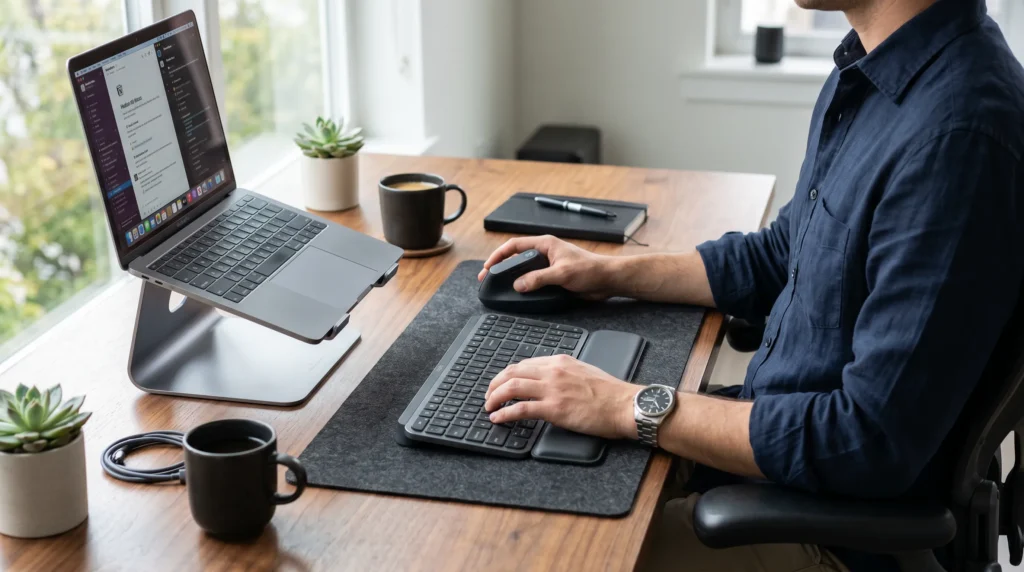
This sounds obvious until you’re actually in a coffee shop trying to set this up. It’s slightly more gear to carry. It’s an extra thing to remember to charge. But for people who work on laptops several hours a day and are experiencing actual neck pain, it’s not optional – it’s the other half of the fix. Our full guide on how to use a laptop without neck pain covers the complete workstation setup in detail if you want to go deeper.
Can a Laptop Stand Alone Fix Neck Pain?
This is probably the most honest question to ask before spending money on any of this, and most buying guides skip it entirely because the answer is complicated.
The short version: a laptop stand will meaningfully reduce neck strain during laptop use, but it won’t fix neck pain that already exists, and it won’t compensate for other ergonomic problems in your setup.
Here’s what a stand actually does well: it eliminates the primary mechanical cause of laptop-related neck strain — the downward gaze. If the bulk of your neck pain comes from extended laptop sessions, a good stand paired with an external keyboard will almost certainly help. Many people notice a difference within the first week. That 32% reduction in cervical strain isn’t a marketing figure – it reflects a real postural change that happens immediately when your screen is at the right height.
Here’s what it won’t do: it won’t fix pain caused by a bad chair, a desk that’s too high or too low, sleeping position, stress-related tension, or a pre-existing cervical condition. If your pain is severe, persistent, or accompanied by numbness or tingling in your arms, that warrants a conversation with a physio or doctor — not an Amazon order.
There’s also the adaptation factor. A lot of people buy a stand, set it up at a height that’s roughly right, and then gradually start hunching forward toward the screen anyway, especially as the day wears on and their posture deteriorates. The stand doesn’t stop that from happening. It just raises the starting point. You still need to be conscious about posture, take breaks, and ideally have a chair with decent lumbar support.
One more thing worth saying plainly: the cheap stands can actually make things worse. A stand that only raises your screen 2–3 inches still leaves you looking down. A stand that wobbles every time you type creates visual noise that makes you unconsciously lean forward to stabilize the image. The quality of the stand matters – which is why the picks below are filtered for both ergonomic effectiveness and real-world stability, not just looks.
How We Evaluated These Stands?
Every stand in this list was evaluated through the same filter: does it actually reduce neck strain, and is it practical enough that someone will actually use it every day?
- Height range: Does it raise the screen enough to reach true eye level? Two to three inches isn’t enough for most people. Ten inches or more of available lift is the realistic target and the stand should be able to reach that height without becoming unstable.
- Adjustability: Fixed-height stands are a gamble. Your eye level depends on your chair, your desk, your own height. A stand with multiple height settings (or stepless adjustment) gives you the flexibility to actually dial in the right position.
- Stability: This matters more than it sounds. A stand that wobbles when you type is one you’ll eventually stop using. Cheap stands on lighter desks are notoriously bad for this.
- Compatibility: Does it work with the laptop you actually own? Heavier 15–16 inch machines need more robust support than a MacBook Air.
- Real-world use: We weighted Reddit threads, verified owner reviews, and community recommendations heavily, particularly from ergonomics-focused communities where people report back after weeks of actual use, not just first impressions.
The Best Laptop Stands for Neck Pain (2026)
🏆 Best Over all : Rain Design iLevel 2
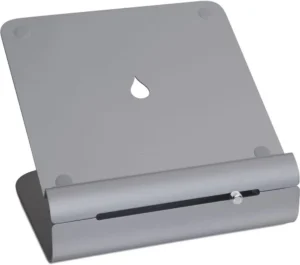
Wirecutter’s top pick after testing 20 stands, and it earns that position. The iLevel 2 gets the fundamentals right in a way that sounds obvious but turns out to be genuinely rare at this price: it’s tall enough, stable enough, and adjustable enough to work for most setups without compromise.
Cheap stands often wobble when you type, especially on lighter desks. The iLevel 2 stays surprisingly stable even with heavier 15-inch laptops, which is one of the first things owners mention in long-form reviews. The aluminum base grips without needing adhesive pads. The height adjustment clicks into place firmly rather than creeping down over the day.
It raises screens roughly 5 to 10 inches, wide enough to accommodate different desk heights and seated positions. For most adults, the top setting or close to it brings a standard laptop screen within the correct eye-level range. It’s not entirely stepless (adjustment happens at discrete positions), but in practice this isn’t a meaningful limitation — you pick your height once and leave it.
One honest caveat: it’s not portable. It’s bulky, and the design isn’t meant to fold flat. If you need a stand you can pack in a laptop bag, look at the Nexstand or Roost below. But for a permanent desk setup, this is the one most people should buy.
| ✓ Strengths | ✗ Weaknesses |
|---|---|
| Wide height range — genuinely reaches eye level Stable under heavier laptops Wirecutter #1 after real-world testing Works with 11″-17″ laptops |
Not portable or packable Stepped (not stepless) height adjustment Mid-high price |
Best for: Permanent home office or fixed desk setup. Pair with a Bluetooth keyboard for the full ergonomic fix.
💰 Best Budget : Nexstand K2
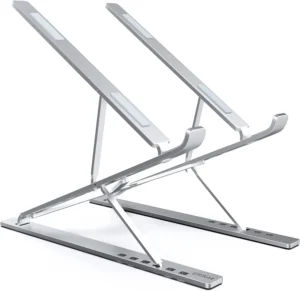
At this price, 868 reviews and a 4.8-star average is unusual. Usually budget stands earn reviews like “it works I guess.” The Nexstand K2 earns reviews like “I bought a second one for the office.” That tells you something real about the product.
It folds flat and slips into most laptop bags without fighting for space. It has six height settings, with the top setting reaching approximately 19 inches – which, for most 13–15 inch laptops, is genuinely enough to hit eye level. The plastic construction is lighter and less premium-feeling than aluminum stands, and at maximum height it has a slight flex when you type firmly. Not alarming, but noticeable if you’re used to something more solid.
The practical case for the K2 is strong. If you’ve never used a laptop stand before and you’re unsure whether it will actually help, $25–40 is a very reasonable amount to spend to find out. If it works for you, and statistically, it probably will. You haven’t wasted much. If you later want something more substantial, you’ve still got a portable backup stand.
| ✓ Strengths | ✗ Weaknesses |
|---|---|
| 868 reviews, 4.8 stars – exceptional for this price Folds flat, fits in a laptop bag Reaches true eye level at maximum settings |
Slight flex at maximum height under heavier laptops Plastic, not as durable long-term Only 6 height settings (no fine-tuning) |
Best for: Budget-conscious buyers, students, or anyone who wants to verify that a stand actually helps before investing in something premium.
✈️ Best Portable : Roost Laptop Stand V3
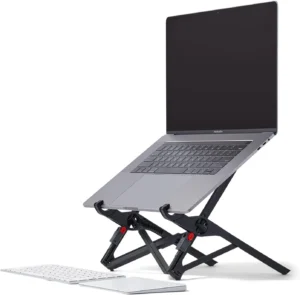
The Roost is the most consistently recommended portable laptop stand on the internet, especially in communities where people work from multiple locations. Ask in r/digitalnomad what stand people use, and Roost comes up more than any other name. That kind of persistent community consensus is hard to manufacture.
It folds down to roughly the size of a thick pen, small enough that it genuinely doesn’t feel like something you have to remember to pack. It weighs under 170 grams. And it offers 12 height settings, which means you can actually dial in the right position for a hotel desk that’s too high, a coffee shop table that’s too low, or a coworking space where you didn’t get the good chair.
Here’s the thing about working on a laptop while traveling that most standing desk and ergonomics content doesn’t address: neck pain gets worse when you’re moving, not better. You’re working in more awkward positions, in unfamiliar environments, probably on less sleep. The Roost is specifically the answer to that problem. You can’t control the hotel desk. You can control your screen height.
It’s not cheap for what it is mechanically, you’re paying a premium for the engineering that gets it down to that weight and folded size. Whether that’s worth $80–95 depends entirely on how much you travel. If you work from home and never leave, the iLevel 2 or Nexstand makes more sense. If you’re on the road more than a few times a month, the Roost pays for itself in avoided neck pain fairly quickly.
| ✓ Strengths | ✗ Weaknesses |
|---|---|
| Definitive portable stand – pen-sized when folded 12 height settings, reliable adjustment The most recommended travel stand on Reddit, consistently |
Premium price for a portable accessory Still requires an external keyboard for full benefit Some find the arm mechanism fiddly at first |
Best for: Digital nomads, frequent travelers, anyone who works from multiple locations. If you travel more than twice a month and work on a laptop, this is the one.
🔧 Best Adjustable : Twelve South Curve Flex
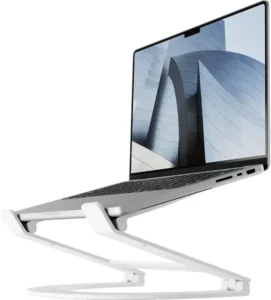
Most stands make you commit to one height and leave it. The Curve Flex takes a different approach: a flexible arm mechanism that lets you reposition without tools, in multiple dimensions, not just up and down, but forward, back, and with some tilt control. For people who genuinely shift their posture throughout the day, this is legitimately useful rather than just a selling point.
The 4.8-star average from 189 reviews reflects owners who clearly use it for extended periods, the kind of rating that holds up under scrutiny rather than spiking on launch. It’s particularly well-suited to MacBook users: the aluminum finish matches Apple hardware almost perfectly, which matters less than it sounds functionally but more than it sounds emotionally when you’re staring at a desk all day.
The flex arm does have one honest limitation: if you want to move the laptop frequently, opening it to use the built-in camera for calls, then repositioning back to working mode, the arm adjustment takes a few seconds more than a simple height-lock stand. It’s not a dealbreaker, just something worth knowing before you buy.
| ✓ Strengths | ✗ Weaknesses |
|---|---|
| Flexible arm – adjustable in multiple dimensions 4.8 stars, 189 verified reviews MacBook-compatible design and aesthetic |
Arm repositioning takes longer than simple stands Not portable On the expensive end for a riser |
Best for: Mac users, people who adjust their posture throughout the day, or anyone who wants more than simple vertical height adjustment.
⭐ Best Premium : Ergotron Neo-Flex Notebook Lift Stand
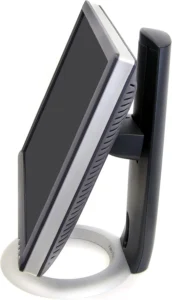
Ergotron makes the monitor arms that occupational therapists recommend, the ones you see in ergonomic workstation setups at hospitals and corporate offices. The Neo-Flex is their laptop stand and it shows. The gas-assisted lift mechanism allows smooth, stepless height adjustment with one hand. No clicking through positions. No levers to squeeze. You lift, it stays.
This sounds like a minor convenience until you’ve used one. Stepless adjustment means you can fine-tune your screen height by half a centimeter when your posture shifts, which it does, especially across an eight-hour workday as your chair compresses slightly or you swap from sitting straight to leaning back. The other stands on this list require more deliberate repositioning. The Neo-Flex is more responsive to the small adjustments that actually matter for posture maintenance.
The price is real, and it’s not for everyone. But for people with chronic neck issues, or those who work long hours and want the most capable stand available, it’s the right call. The 4.7-star rating from 30 reviews isn’t a large sample, but the reviews are consistent in the things they praise, which are exactly the things that matter for neck pain: height range, stability, and ease of daily adjustment.
| ✓ Strengths | ✗ Weaknesses |
|---|---|
| Stepless gas-lift – infinitely adjustable with one hand Professional-grade ergonomic brand Built for all-day daily use |
$50–70 is a significant investment for a stand Smaller review sample (30 reviews) Not portable — heavy and substantial |
Best for: Serious home office users with chronic neck issues, or anyone who works long hours and wants to stop compromising.
🖥️ Best for Standing Desks : VIVO Pneumatic Arm Laptop Mount
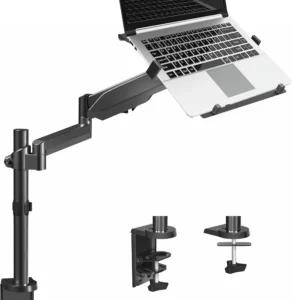
Standard risers don’t work well with standing desks, and for an understandable reason: when you sit, your eye level is one height; when you stand, it’s another. A fixed riser calibrated for sitting will be too low when you’re standing. An articulating arm, one that clamps to the desk edge and holds your laptop on a repositionable mount, solves this properly.
The VIVO pneumatic arm allows full height and angle adjustment across a wide range, which means you can set it correctly for sitting, then lift it to the right position for standing, without repositioning the laptop itself. It also frees your entire desk surface, the laptop effectively floats in front of you rather than occupying desk real estate.
The installation requires clamping to a desk edge, which works well on standard desk profiles but can be problematic with very thick or curved desk edges, or glass desks. Worth checking your desk edge dimensions before ordering. That aside, for people who already have a sit-stand desk and are still fighting neck pain, this is the most complete solution available at this price.
| ✓ Strengths | ✗ Weaknesses |
|---|---|
| Adjusts for both sitting and standing heights Frees up full desk surface Strong value for an articulating arm |
Requires compatible desk edge for clamping Won’t work on glass or very thick desks Installation is more involved than placing a stand |
Best for: Standing desk setups, small desk surfaces, or anyone who alternates between sitting and standing throughout the day. Also consider whether a laptop arm might suit your setup better than a riser — our comparison covers this in detail.
Comparison: All Six Picks at a Glance
| Stand | Price | Height Range | Adjustable? | Portable? | Best For |
|---|---|---|---|---|---|
| Rain Design iLevel 2 | $58–65 | 5″-10″ | Yes (stepped) | No | Home office |
| Nexstand K2 | ~$25–40 | Up to 19″ | Yes (6 levels) | Yes | Budget / student |
| Roost V3 | $80–95 | 12 positions | Yes (12 levels) | Very (pen-size) | Travel / nomad |
| Twelve South Curve Flex | $70–90 | Flexible arm | Yes (arm) | No | Mac users |
| Ergotron Neo-Flex | $50–70 | Gas-lift range | Yes (stepless) | No | Premium / chronic pain |
| VIVO Desk Mount | $50–70 | Full arm range | Yes (arm + tilt) | No | Standing desks |
Which Type of Stand Is Actually Right for You?
The stand that helps your neck most is the one you’ll actually use consistently, which means it has to fit your real workflow, not an idealized version of it.
| Stand Type | Buy It When: | Skip It When… |
|---|---|---|
| Fixed riser | Your desk and chair heights are consistent; you sit at the same position daily | You’re very tall or short; the fixed height may not align with your eye level |
| Adjustable stand | You want to dial in the position precisely; your chair or posture varies | You need to pack it — most are too bulky for regular travel |
| Portable / foldable | You work in multiple locations; travel is a regular part of your life | You have a permanent desk and want maximum stability |
| Desk-mounted arm | You have a standing desk and alternate positions throughout the day | You have a glass desk or thick edge that won’t accommodate a clamp |
Not sure whether a riser or an arm better suits your setup? Our full breakdown, Laptop Stand vs. Laptop Arm for Neck Pain: Which Setup Actually Fixes It? covers the trade-offs in more depth.
How to Set Up Your Stand for Actual Neck Pain Relief (5 Steps)?
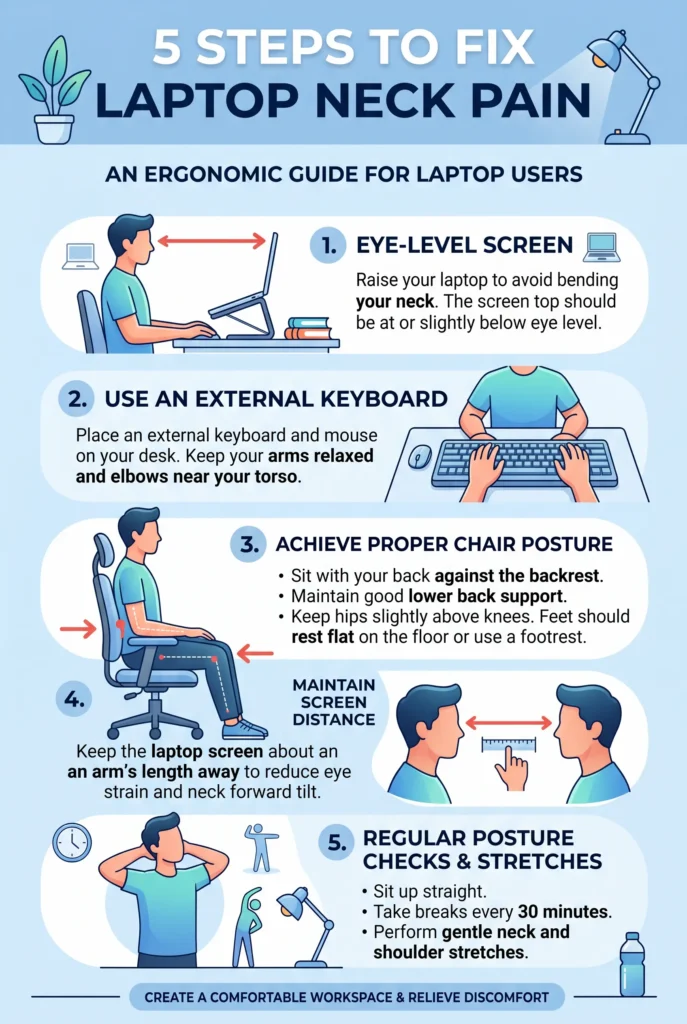
After raising the laptop, use the monitor height calculator to estimate a practical screen-center height and viewing distance for the elevated display.
Buying the right stand is step one. Setting it up correctly is step two, and a lot of people skip it. Most people under-raise their screens by two to three inches. This is the checklist:
- Start high, then come down. Raise your laptop to its maximum height first. Sit normally, back supported, feet flat. Then lower the screen gradually until the top edge is at or just below your eye level. If you start from the bottom and work up, you usually stop too early.
- Connect an external keyboard and mouse before you assess the setup. You can’t properly evaluate neck position while reaching up to type on a raised laptop keyboard.
- Check your screen distance. Your face should be 20–28 inches from the screen. Hold your arm out, your knuckles should almost touch the screen. Too close creates eyestrain; too far makes you lean in.
- Assess your chair. The stand moves your screen. Your chair determines the rest of your posture. If you’re sinking into a soft couch cushion or sitting on a chair with no lumbar support, your posture degrades regardless of screen height. A rolled towel behind the lower back helps more than it has any right to.
- Take a side-angle photo of yourself working. This is the step nobody does and the one that reveals the most. If your head is still jutting forward toward the screen, raise it further. If your neck is craning upward, lower it. Your eye gaze should feel effortless, not directed down or strained up.
Frequently Asked Questions
Do laptop stands actually help with neck pain?
Yes! for most people, noticeably. Research consistently shows that raising the screen to eye level reduces cervical strain by up to 32%, by allowing the head to return to a more neutral position. If the majority of your neck pain comes from extended laptop use, a properly positioned stand will likely help within the first week or two. It won’t fix pain caused by other factors (chair, sleep, pre-existing conditions), but for the specific problem of laptop posture, the evidence is solid.
Do I need an external keyboard to use a laptop stand?
Technically no, but practically yes! if your goal is actually fixing neck pain. When you raise the screen to eye level, the built-in keyboard rises with it and becomes uncomfortably high for typing. A separate keyboard placed at the correct height (elbows at 90–100 degrees, wrists neutral) completes the ergonomic setup. A stand without a separate keyboard is still better than nothing, but it’s solving about half the problem.
How high should a laptop screen actually be?
The top edge of the screen should be at or just below your eye level when you’re seated with back support. Most people find this is higher than they initially expect, usually 8–12 inches above the desk surface, depending on your chair height. Pair this with a screen distance of 20–28 inches from your face, and a slight downward tilt of around 10–20 degrees.
Are foldable stands as stable as solid ones?
Generally, no! but the gap is smaller than you might expect at the good end of the market. The Nexstand K2 and Roost V3 both have some flex at maximum height, which most users find acceptable for typing but notice with firmer trackpad use. For a permanent desk where you never need to move the stand, a solid aluminum riser (like the iLevel 2) is more stable. For travel, the portability trade-off is worth it.
Is a laptop stand enough for a standing desk setup?
Usually not. When you stand, your eye level rises and a riser calibrated for sitting will be too low. For sitting-to-standing transitions, a desk-mounted arm (like the VIVO mount) that can be repositioned is a better solution. It allows you to set the right height for both positions without having to swap the stand or the laptop position.
What if a laptop stand doesn’t help my neck pain?
First, check that you’ve set it up correctly, most people under-raise the screen. Second, make sure you’re using an external keyboard (without one, you’ve only solved half the problem). Third, assess your chair and desk height. If you’ve addressed all of those and pain persists or is severe, it warrants a visit to a physiotherapist or doctor, ergonomic tools are helpful, but they’re not a substitute for medical evaluation when pain is significant.
Final Verdict
The practical summary, for people who need to make a decision:
- For most home office users: Rain Design iLevel 2 ($58–65). Stable, adjustable, Wirecutter-tested, and built to last.
- On a tight budget: Nexstand K2 (~$25–40). Genuinely good. Not a compromise product — a legitimate recommendation.
- For travel: Roost V3 ($80–95). No real competition in this category. If you travel with a laptop, this is the one.
- For Mac users or people who adjust posture frequently: Twelve South Curve Flex ($70–90). The arm flexibility is actually useful, not just a feature.
- For chronic or serious neck issues: Ergotron Neo-Flex ($50–70). Stepless adjustment, professional build quality, built for all-day use.
- For standing desks: VIVO Pneumatic Arm ($50–70). The only pick that handles the sitting-to-standing transition properly.
Whatever you choose: add the external keyboard. The stand gets your screen to the right height. The keyboard brings your arms back down. Together, they’re the actual fix, not just a partial one.
Related Guides
- How to Use a Laptop Without Neck Pain
- Laptop Stand vs Laptop Arm for Neck Pain
- Best Ergonomic Keyboards for Neck Pain
- How to Fix Tech Neck