

Disclosure: This article may contain affiliate links. If you buy through these links, ErgoLivingSpace may earn a commission at no extra cost to you. Our recommendations are based on research, product usefulness, ergonomic relevance, value, and user needs.
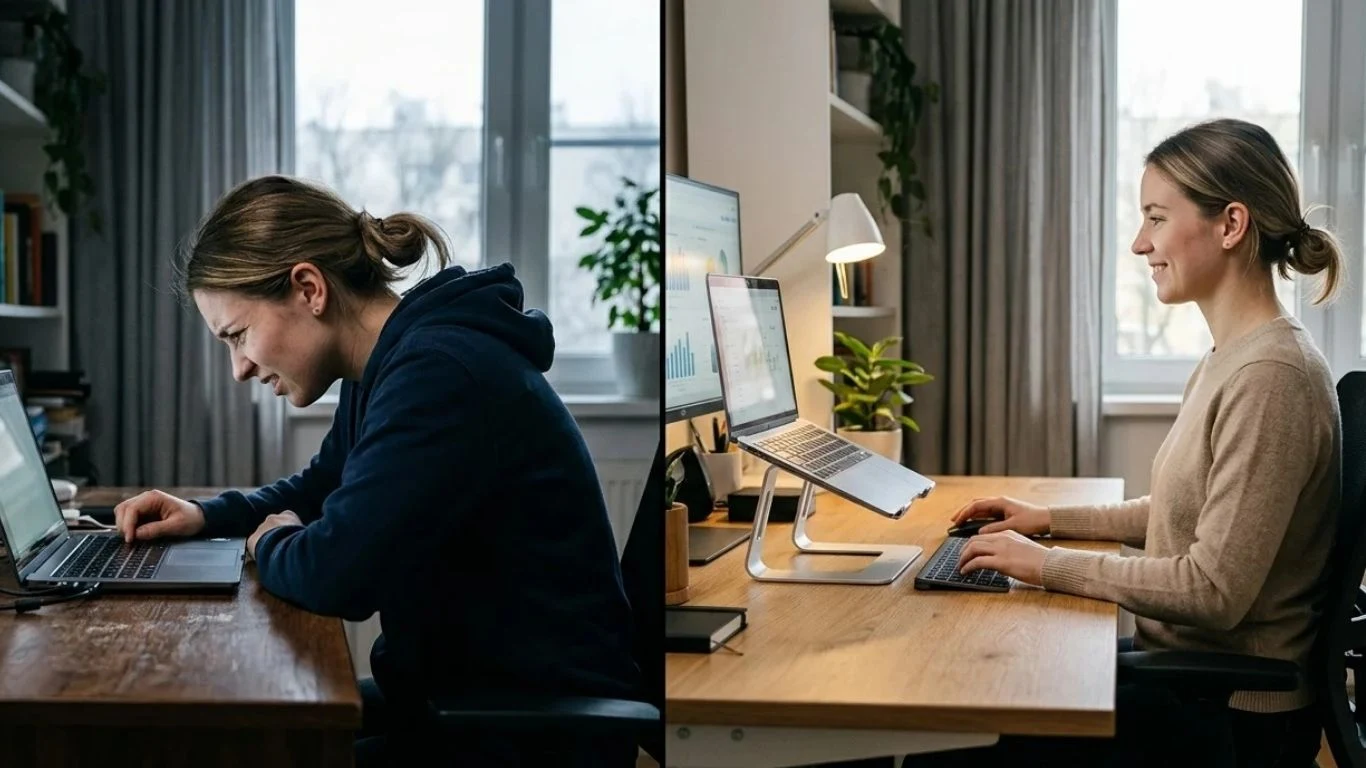
Using a laptop without neck pain starts with one fix: raise your screen to eye level. Your laptop’s built-in design forces your head to tilt forward — and at 45°, that puts nearly 49 lbs of pressure on your cervical spine. That’s one of the biggest reasons articles like How to Use a Laptop Without Neck Pain (2026): 7 Simple Fixes That Actually Work have become so relevant for remote workers and students alike. Here’s how to stop it:
- Place your laptop on a stand so the top of the screen aligns with your eyes
- Use an external keyboard and mouse below the stand
- Sit with your ears directly above your shoulders — not in front
- Take a 20-second posture break every 20 minutes
If you’re unsure whether a stand or arm setup is better for your workspace, read our complete comparison of laptop stand vs laptop arm for neck pain.
Your neck hurts right now. Not yesterday, not “sometimes after long sessions” — right now, as you’re reading this, hunched toward a screen that’s sitting flat on your desk like it was designed to break you.
It wasn’t. But laptops weren’t designed for ergonomics either. The screen and keyboard are locked together in a single unit — which means any position that’s good for your eyes is terrible for your wrists, and vice versa. That physical compromise is why your cervical spine is absorbing forces it was never meant to handle for eight hours a day.
The good news: none of the fixes below require an expensive chair or a full office renovation. Most of them take under three minutes. And the one change that matters most — raising your screen — can be done for free, right now, with a stack of books.
Why does your neck hurt when using a laptop?
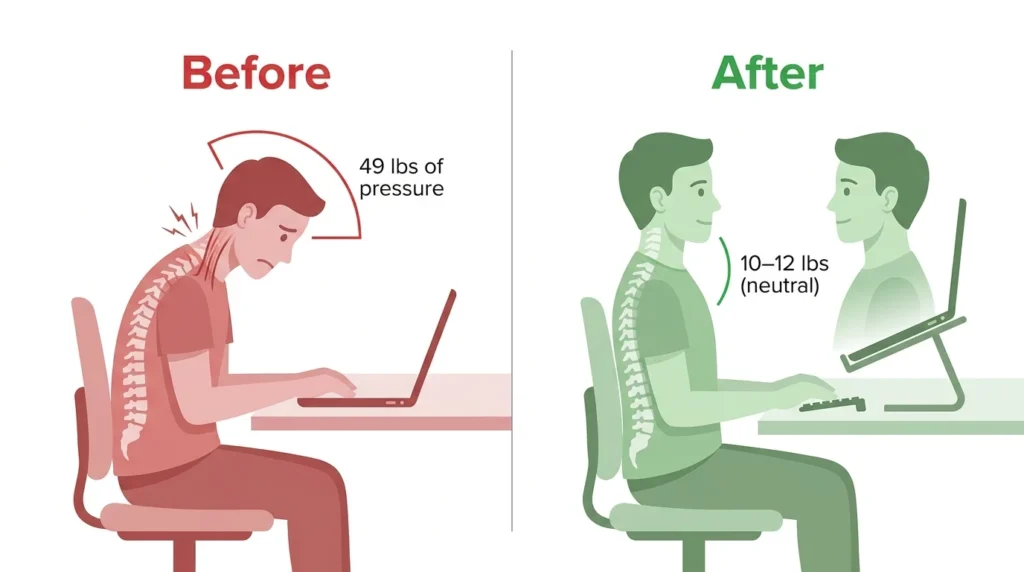
Your head weighs between 10 and 12 pounds when it’s upright and balanced over your spine. The moment it tilts forward — which is exactly what happens when you look down at a flat laptop — that load multiplies dramatically.
49 lbs — The effective force on your cervical spine when your head is tilted 45° forward. At just 15° of tilt — a barely noticeable lean — it’s already 27 lbs. A laptop on a flat desk keeps your head in that zone for hours.
This isn’t a posture problem. It’s a geometry problem. Your laptop was built for portability, not ergonomics — the screen and keyboard share a single unit, which makes it physically impossible to position both correctly at the same time. Every hour you spend looking down compounds that strain.
The fix isn’t a new chair. It’s where your screen is. Let’s move it.
Fix #1: Raise your laptop screen to eye level
The top of your screen should sit at — or just below — your natural eye level when you’re sitting upright. Right now, it probably sits 8 to 12 inches lower than that. That gap is the entire source of your neck pain.
You don’t need to buy anything to test this. Stack some books, a shoebox, or a firm bag under your laptop right now. If your neck feels immediately less tense within five minutes, you’ve confirmed the diagnosis. Three options for making it permanent:
| Option | Product | Price | Best for |
|---|---|---|---|
| Free | Books / shoebox stack | $0 | Testing the fix today |
| Budget | BESIGN LS03 Aluminum Stand [affiliate link] | ~$15–25 | Permanent desk setup |
| Best pick | Tounee Adjustable Laptop Stand [affiliate link] | ~$45–60 | Seated + standing desk |
Important: Once your laptop is elevated, the built-in keyboard is too high to type on comfortably. This is what Fix #2 solves — don’t skip it.
Fix #2: Add an external keyboard and mouse
A stand without an external keyboard is a trap. The moment you raise your screen to eye level, your built-in keyboard rises with it — putting your arms at an angle that strains your shoulders and wrists in a brand new way. You’ve solved the neck problem and created two others.
An external keyboard sits flat on your desk at elbow height, keeping your arms relaxed at a natural 90° angle while your screen stays elevated. The combination is what makes the ergonomic setup complete.
What to look for?
- Wireless or Bluetooth — no cable clutter pulling at the keyboard
- Compact or tenkeyless — keeps your mouse close, reducing shoulder reach
- Slightly negative tilt (front higher than back) — keeps wrists neutral
| Budget | Product | Price | Best for |
|---|---|---|---|
| Budget | Logitech K380 Bluetooth [affiliate link] | ~$45–60 | Most users, Mac + Windows |
| Mid-range | Microsoft Ergonomic Keyboard [affiliate link] | ~$45–65 | Wrist and shoulder relief |
| Premium | Logitech ERGO K860 [affiliate link] | ~$135–165 | Chronic pain, 4+ hours daily |
Fix #3: Adjust your chair and sitting position in 2 minutes
No product required. Run through this checklist right now — it takes two minutes and most people find one or two things immediately wrong:
- Feet flat on the floor — not dangling, not crossed
- Knees at roughly 90°, hips at the same level or slightly higher
- Elbows bent at 90°, upper arms relaxed at your sides
- Shoulders down, not raised toward your ears
- Ears directly above your shoulders — not in front of them
- A small gap between the back of your knees and the seat edge
If your chair doesn’t allow these positions, a rolled towel behind your lower back and a footrest under your feet can get you 80% of the way there for free.
Fix #4: How to use a laptop without neck pain when you have no stand at all
You’re at a café. On a train. In a hotel room. Your stand is at home and your neck is already tightening. Here’s what to improvise:
At a café or co-working space: Stack your laptop bag or ask for a menu book. Even 3–4 inches of elevation meaningfully reduces neck flexion.
On a train or plane: Use the tray table and place your laptop on your jacket or a folded scarf. Prop your elbows on the armrests — it reduces shoulder load significantly.
In a hotel room: Work at the desk, not on the bed. Stack the room guide or your toiletry bag under the laptop. Drag a pillow behind your lower back.
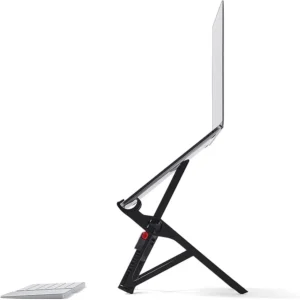
If you travel more than a few days a month, a portable stand that folds into a stick and weighs under 200g is worth every dollar: Nexstand K2 / Soundance Portable Stand [affiliate link] (~$25–$35).
Fix #5: The 20-20-2 rule for your cervical spine
You’ve probably heard of the 20-20-20 rule for eye strain. This is the cervical version: every 20 minutes, spend 20 seconds actively correcting your posture, and do 2 slow neck rotations.
Cervical muscles fatigue under static load even when your posture is good. Movement resets compression, restores circulation to spinal discs, and prevents the slow creep of forward head position. Set a repeating 20-minute timer — your neck will feel the difference by end of day.
Fix #6: Best laptop position for every situation
| Situation | The problem | The fix |
|---|---|---|
| Desk | Screen too low | Stand + external keyboard. Even books work. |
| Sofa | Back unsupported, screen on lap | Firm pillow or lap desk. Sit back into cushions. Tilt screen toward you. |
| Bed | Head constantly bent forward | Sit upright against headboard. Use a lap desk. Never work on your stomach. |
| Standing desk | Laptop keyboard too high | Always use external keyboard and mouse. Raise laptop higher than seated. |
| Café | Low fixed tables | Portable stand + Bluetooth keyboard. Sit close to the table. |
Fix #7: 3 neck stretches to relieve pain right now
Chin tuck
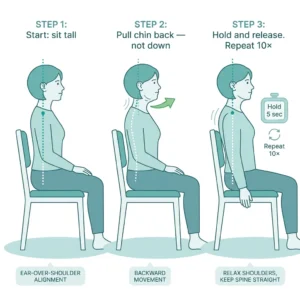
Sit tall. Gently pull your chin straight back — not down — as if making a double chin. Hold 5 seconds. Repeat 8–10 times. This directly counteracts forward head position and decompresses the upper cervical vertebrae.
Cervical rotation
Turn your head slowly to the right until you feel a mild stretch. Hold 10 seconds. Return to center, repeat left. 3 repetitions each side. Never force past gentle resistance.
Shoulder roll and drop
Roll both shoulders slowly backward 5 times, then let them drop completely. Most people carry their shoulders elevated by 1–2 cm without realizing it — releasing this tension immediately reduces cervical muscle load.
If pain is severe, persists more than a few days, or comes with numbness or tingling in your arms or hands, consult a healthcare provider.
The complete pain-free laptop setup
| Tier | Stand | Keyboard | Total | Impact |
|---|---|---|---|---|
| Free | Books / shoebox | Laptop keyboard (low) | $0 | Partial |
| Starter | BESIGN LS03 [affiliate link] | Logitech K380 [affiliate link] | ~$60–80 | Strong |
| Optimal | Tounee Adjustable [affiliate link] | Microsoft Ergonomic [affiliate link] | ~$90–120 | Excellent |
| Premium | Tounee + Nexstand [affiliate link] | Logitech ERGO K860 [affiliate link] | ~$200–250 | Maximum |
The Starter tier eliminates roughly 70% of laptop neck pain for most users. The Optimal tier handles chronic sufferers and people who spend 6+ hours daily at a laptop. Premium is for anyone with existing neck issues, frequent travel, or who uses both a seated and standing setup.
Once the laptop screen and input devices are separated, review the rest of your workstation with the free 20-question ergonomic assessment.
Start with whatever you can do today – even the free version – and upgrade when you feel the difference. The biggest mistake is waiting for the perfect setup before making any change at all.
Medical disclaimer: This article is for informational purposes only and does not constitute medical advice. Always consult a healthcare provider for persistent or severe pain.
Frequently asked questions
Does tech neck go away on its own?
Mild tech neck typically resolves within 24 to 48 hours with rest and movement. Chronic tech neck requires active intervention: setup changes, targeted stretches, and sometimes physical therapy. It does not resolve on its own if the underlying posture habit remains unchanged.
Can a chiropractor fix tech neck?
Chiropractic care can relieve acute pain, but won’t fix the cause. If you return to the same laptop setup after each session, the pain returns. Combine ergonomic corrections with any manual therapy you pursue.
What is the ideal laptop screen height?
The top edge should sit at or just below your natural eye level when sitting upright. Most people need to raise their laptop 4 to 8 inches above flat. Use books to calibrate before buying a stand.
Is it okay to use a laptop on the couch?
For short sessions under 30 minutes, yes — sit back into the cushions, place the laptop on a firm surface, and tilt the screen toward you. For longer sessions, move to a table.
How long does it take for neck pain to improve?
Most people notice reduced end-of-day fatigue and tension within 3 to 7 days of consistent ergonomic corrections. Full relief from chronic pain — where muscles and joints have adapted to poor posture over months — typically takes 3 to 6 weeks, especially combined with the stretching routine in Fix #7. The timeline shortens significantly when setup changes are paired with regular movement breaks.
Your neck pain isn’t inevitable. It’s a symptom of a setup that was never designed with your body in mind — and most of the fixes cost nothing but five minutes of your attention. Raise the screen, free the keyboard, move more often. Start with one change today. Your cervical spine will have a better answer by the end of the week.