

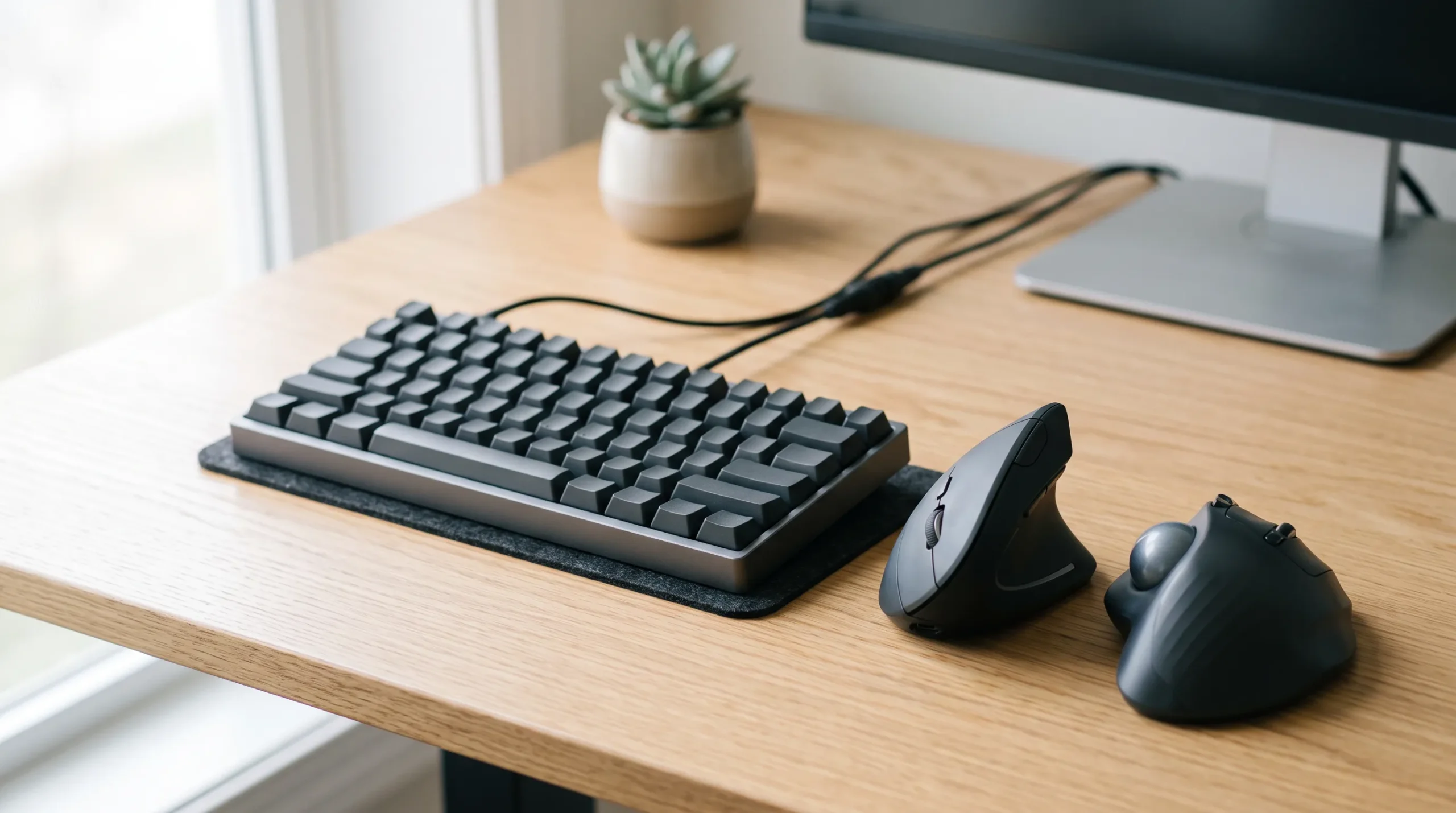
The vertical mouse vs trackball choice comes down to mechanics: both are different answers to the same complaint: a standard mouse asks your forearm, wrist, and hand to do more work than they need to. They just don’t solve it the same way.
A vertical mouse keeps the basic motion of a normal mouse – you still pick it up, still slide it across the desk, still grip it – but it turns your hand into a neutral, thumb-up “handshake” position rather than the more palm-down position a standard mouse typically encourages. A trackball removes that motion almost entirely: the body of the device stays still, and your thumb, fingers, or palm roll a ball to move the cursor instead.
Neither one is universally better. They change different things. A vertical mouse mainly changes the angle your forearm holds, it doesn’t reduce how much you move your arm across the desk. A trackball mainly changes how much the device travels, but it moves that work into a smaller, more concentrated part of your hand. Which one is the better fit depends on which of those two demands is actually bothering you, and which new demand your hand can take on comfortably.
That’s the question this guide is built to help you answer. It won’t tell you a single model is best for every hand, and it won’t organize the choice around pain intensity. Two people can feel different levels of discomfort and still benefit from comparing the same mechanical demand, because the deciding factor here is what the device asks your hand and arm to do. If you’re trying to figure out what’s actually causing your symptoms rather than which device to try, ErgoLivingSpace’s Wrist & Hand Pain Self-Test and carpal tunnel and computer work guide are the better starting points. If you have not yet narrowed the choice to these two formats, start with the broader ergonomic mouse choosing guide. This article assumes you already know roughly where the discomfort shows up and want to understand what each device changes.
Table of Contents
Quick Comparison
On a phone, swipe inside the table to view every column.
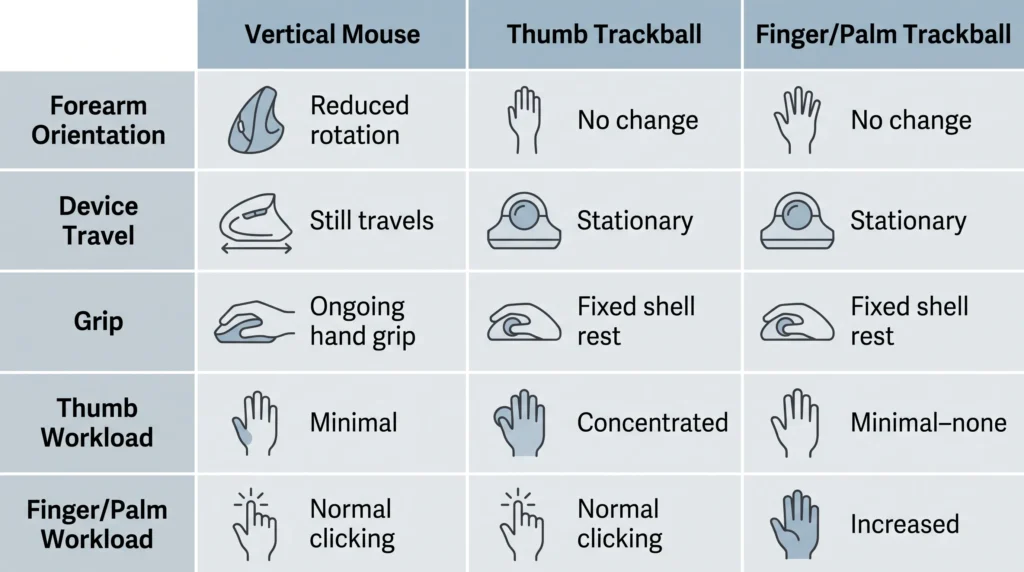
| Factor | Vertical mouse | Thumb trackball | Finger/palm trackball | Why it matters |
|---|---|---|---|---|
| Forearm orientation | Reduces palm-down rotation; hand rests closer to neutral, thumb-up | No change from a standard mouse’s resting angle unless the model is also angled | No change from a standard mouse’s resting angle unless the model is also angled | Sustained forearm twisting is one of the demands people are trying to reduce |
| Device travel | Still moves across the desk like a standard mouse | Stationary, the body doesn’t move | Stationary, the body doesn’t move | Less travel means less shoulder/arm sweep, but it doesn’t disappear – it moves into the thumb or fingers |
| Grip demand | Ongoing — the hand holds and repositions the device | Lower for the palm/fingers; the hand rests on a fixed shell | Lower for the palm/fingers; larger shell often supports more of the hand | A stable, low-force grip is generally easier to sustain than a moving one |
| Thumb workload | Usually limited to grip support and side-button use; the thumb does not control the cursor directly | Concentrated, the thumb drives the cursor | Minimal to none, depending on model | Matters most if the thumb is already the sore part |
| Finger/palm workload | Normal index/middle-finger clicking | Normal index/middle-finger clicking | Increased, fingers or palm roll the ball | Matters most if fingers, not the thumb, are the concern |
| Shoulder/arm movement | Similar to a standard mouse | Reduced – less reaching and sweeping | Reduced – less reaching and sweeping | Relevant for cramped desks or shoulder-related discomfort |
| Desk space | Same footprint as a standard mouse | Small, fixed footprint | Larger, fixed footprint | Trackballs can suit tight desks precisely because they don’t need travel room |
| Precision | Familiar mouse-style pointing | Requires new fine-motor control from the thumb | Requires new fine-motor control from fingers/palm | Relevant for detail work like photo editing or CAD |
| Learning curve | Usually the most familiar transition, since the device still moves like a conventional mouse | Involves building new thumb-driven cursor control; how much practice this takes varies by person and task | Often the least familiar at first, combining a new finger- or palm-driven control pattern with a larger shell | Affects how much frustration to expect before judging fit |
| Typical trade-off | Trades a flat wrist angle for continued device travel | Trades device travel for concentrated thumb work | Trades device travel and thumb workload for finger/palm work and a bigger footprint | There’s no option that reduces every demand at once |
What a Vertical Mouse Actually Changes?
Picture your hand resting on a standard mouse: palm flat, facing straight down. That position requires your forearm to stay pronated — rotated inward — for as long as your hand is on the mouse. A vertical mouse tilts the device so your hand meets it closer to a handshake, thumb pointing up instead of forward. In one controlled laboratory comparison of standard and vertical mouse use, researchers found that the vertical design let participants’ forearms settle closer to a neutral rotation rather than staying pronated, and measured lower electrical activity in the wrist-extensor muscles – the muscles that pull the hand back and to the side – during vertical-mouse use. That reflects one study’s findings in the tasks and participants tested, not a guarantee for every vertical mouse or every user. A broader systematic review of alternative mouse designs found mixed and generally limited-quality evidence across vertical, slanted, and other alternative designs, some studies show benefits, but the overall research base isn’t strong enough to call any one design a proven fix.
What a vertical mouse does not change is device travel. You’re still picking your hand up, sliding it across the desk, and repositioning your grip the same way you would with a flat mouse; the angle changes, but the motion doesn’t. It also doesn’t remove the need for a stable grip: a shell that’s too wide, too narrow, or has poorly placed buttons can quietly reintroduce the squeezing or overreaching that a better forearm angle was supposed to fix. Steeper angles (closer to 90°) shift the forearm further from pronation but typically feel less immediately familiar than shallower angles (in the 50–57° range).
What a Trackball Actually Changes?
A trackball flips the problem around. Instead of changing the angle your hand holds while moving the device, it removes the device movement and asks a smaller part of your hand to take it over. The shell sits still on the desk; a ball set into it (or beside it) does the work a moving mouse would otherwise do.
In a comparative study of mouse and trackball operation, researchers found that trackball use involved less shoulder and neck muscle activity than standard mouse use, since there is simply less reaching and sweeping to do. The same study also found higher forearm and hand-extensor muscle activity during trackball use, along with higher perceived exertion in the hand even as shoulder exertion dropped. In the tasks that study measured, a trackball did not reduce total workload; it transferred workload away from the shoulder and arm and into the thumb, fingers, or palm, depending on where the ball sits and which digits operate it.
That relocation is exactly why “which trackball” matters as much as “trackball or not.”
Thumb Trackball vs. Finger Trackball
Trackballs aren’t one category. The ball can sit where your thumb naturally falls, or it can sit in the center of the shell where your index and middle fingers (or your palm) reach it instead and those two layouts send the workload to very different places.
A thumb-operated trackball keeps the rest of the hand in a fairly familiar, mouse-like grip, with the thumb doing the rolling. That makes the transition feel closer to using a regular mouse, but it also means every bit of cursor work that used to be spread across the arm now lands on one digit. If your thumb is already the part that feels overworked – from texting, gripping, or a previous trackball – concentrating more control there may not be the trade you want.
A finger- or palm-operated trackball uses a larger ball, usually centered in a bigger shell, moved by the index and middle fingers or by the whole palm rolling across it. This avoids loading the thumb specifically, but it asks the fingers (or a broader part of the hand) to develop a new, fairly technical control pattern. The larger shell also takes up more desk space and generally takes more practice to control precisely.
Neither format is “the advanced version” of the other, they’re different distributions of the same underlying work. The right one depends on which digit you’d rather not overload, not on how long you’ve been using a mouse.
Vertical Mouse vs Trackball by Workload
Rather than asking “which is better” in the abstract, it’s more useful to ask which specific demand you’re trying to change:
- Forearm rotation is the main complaint → A vertical mouse addresses this directly; a trackball doesn’t inherently change forearm angle unless the specific model is also tilted.
- Device travel and reaching are the main complaint → A trackball addresses this directly; a vertical mouse still travels across the desk.
- Grip and repositioning feel like the issue → Both may reduce this demand if the shell fits your hand well; a poor-fitting shell undoes the benefit of either category.
- The thumb is already sore or overworked → A thumb trackball adds cursor-control demand to the thumb, so it may be a poor fit here; a vertical mouse or a finger/palm trackball routes that demand elsewhere instead.
- Fingers or palm feel like the more available option → A finger/palm trackball routes work there instead of the thumb.
- Desk space is genuinely limited → Either trackball style removes the need for a travel path; a vertical mouse still needs the same footprint as a standard mouse.
Which Is Better for Broad Wrist Discomfort?
For a general, diffuse ache across the wrist that isn’t clearly tied to one specific task, both categories change demands that may be relevant to broad wrist discomfort for different reasons, and neither is a universal answer. A vertical mouse changes sustained forearm rotation, which is a contributor to that kind of ache for some desk workers. A trackball changes the sweeping arm motion that comes from moving a mouse across a full workday, a different contributor to the same kind of ache. If you’re not sure which mechanism applies to you, the Best Ergonomic Mouse for Wrist Pain guide compares specific vertical and trackball models built for exactly this broad, general-discomfort use case.
Which Is Better When Device Travel Is the Problem?
If what bothers you is the repeated reaching, sliding, and re-gripping – long days of dragging windows, scrolling through spreadsheets, or working across multiple monitors – a trackball addresses that specific demand more directly than a vertical mouse does, since a vertical mouse still requires device travel across the desk. The trade-off is that the motion doesn’t disappear; it moves into your thumb or fingers, so this is a better fit when you’re confident that digit can take on more work, not just when travel feels like the annoyance.
Which Is Better When Thumb Workload Is the Problem?
If the thumb is already the part that feels the most taxed, a thumb-operated trackball adds repeated cursor-control demand to that same digit, since it’s built specifically to route cursor control through the thumb, which may make it a poor fit in that situation. A vertical mouse or a finger/palm trackball are both reasonable alternatives here, since neither routes repeated control through the thumb the way a thumb trackball does.
Which Is Better for Precision-Heavy Work?
For tasks with fine positional demands – detailed image editing, CAD, multi-monitor pixel-level work – the basic pointing method of a vertical mouse stays familiar, since the underlying motion (moving the whole device) doesn’t change, only the angle does; that familiarity may mean less relearning for some precision tasks. A thumb or finger/palm trackball asks you to build a new fine-motor control pattern from a smaller range of motion, and how closely that matches your previous accuracy depends on the person, the task, and the amount of practice involved. Measured accuracy is individual, not categorical, so it’s worth testing during a return window (below) rather than assuming either way. Gaming-specific trackball or vertical-mouse use is a narrow, separate topic on its own — outside what general search demand or evidence supports covering here in depth.
Which Requires More Adaptation?
Of the three formats, a vertical mouse is usually the most familiar transition, since the underlying skill – moving a device to move a cursor – doesn’t change. A thumb trackball is a bigger shift, since cursor control moves into a single digit that wasn’t doing that job before. A finger or palm trackball tends to feel least familiar at first, combining a new control method with a larger shell. None of this happens on a fixed timeline; how quickly it feels natural depends on the person, the task mix, and how much of the workday involves fine pointer work versus general navigation.
When Neither Option Solves the Real Setup Problem?
Sometimes the device isn’t the issue. A mouse – vertical, trackball, or standard – that sits too far from the keyboard, on a desk that’s too high or too low, or beside a monitor that encourages a twisted, reaching posture, can keep contributing to discomfort no matter which pointing device you switch to. Before attributing ongoing discomfort entirely to “the wrong mouse,” it’s worth checking keyboard and mouse height, monitor position, and whether the wrist is resting on a hard desk edge during active use rather than floating or resting only during pauses. If symptoms are tied to a specific pattern, numbness in particular fingers, nighttime symptoms, or a weakening grip, that’s a signal to look at causes, not just equipment; the carpal tunnel and computer work guide walks through that distinction.
How to Test Either Device During the Return Window?
A few minutes of resting your hand on a new mouse in a store or a product photo won’t tell you much. A more useful test uses the return window you already have:
- Do your ordinary work with it for multiple full days, not just an afternoon. Early clumsiness with a trackball is normal and doesn’t predict long-term fit.
- Pay attention to whether your grip tightens as tasks get more precise (selecting text, fine dragging, detailed clicking), not just how it feels at rest.
- Notice which specific part of the hand feels different by the end of the day compared to before — that tells you whether the workload actually moved where you expected.
- Keep your old mouse available and compare directly rather than relying on memory of how the old one felt.
- Stop and reassess if a new, different discomfort shows up that wasn’t there before, rather than pushing through it hoping it resolves on a fixed timeline.
Common Mistakes
- Choosing by category label instead of fit. “Vertical” and “trackball” describe a mechanism, not a guarantee, a poorly sized vertical mouse or an awkwardly placed trackball can still leave you straining.
- Assuming a trackball reduces total workload. It transfers workload from the shoulder or arm toward the thumb, fingers, or palm, it doesn’t make the work disappear.
- Picking a thumb trackball specifically because the thumb already hurts. A thumb trackball adds repeated cursor-control demand to the thumb, so it may be a poor fit when thumb workload is already unwelcome.
- Judging a trackball after a single short session. The learning curve is real and doesn’t reflect how the device will feel once the new motor pattern is familiar.
- Ignoring the rest of the setup. A well-chosen pointing device paired with a mouse that’s too far from the keyboard, a desk at the wrong height, or a wrist pressed against a hard edge will still leave the underlying problem unresolved.
Frequently Asked Questions
Is a vertical mouse or a trackball better for wrist pain? Neither is universally better, they change different things. A vertical mouse reduces sustained forearm rotation but still requires moving the device across the desk. A trackball removes that device travel but shifts cursor control into the thumb, fingers, or palm. The better fit depends on which specific demand – rotation or travel – is the one you want to change.
Is a trackball better than a vertical mouse for carpal tunnel symptoms? This article compares general mechanical trade-offs, not carpal-tunnel-specific guidance. If your symptoms follow a median-nerve pattern – numbness or tingling in the thumb, index, and middle fingers – the Best Mouse for Carpal Tunnel guide and the carpal tunnel and computer work guide address that specific context in more depth.
Can a trackball cause thumb pain? A thumb-operated trackball adds repeated cursor-control demand to the thumb, which may be a poor fit when thumb workload is already unwelcome. A finger- or palm-operated trackball avoids putting that specific demand on the thumb, though it introduces its own finger and palm workload instead.
Does a vertical mouse actually reduce forearm rotation? In controlled research comparing standard and vertical mouse use, study measurements have shown reduced forearm pronation and lower wrist-extensor muscle activity with a vertical design in the conditions tested. That’s a measured change in posture and muscle demand during use, not a treatment for an existing condition and individual results depend on fit and the specific angle of the mouse.
Which is easier to learn, a vertical mouse or a trackball? A vertical mouse is usually the more familiar transition, since the core motion – moving a device to move the cursor – stays the same. Trackballs, especially finger- or palm-operated ones, ask you to build a new control pattern in a smaller muscle group, and that pattern typically takes more practice to feel natural.
What’s the real difference between a thumb trackball and a finger trackball? A thumb trackball keeps a more familiar, mouse-like grip and routes cursor control through the thumb. A finger or palm trackball uses a larger ball operated by the index and middle fingers or the palm, avoiding thumb-specific load at the cost of a bigger shell and a control pattern that typically feels less familiar at first. Neither is a more advanced version of the other, they distribute the same underlying task differently.
Final Decision Framework
- Choose a vertical mouse when reducing palm-down forearm rotation is the main goal, and moving a mouse across the desk still feels comfortable.
- Consider a thumb trackball when reducing device travel matters most, and putting more control into the thumb feels acceptable.
- Consider a finger or palm trackball when stationary control is the priority but thumb workload specifically should be avoided.
- Reconsider the setup itself, mouse distance, desk height, monitor position, or a hard desk edge, when discomfort persists regardless of which device you try, since no pointing device compensates for a workstation that’s fighting your posture in the first place.
If you’ve decided a vertical mouse is the better fit, see our Best Vertical Mouse guide to compare specific models by hand fit, handedness, and adjustability. Once you know which demand you’re trying to change, the Best Ergonomic Mouse for Wrist Pain, Best Mouse for Carpal Tunnel, and Best Ergonomic Mouse for Hand and Finger Pain guides can help you narrow down specific models for your situation.