

Disclosure: This article contains affiliate links. As an Amazon Associate I earn from qualifying purchases. ErgoLivingSpace may also earn commissions from other qualifying purchases, at no extra cost to you.
A keyboard tray can be a poor buy even when the product itself is fine, simply because it doesn’t fit the desk it was bought for. A clamp that can’t grip a thick desktop. A slide that hits a crossbar three inches into the track. A drawer that clears the desk but eats the last inch of legroom you had. Before comparing brands or prices, the more useful question is whether a tray can physically go where you want it, and which mounting method your desk actually allows.
This guide starts there. We’ll walk through what to measure, whether you need clamp-on or drilled mounting, and whether your setup is sitting-only or needs to move with a standing desk, then compare five under-desk keyboard trays whose specs we’ve checked directly against manufacturer documentation, not just marketplace listings. Jump straight to the comparison table if you already know your desk’s dimensions.
A keyboard tray isn’t for everyone. If your desk and chair already put your keyboard near elbow height, you may not need one at all, more on that below.
Quick Answer
- Most people, no-drill: VIVO Clamp-on Keyboard Tray (MOUNT-KB05E) – clamps to desks 0.5″–1.25″ thick, no drilling.
- Tightest budget, don’t mind drilling: Kensington Comfort Keyboard Drawer (K60004US) – a simple screw-mounted drawer for a permanent setup.
- Want a more customizable permanent install: Uncaged Ergonomics KT1 – an adjustable keyboard tray with an independently adjustable left/right mouse platform and negative tilt.
- Want tilt and swivel adjustment: HUANUO 25″ All-Motion Keyboard Tray – under-desk track mount with 180° swivel and up to 22° of tilt.
- Want a keyboard tray for a standing desk: 3M AKT180LE Sit/Stand Easy Adjust Keyboard Tray – built with a +10″/−4″ height range to move with a height-adjustable desk.
Full fit details, verified specs and downsides for each are below.
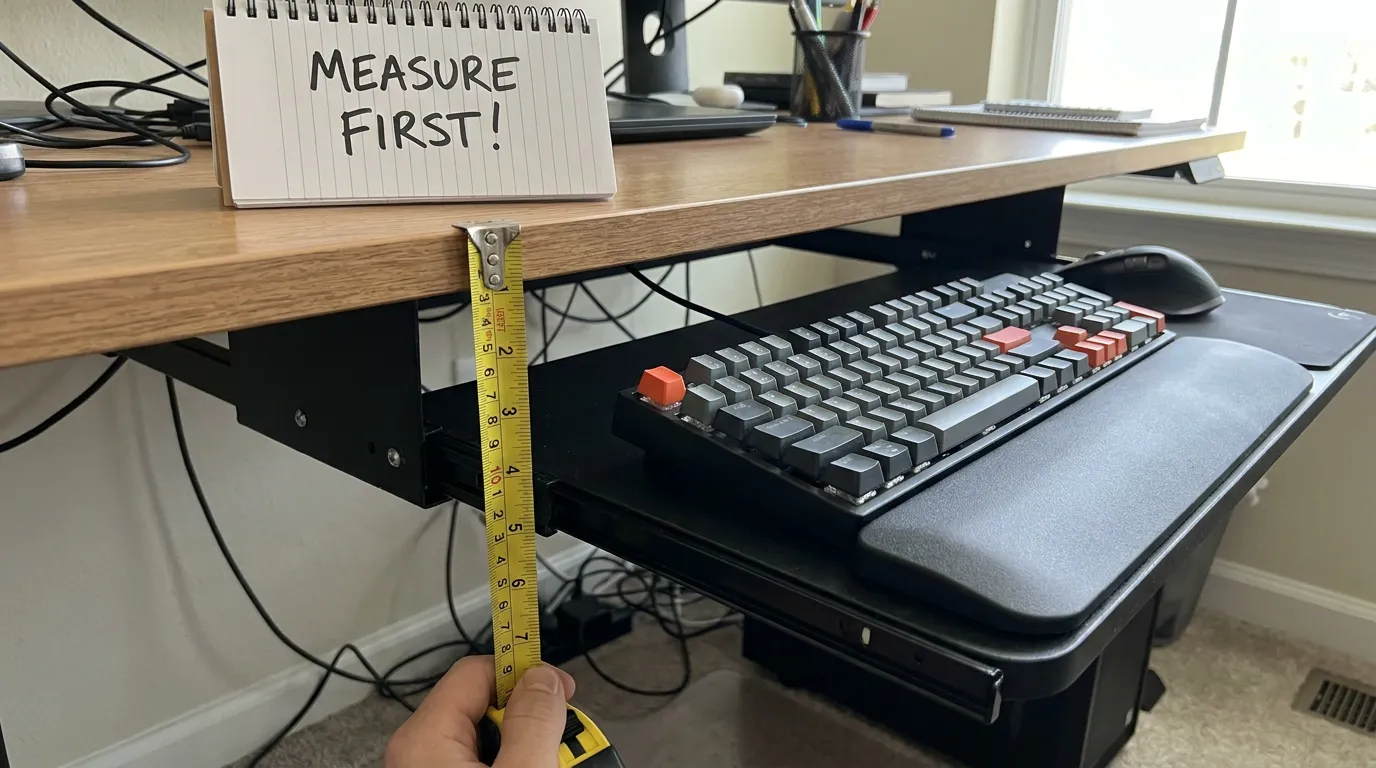
Measure Your Desk First: The Fit Checklist
This is the step most keyboard-tray guides skip, and it’s the one that actually determines whether the tray you order will work.
Desktop thickness. Clamp-on trays only grip within a specific thickness range – VIVO’s clamp-on tray, for example, is built for desks 0.5″ to 1.25″ thick. Outside that range, the clamp either can’t close or can’t hold securely. A drilled or track-mounted tray isn’t limited by desktop thickness in the same way, but the mounting hardware still needs solid material to bite into.
Usable depth under the desk. Every tray needs a track or rail bolted or clamped to the underside, plus room for the tray itself to slide out. Measure from the front edge of the desk straight back to the first obstruction.
Distance to crossbars. Most desks have a structural crossbar or apron running under the front edge. If a tray’s mounting track needs more depth than the distance to that crossbar, it won’t install, full stop. Measure this before you measure anything else.
Drawer interference. If your desk has a center drawer, a keyboard tray usually has to mount below it, which eats into your usable leg and knee clearance. Check whether the drawer opens far enough to clear a tray mounted just beneath it.
Knee clearance. Once a tray is installed and pulled out, there should still be room for your knees to sit comfortably. A tray that solves your wrist position but leaves you sitting sideways isn’t a net improvement.
Keyboard width and mouse space. Measure your actual keyboard (not the tray’s spec) end to end, and decide whether you want the mouse on the same platform or a separate one. A full-size keyboard with a number pad needs meaningfully more width than a compact layout, and less width left over for the mouse.
Desktop material. Particleboard, laminate, solid wood, metal and glass all grip clamps and screws differently. Glass desktops in particular are usually not compatible with either mounting method without added hardware; check a specific product’s installation guide if your desktop isn’t standard wood-composite or laminate.
Keyboard Tray Desk-Fit Checklist
Print or screenshot this before you shop:
- Desktop thickness
- Usable depth under the desk (to the first obstruction)
- Distance to the nearest crossbar
- Drawer interference, if you have a center drawer
- Knee clearance with the tray extended
- Keyboard width (measured, not assumed)
- Mouse space needed, shared platform or separate

For the desk itself – how high the surface should sit for your body, before you even add a tray – see our ideal desk height guide and desk height calculator.
Do You Actually Need a Keyboard Tray?
A keyboard tray solves a specific problem: a keyboard that sits too high because the desk itself can’t be lowered. It’s worth considering when:
- Your desk is fixed and the keyboard sits noticeably above your elbow height when you type.
- You can’t lower the desk or raise the chair without leaving your feet unsupported.
- You want the keyboard and mouse on a slightly different plane than the rest of the desktop, for example, tucked away when not typing.
- Your current setup keeps the mouse too far from the keyboard, and a combined keyboard and mouse tray would bring them closer together.
It’s less useful – and sometimes counterproductive – when:
- Your desk and chair already put your keyboard close to elbow height. Check with the desk height calculator before assuming you need hardware to fix this.
- Installing a tray would take away knee clearance you’re currently using.
- You work primarily from a laptop’s built-in keyboard rather than an external one, a tray solves an external-keyboard positioning problem, not a laptop-screen-height problem.
- Your desk’s construction (thin composite, an unsupported overhang, a glass top) can’t take a clamp or screws safely.
If a tray does make sense for your setup, the next decision is how it mounts and that depends entirely on what you measured above.
Clamp-On or Drilled: Which Mounting Method Fits Your Desk?
| Clamp-on (no drill) | Drilled / track-mounted | |
|---|---|---|
| Installation | Faster, no tools beyond tightening clamps | Requires drilling or screwing into the desk underside |
| Renting? | Better fit — removes without marking the desk | Leaves holes when removed |
| Desk-thickness limits | Yes — clamps only close within a specific range | Generally more flexible, but needs solid material to screw into |
| Adjustment range | Often simpler (fewer moving parts) | Can offer more range — tilt, swivel, independent mouse positioning |
| Moving between desks | Easier | Harder — the mounting hardware stays with the original desk |
| Best for | Renters, dorms, desks you don’t want to modify | Owned desks where you want a more built-in, adjustable result |

Of the five trays compared here, VIVO’s MOUNT-KB05E is the clamp-on, no-drill option. Kensington’s K60004US, Uncaged Ergonomics’ KT1, HUANUO’s 25″ All-Motion tray and the 3M AKT180LE all require drilling or screwing a track into the desk underside — so before ordering any of the drilled options, confirm you’re comfortable committing to a fixed installation point on that desk.
Sitting or Standing? Match the Tray to Your Desk
Because the tray is attached to the desktop, it moves up and down with a sit-stand desk. You still adjust the desk itself to keep the keyboard near elbow height in each posture. The tray mechanism determines how far below the desktop the keyboard can sit and how much tilt or positional adjustment you have.
If you split time between sitting and standing, look for a tray with real height and tilt adjustment built into the mounting mechanism itself, not just the option to mount it once. The 3M AKT180LE is explicitly built for this, its arm has a full +10″/−4″ height range built into the mount itself, independent of the desk’s own brand or motor. If you’re seated all day at a fixed-height desk, that flexibility matters less, and a simpler clamp-on or fixed drilled tray is usually the more practical – and cheaper – choice.
Keyboard Tray Types, In Plain Terms
The category gets described with a handful of overlapping terms, so it’s worth knowing what each one actually means before you shop:
- Sliding tray – the basic mechanism behind most of the trays here: a sliding keyboard tray is a platform on rails that pulls out from under the desk and pushes back in when you’re done. VIVO’s, Kensington’s and HUANUO’s trays are all variations on this.
- Track-mounted tray – a sliding tray whose rail system is screwed to a dedicated track under the desk, rather than clamped to the edge. This is how the HUANUO 25″ All-Motion tray and the 3M AKT180LE attach.
- Clamp-on (no-drill) tray – a sliding tray that grips the desk edge with clamps instead of screws, trading some desk-thickness flexibility for a fully reversible installation. VIVO’s MOUNT-KB05E is the clamp-on option in this lineup.
- Articulating keyboard tray – usually a tray attached to an adjustable arm or mechanism that adds height, tilt and/or swivel adjustment beyond a basic sliding drawer. Manufacturers use the term inconsistently, so check the actual adjustment mechanism rather than relying on the label alone. The five trays compared here are sliding and track-mounted designs rather than full articulating-arm systems.
Knowing which category a listing falls into matters more than the marketing name attached to it — a “keyboard drawer,” a “keyboard platform” and a “keyboard tray” are, in practice, usually the same sliding mechanism described three different ways.
Best Keyboard Trays: Comparison Table
| Product | Best for | Mount / fit | Adjustment | CTA |
|---|---|---|---|---|
| VIVO MOUNT-KB05E | Most people, no-drill | Clamp-on; 0.5–1.25 in desktops | Slides out; tilt not published | Check price |
| Kensington K60004US | Budget permanent mount | Screw-mounted drawer; needs a solid, clear underside | Several fixed SmartFit heights | Check price |
| Uncaged Ergonomics KT1 | Adjustable permanent mount | 16 in rail; separate mouse platform | Height plus negative tilt | Check price |
| HUANUO 25-inch All-Motion | Tilt and swivel | Track-mounted; 25 in clear width (35.4 in for full swivel) | 180° swivel; +6°/−22° tilt | Check price |
| 3M AKT180LE | Sit-stand range | 23 in track; about 24 × 23.25 in underside clearance | +10/−4 in height; +10°/−15° tilt; 360° swivel | Check price |
Pricing and availability change; use the retailer links for current information.
The Picks
VIVO Clamp-on Keyboard Tray (MOUNT-KB05E) – Best Overall / Best No-Drill
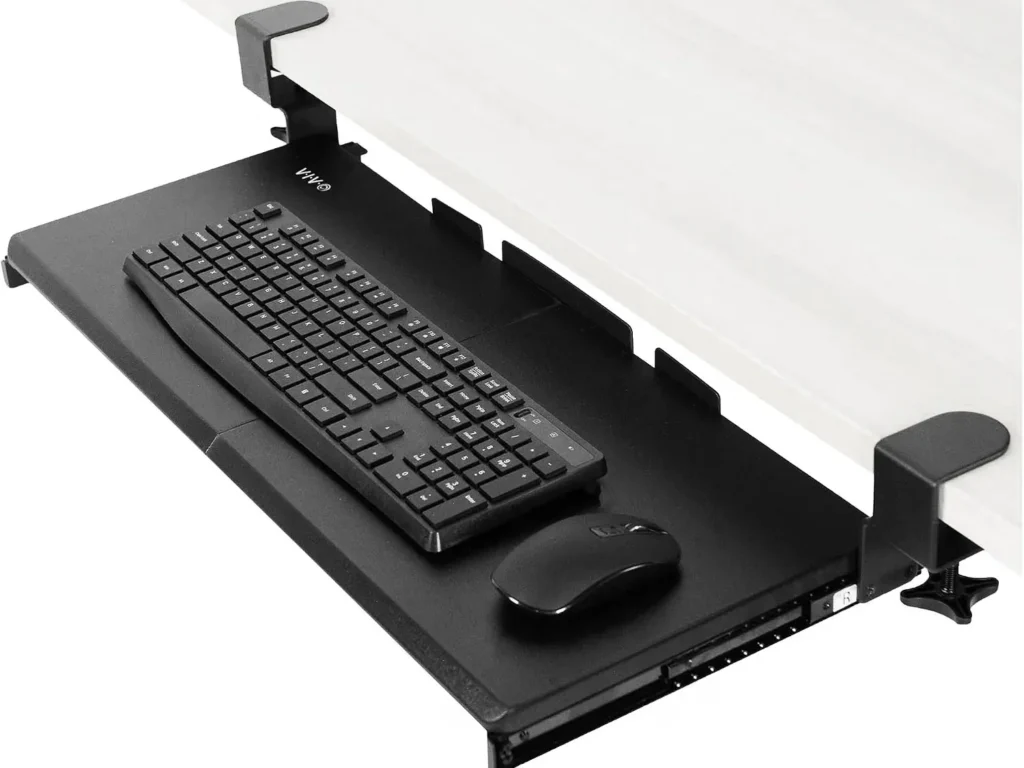
Best for: Anyone who wants a straightforward, renter-friendly tray and has a desk between 0.5″ and 1.25″ thick.
Why it made the list: Based on current manufacturer specifications, this is the only clamp-on, no-drill tray in this lineup, making it the most reversible option for a compatible desk.
Fit information: The clamp mechanism is built for desktops 0.5″ to 1.25″ thick. The tray itself measures approximately 26.8″ × 11″ (about 32.5″ including the clamps), and it sits 1.5″ to 2.75″ below the desk surface once installed, extending up to 8.5″ from the desk edge.
Adjustment: VIVO does not publish a user-adjustable tilt range for this model, so we treat tilt as unspecified.
Biggest downside: An 11 lb load capacity, which is on the lower end for a shared keyboard-and-mouse platform. If you use a heavy mechanical keyboard plus other accessories, add up their combined weight and compare it against that 11 lb figure.
Check your desk first: If your desktop is thicker than 1.25″ – a common issue with older solid-wood desks – this clamp won’t close around it. Measure before ordering.
Verdict: The safest starting recommendation for most home-office desks, provided the thickness works.
Kensington Comfort Keyboard Drawer (K60004US) – Best Budget
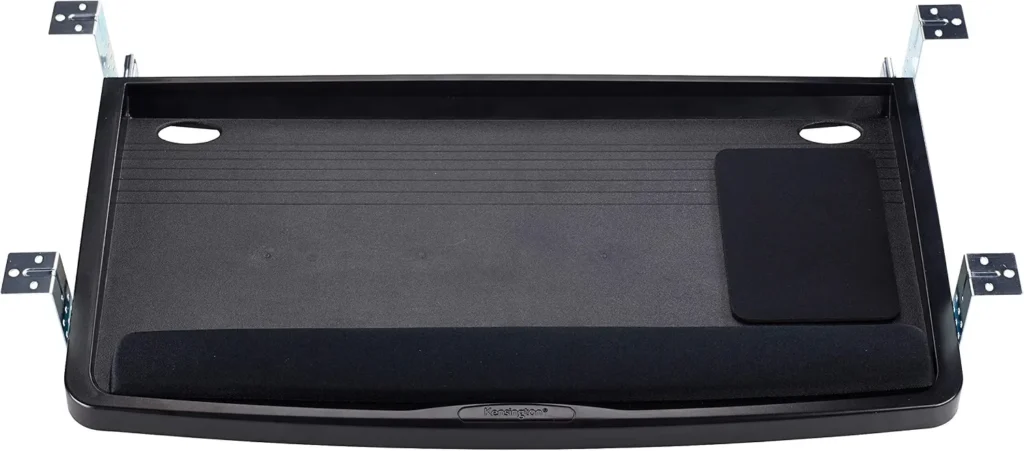
Best for: Budget-conscious buyers with a standard desk who are comfortable drilling or screwing into it.
Why it made the list: This is a straightforward screw-mounted keyboard drawer with several fixed SmartFit height settings.
Fit information: The drawer has an outer width of about 26″ (24.5″ inner drawer width) and mounts using Kensington’s SmartFit system, which offers multiple height positions so you can match the drawer height to your desk. The manufacturer does not publish a desk-thickness limit or a load-capacity figure for this model, so we’re not stating either.
Adjustment: SmartFit lets you choose from several fixed mounting heights at install time, rather than sliding tilt or swivel adjustment.
Biggest downside: This is a drilled installation, not a no-drill option – it still requires committing to screw holes in the desk underside. Customer feedback also flags that the tray’s front edge can press on the wrist without the included pad in place; if that’s an issue, a dedicated keyboard wrist rest can help cushion the edge.
Check your desk first: Because installation is screw-based, confirm your desk’s underside has solid material to screw into (not thin composite or a hollow panel) before ordering.
Verdict: A straightforward budget-oriented option, as long as you’re comfortable drilling.
Uncaged Ergonomics KT1 : Best Permanent-Mount Adjustable Tray
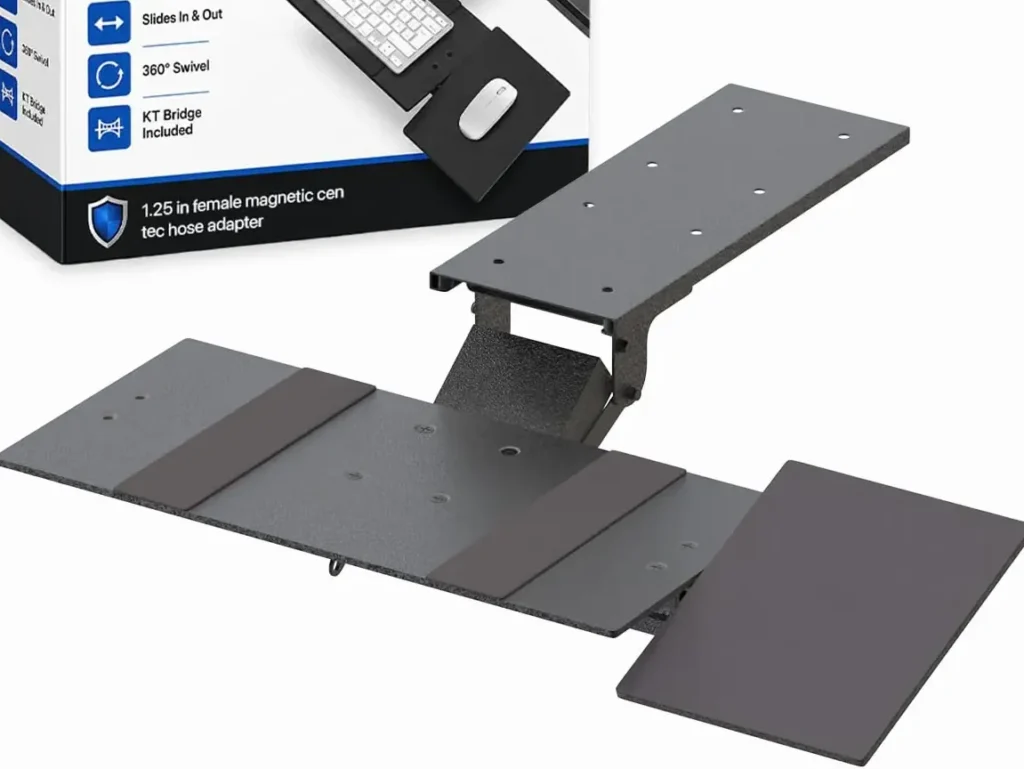
Best for: Owners who want more built-in adjustment than a basic clamp-on tray offers and don’t mind a permanent installation.
Why it made the list: Based on current manufacturer specifications, the KT1 offers something none of the other trays here do: a mouse platform that installs independently on either the left or right side, with its own distance and tilt adjustment, separate from the keyboard platform.
Fit information: The tray mounts via a 16″ rail attached to the desk underside. The keyboard panel measures about 18.5″ × 8.75″, and the mouse pad about 7″ × 8.75″. Height adjusts from roughly 3.75″ below the desk up to desk height. Uncaged Ergonomics does not publish a maximum desk-thickness figure or a load-capacity rating for the KT1, both are absent from current manufacturer documentation, so neither appears here as a number.
Adjustment: Negative tilt is supported, letting the keyboard angle slightly away from you; the manufacturer doesn’t publish an exact degree range for that tilt.
Biggest downside: The permanent installation and separate mouse platform add complexity, so confirm the 16-inch rail and underside clearance fit your desk.
Check your desk first: This is a permanent, drilled installation with a 16″ rail, confirm you have that much clear, obstruction-free depth under the desk before installing, and that you’re ready to commit this desk to the tray long-term.
Verdict: Worth considering if the left/right mouse-platform adjustment solves a specific problem for you.
HUANUO 25″ All-Motion Keyboard Tray : Best for Full-Motion Adjustment
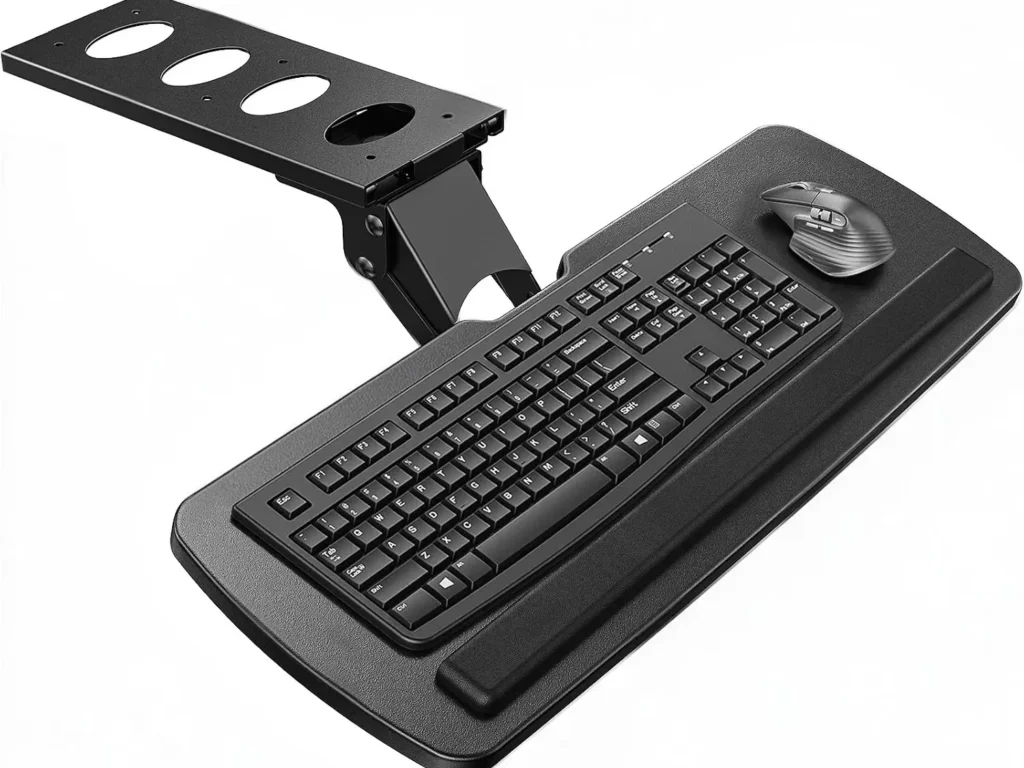
Best for: Buyers who want the widest range of tilt, swivel and height adjustment in this lineup, in a permanent, track-mounted design.
Why it made the list: Of the drilled/track-mounted options here, this is the one with the most complete published motion range: a full 180° swivel left and right, plus 6° of upward and 22° of downward tilt.
Fit information: The platform measures 25″ × 9.84″, with 6.3″ of total height adjustment and a minimum connector height of 7.48″. HUANUO’s installation guidance calls for either no crossbar under the desk or at least 14.17″ of crossbar clearance, roughly 25″ of width clearance (35.4″ if you’ll use the full swivel), and a desk thickness greater than 0.6″. The manufacturer does not publish a load-capacity figure for this model — we’re stating that plainly rather than estimating a number.
Adjustment: 180° swivel, +6°/−22° tilt – both manufacturer-published figures. A wrist rest is included.
Biggest downside: No published weight limit means there’s no manufacturer number to check a heavier keyboard-and-mouse combination against – budget conservatively until you can confirm capacity with HUANUO directly if that matters for your setup.
Check your desk first: The mount needs roughly 25″ of horizontal clearance under the desk (35.4″ if you’ll use the full swivel) and either no crossbar or at least 14.17″ of clearance to it, measure both before ordering.
Verdict: The widest adjustment range of the drilled options here, plus an included wrist rest, with the same caveat as the rest of this group: load capacity isn’t manufacturer-published.
3M Sit/Stand Easy Adjust Keyboard Tray (AKT180LE) : Best Premium / Best for Sit-Stand Desks
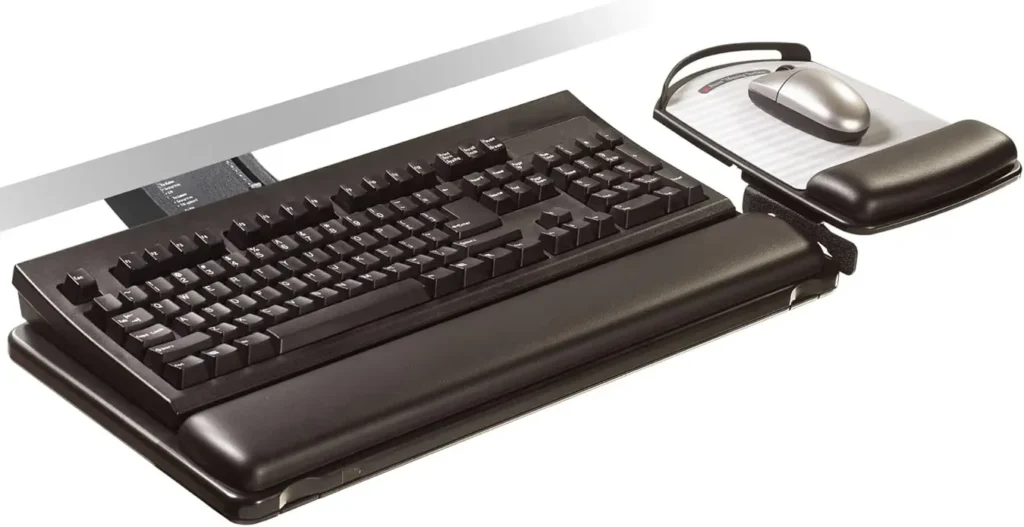
Best for: Sit-stand desk owners who want the widest built-in height swing and the strongest warranty in this lineup, and who don’t mind paying more for it.
Why it made the list: This is the only tray in the lineup with a genuine sit-to-stand height range built into the mount itself – +10″/−4″ from the mounting surface – plus a 360° swivel and an articulating mouse platform, backed by the longest warranty here: lifetime on the arm.
Fit information: The tray uses a 23″ track and needs about 24″ × 23.25″ of clearance under the desk surface. The mouse platform adjusts in all directions, tilts forward and back, and can be mounted on either the left or right side. It includes a leatherette gel wrist rest and a mouse pad. 3M’s product sheet does not state a maximum desk thickness or a load-capacity figure for this model, and doesn’t explicitly confirm the mounting hardware (screws vs. a bracket kit), confirm all three against the physical installation manual before ordering.
Adjustment: +10″/−4″ height, +10°/−15° tilt, 360° swivel – all manufacturer-published figures.
Biggest downside: No published maximum desk thickness or load-capacity figure, and the exact mounting hardware isn’t detailed in the documentation we could reach, confirm both from the physical installation manual before ordering, especially on an unusually thick or thin desktop.
Check your desk first: You’ll need roughly 24″ × 23.25″ of clear, obstruction-free space under the desk for the track and swing arm, measure before ordering, and check the installation manual for desk-thickness limits specific to your desk.
Verdict: The strongest sit-stand height range and warranty in this lineup, with the caveat that desk-thickness, load-capacity and exact mounting hardware aren’t confirmed from the spec sheet we reviewed.
FAQ
Is a keyboard tray necessary?
Not for everyone. It’s most useful when a fixed-height desk puts your keyboard above a comfortable elbow height and the desk itself can’t be adjusted. If your desk and chair already let you type with elbows near 90°, a tray may not add anything.
Can you add a keyboard tray to any desk?
No — fit depends on desktop thickness (for clamp-on trays), usable depth under the desk, crossbar location, and desktop material. Measure before buying; see the Fit Checklist above.
Clamp-on vs. drilled keyboard tray — which should I choose?
Clamp-on trays install faster and leave no marks, which suits renters or anyone who doesn’t want to modify the desk. Drilled or track-mounted trays are more permanent but can offer more adjustment range, like the tilt and swivel on the HUANUO 25″ All-Motion tray.
Do keyboard trays work with standing desks?
A tray mounted to the desk itself generally moves with that desk, including a height-adjustable one. For sit-stand use specifically, look for a tray built and marketed for that use case, like the 3M AKT180LE, rather than assuming any drilled tray will keep pace with a wide sit-to-stand height range.
How should a keyboard tray be positioned once it’s installed?

Once mounted, positioning follows the same principles as any keyboard: roughly elbow height, shoulders relaxed, wrists straight rather than bent up or down. Our keyboard and mouse height guide covers the specifics in more depth.
What should I measure before buying a keyboard tray?
Desktop thickness, usable depth to the nearest crossbar, drawer interference, knee clearance with the tray extended, your keyboard’s actual width, and how much mouse space you want alongside it.
Can a keyboard tray hold both a keyboard and a mouse?
Most of the trays here share one platform for both. A few, like the Uncaged Ergonomics KT1, include a separate, independently adjustable mouse platform rather than a single shared surface.
A Note on How These Picks Were Made
These recommendations are based on current manufacturer specifications, published fit and mounting information, and — where available — verified customer review data, cited by source, whether that’s the manufacturer’s own page or a live retailer listing. No hands-on testing was performed for this guide; where a manufacturer doesn’t publish a figure — load capacity, desk-thickness limit, tilt range — we’ve said so directly rather than estimating one. Some links on this page are affiliate links; if you buy through them, ErgoLivingSpace may earn a commission at no extra cost to you.
A keyboard tray addresses where your keyboard sits — it’s one piece of a larger setup. If neck strain is part of what you’re trying to solve alongside wrist and shoulder position, our guide to ergonomic keyboards for neck pain covers the rest of that picture.