

Last updated: October 2026 · ErgoLivingSpace Editorial Team
Disclosure: This article contains affiliate links. If you purchase through one of these links, we may earn a commission at no additional cost to you. As an Amazon Associate I earn from qualifying purchases.
The best mouse pad with wrist support depends on the support strategy that fits your movement. “Ergonomic mouse pad” can mean very different things: a cushioned pad with a built-in rest, a desk-sized flat surface, or a separate rest that glides under your hand. Some people want cushioning where a hard desk edge meets the palm. Others need room to move the mouse with the whole arm, and a raised support only gets in the way.
That is why this guide starts with the support type, not the product. Decide whether you want integrated gel support, memory foam, a flat surface with no raised support, or a separate sliding rest. Then choose the format that fits. If you are ready to compare, jump to the Quick Answer or the comparison table.
Table of Contents
Quick Answer
- Want classic gel support? Kensington Duo Gel Wave (K62413WW).
- Want simple memory foam at a lower-cost position? Fellowes 9176501.
- Want support that moves with your hand instead of a fixed raised pad? DeltaHub Carpio 2.0 is a separate alternative, not a mouse pad. See below.
- Need lots of mouse movement space? Consider a large flat desk mat rather than an integrated wrist-rest pad.
Do You Need an Ergonomic Mouse Pad?
It depends on the problem you are trying to solve. A wrist-support mouse pad may be worth considering when a hard desk edge presses on the palm or forearm, a soft raised support feels comfortable during pauses, or a stable surface helps compact mouse movements.
An integrated rest may be a poor fit if it is too high, anchors the wrist in one spot, or takes away movement space. Readers who use low sensitivity, make wide arm-led movements, or dislike fixed contact may prefer a large flat surface. Changing the pad may also miss the real issue when the mouse sits too far away, too high, or does not fit the hand.
Before buying, notice what happens during an ordinary work session: whether the palm meets a hard edge, whether the mouse runs out of surface, and whether the arm can move without the support becoming an anchor. Those observations are more useful than the word “ergonomic” on a package.
For reach and placement, see our guide to keyboard and mouse height for wrist and shoulder comfort. If mouse shape or movement seems more relevant, compare the best ergonomic mouse options for wrist discomfort.
Mouse Pad vs Wrist Rest vs Desk Mat
Several support strategies get lumped together under “ergonomic mouse pad.” They solve different problems.
Integrated wrist-support mouse pad
A built-in gel or foam rest suits a fixed mouse position and fairly compact movements. The trade-off is less usable movement area and support fixed at one point.
Large flat desk mat
A desk-sized surface with no raised section suits arm-led movement, low sensitivity, or anyone who dislikes raised supports. It provides no dedicated cushioning, so it may not soften a hard desk edge enough on its own.
Separate sliding wrist support
A small rest that glides with the hand can provide palm contact without fixing it to one point. It has a learning curve and can shift unexpectedly.
Separate fixed wrist rest
A standalone gel or foam cushion gives more placement flexibility than an integrated rest. For keyboard-specific options, see our best wrist rest for keyboard guide.
What Ergonomics Guidance Actually Says About Wrist Support?
Reputable sources do not all give the same advice, and that disagreement is why “choose the support type first” matters.
Where the guidance agrees
- Keep the mouse close to the keyboard to reduce reaching (OSHA).
- Keep the wrist relatively straight and neutral (OSHA, Cornell).
- Avoid resting the forearm or wrist on hard or sharp desk edges (OSHA).
- If you use a rest, contact should generally be at the heel of the palm, not directly under the wrist (OSHA).
Where it splits
- OSHA describes a mouse pad with an integrated wrist or palm rest as one way to support a neutral posture, with soft, smooth edges. Its wrist-support guidance also warns that resting on a support while typing can limit wrist motion and may increase awkward postures.
- CCOHS frames wrist rests as something for rest breaks and pauses. During active work, it says hands should stay raised and move freely. Heavy or frequent contact can put pressure on the wrist, though a padded rest may be better than a sharp desk edge.
- Cornell’s ergonomics guidance recommends pivoting from the elbow with a straight wrist and cautions against padded supports that lock the forearm in place and encourage wrist flicking. It advises against wrist rests for mouse use.
- Consumer Reports notes that integrated mouse-pad wrist rests can impede movement and be hard to position with a keyboard and other items.
There is no single universally accepted answer. A reasonable reading is that a soft support may help keep the hand off a hard edge during pauses, while a fixed raised support can work against you if it limits movement. Your movement style decides which risk applies.
That also explains why a comfortable first impression is not enough. A support can feel soft yet still be too high, sit under the wrist crease, or restrict the travel your tasks require. Judge contact location, height and freedom of movement together.
A note on carpal tunnel. Choosing a mouse pad is an ergonomic and setup decision, not medical treatment. A pad cannot treat or prevent a medical condition. If you have numbness, tingling, weakness or pain that does not ease, speak to a qualified health professional. Our wrist pain self-test can help you review symptom patterns, but it is not a diagnosis. For a condition-specific mouse comparison, see our best mouse for carpal tunnel guide.
How to Choose the Best Mouse Pad With Wrist Support
Support height and firmness
A taller support is not automatically better. If it is too high, it may tip the wrist upward. If it is too firm, it may feel like a hard edge. Not every manufacturer publishes support height, so check the listing when clearance matters.
Gel vs memory foam
Neither material is medically superior. Gel generally keeps its shape, can be easier to wipe clean, and may feel firmer or cooler; some designs carry a puncture or leak risk. Memory foam compresses to the hand and can feel softer, but density varies and fabric covers may be harder to clean.
Pad size and movement space
Small pads suit compact movement and higher sensitivity. Low sensitivity and arm-led movement need more surface area and may conflict with a fixed rest. Vertical mice can also need lateral room, while a trackball stays in place. Measure the usable area above the raised cushion—not only the product’s outside dimensions—and compare it with the sweeps you actually make. Our vertical mouse vs trackball comparison explains how each format uses space.
Desk edge and keyboard distance
Place the pad close to the keyboard so it does not push the mouse far to the side. If a hard desk edge presses on the forearm, a pad helps only when it covers the contact point.
Surface, cleaning and durability
Surface texture changes effort and control, but manufacturers here do not publish friction figures. Check cleaning instructions and treat durability claims cautiously. Where guidance or dimensions are retailer-listed rather than manufacturer-verified, the product notes say so.
Assess the pad with the rest of the workstation rather than in isolation. A comfortable cushion cannot compensate for a mouse placed beyond a wide keyboard, and a generous surface cannot make an oversized mouse fit the hand. If you change more than one element, adjust them one at a time so you can tell whether support height, reach, friction or movement space made the practical difference.
Comparison Table
On a phone, swipe inside the table to see every column.
| Product | Best For | Support Type | Pad Size | Surface | Link |
|---|---|---|---|---|---|
| Kensington Duo Gel Wave K62413WW | Classic gel support | Integrated gel pillow with ventilation channel | About 9.6 × 7.6 in (retailer-listed) | Wipe-clean finish; rigid base | Check current price on Amazon |
| Fellowes Memory Foam 9176501 | Simple memory foam at a lower-cost position | Integrated memory foam | 1 in H × 7.94 in W × 9.25 in D | Jersey covering; non-skid backing | Check current price on Amazon |
1. Kensington Duo Gel Wave: Best Gel Support
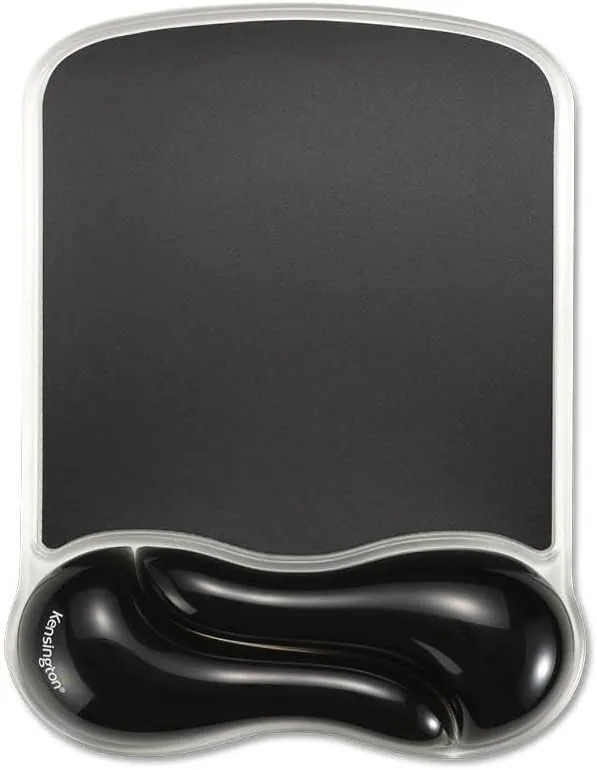
Best for: readers who want gel support at a fixed mouse position and use compact movements.
Verified specs: Kensington describes a gel-pillow rest, wipe-clean finish, ventilation channel, rigid base and two-year limited warranty. Kensington does not publish dimensions on its product page; retailer listings put the footprint at about 9.6 × 7.6 inches, so that figure is not manufacturer-verified. Wrist-rest height is also unpublished.
Main strength: clear manufacturer documentation and a ventilation channel through the gel support. The wipe-clean finish is also easier to maintain than many fabric-covered rests.
Main downside: durability feedback is mixed. Some users report the gel section breaking, and gel products can leak if punctured. These are reported patterns, not a measured failure rate.
Skip it if: you need a lot of mouse travel or a larger surface.
Verdict: a sensible first choice if you already know you want a compact gel rest at a fixed position.
2. Fellowes Memory Foam Mouse Pad with Wrist Rest: Best Lower-Cost Option
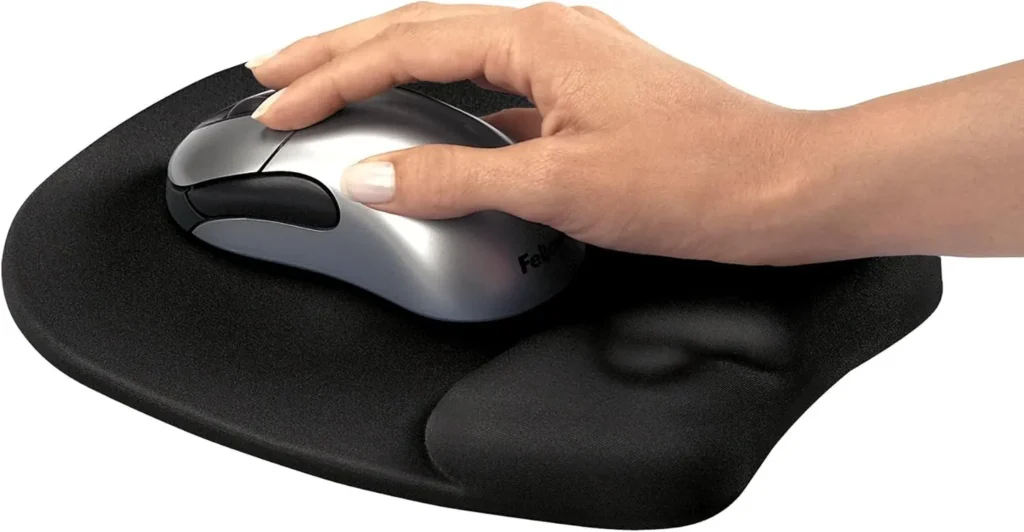
Best for: readers who want a plain office-style memory-foam pad without extra features.
Verified specs: Fellowes documents the 9176501 with memory foam, a jersey covering, non-skid backing, dimensions of 1 inch H × 7.94 inches W × 9.25 inches D, and a five-year limited warranty. It does not specify the mouse-surface material separately or publish cleaning guidance.
Main strength: simple construction from a long-established office brand with a longer-than-usual warranty. Its conventional rectangular format should be familiar to readers replacing an older office mouse pad.
Main downside: some users find the foam firm, the footprint is compact, and the fabric-style covering may be harder to clean than a wipe-clean finish.
Skip it if: you need a large mousing area or a soft, plush rest.
Verdict: a no-frills memory-foam option for a fixed spot and compact mouse movements.
Alternative: DeltaHub Carpio 2.0 Sliding Palm Support
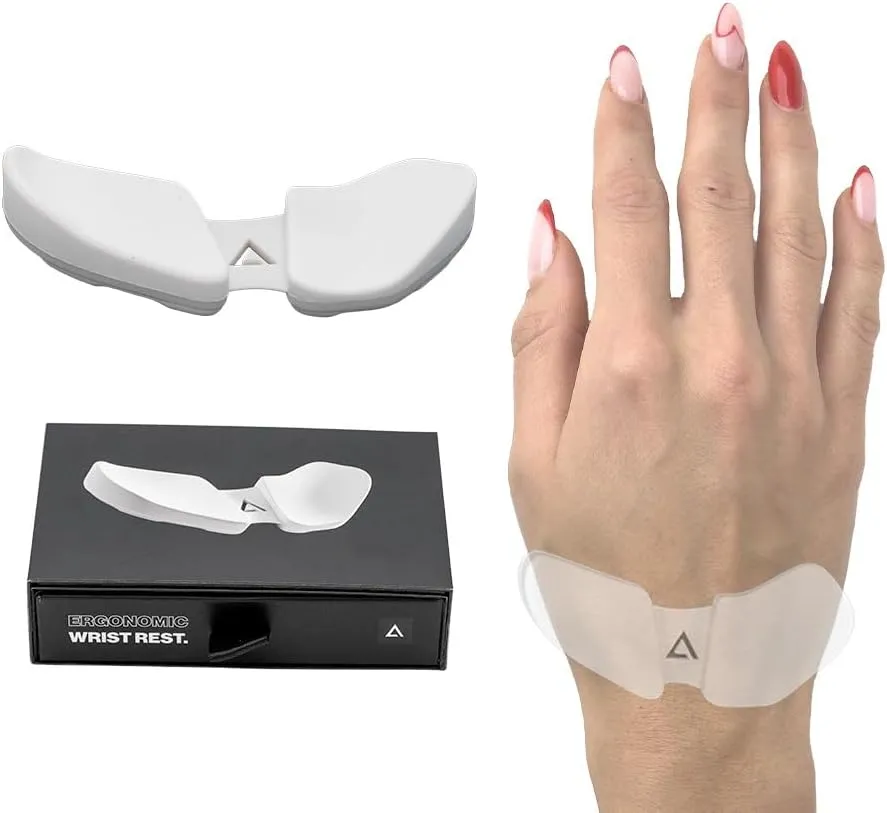
This is not a mouse pad and is intentionally outside the main comparison table. It represents a different support strategy.
DeltaHub’s Carpio 2.0 uses an ABS base, silicone pads and low-friction PTFE feet so it can move with the hand instead of anchoring the wrist to one raised point. DeltaHub lists Small and Large sizes plus right-hand, left-hand and both-hand versions. The linked variant is Large, grey, right-hand.
It may suit readers who dislike integrated rests but still want contact under the palm. The trade-offs are a learning curve, possible slipping at the desk edge, and a relatively high price for a small accessory.
Verdict: worth considering only when a fixed wrist-support pad feels restrictive.
Common Mouse-Pad Mistakes
- Buying only by softness. A soft rest can still be the wrong height or shape.
- Ignoring support height. A rest that is too high may tip the wrist upward.
- Choosing a pad too small. Match the surface to your sensitivity and movement style.
- Keeping the mouse too far from the keyboard. Excess reach can matter more than pad choice.
FAQ
Do ergonomic mouse pads really work?
A pad can make a setup more comfortable by cushioning contact with a hard edge, adding movement room or keeping the mouse on a stable surface. It does not treat or prevent medical conditions, and some ergonomics guidance cautions against fixed supports.
Should your wrist rest on a mouse pad while mousing?
Guidance varies. OSHA discusses contact at the heel of the palm, CCOHS frames rests as something for pauses, and Cornell advises elbow-led movement without relying on a rest. Use any support lightly during pauses and keep the arm free to move.
Is gel or memory foam better?
Neither is medically better. Gel tends to keep its shape and may be easier to wipe clean. Memory foam compresses to the hand and can feel softer, though density and covers vary. Choose by fit, feel and cleaning preference.
Is a desk mat better than a mouse pad?
A desk mat suits wide or arm-led movements. A compact mouse pad with a built-in rest suits readers who want cushioning at a fixed spot. Neither format is universally better.
Do vertical mice need a special mouse pad?
Not necessarily. Make sure the surface leaves enough lateral room for the way you move the device. A larger vertical mouse may feel cramped on a small pad even when the sensor tracks correctly.
Final Recommendation
The best mouse pad with wrist support is the format that matches your movement. Choose the support type first: Kensington Duo Gel Wave for compact gel support, Fellowes 9176501 for a simpler memory-foam option, or DeltaHub Carpio 2.0 when you want a separate support that moves with the hand. If movement space is the priority, use a large flat desk mat rather than forcing a raised rest into the setup.