

Table of Contents
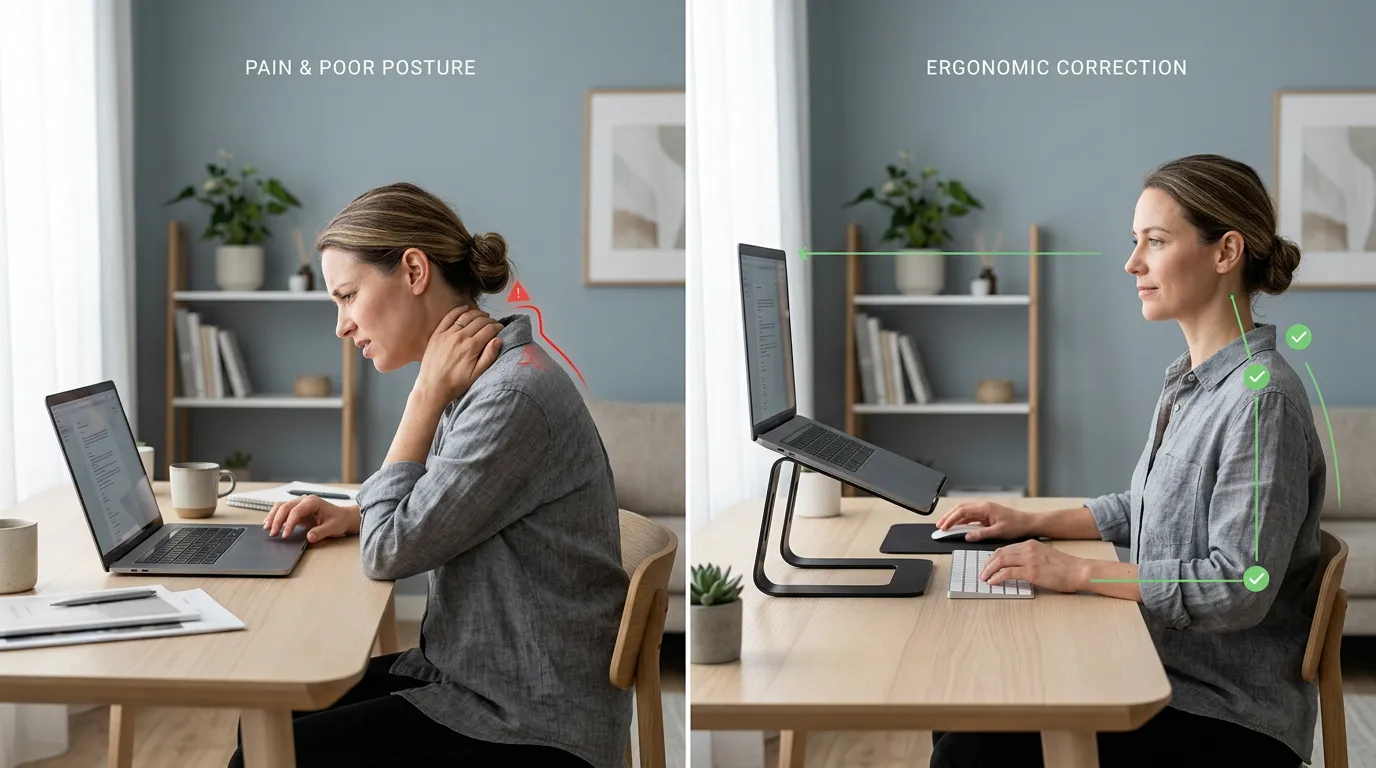
You probably don’t think about your neck until it starts complaining. It might be the familiar tightness at the base of your skull after a long call, or the dull ache that creeps in around mid-afternoon and doesn’t really leave until morning. Maybe your shoulders feel permanently elevated. Maybe you’ve caught a glimpse of yourself in a window reflection and noticed your head sitting much further forward than you’d expected — and started wondering how to fix tech neck before it becomes a more serious problem.
That’s what most people are now calling tech neck — the cumulative strain on the neck and upper back that builds from spending hours looking at screens positioned below eye level. It’s one of the more common complaints of the laptop-working era, and it tends to worsen gradually, which is exactly why most people don’t take it seriously until it becomes hard to ignore.
Here’s what most guides miss: exercises help, but they won’t solve the underlying problem if you’re sitting back down to the same setup that caused it. This guide covers both — the daily exercises that actually move the needle, and the workspace change that stops the damage from accumulating. Doing one without the other means working uphill.
Related: How to Use a Laptop Without Neck Pain (2026): 7 Simple Fixes That Actually Work
What Is Tech Neck? (Symptoms, Causes & What’s Happening)
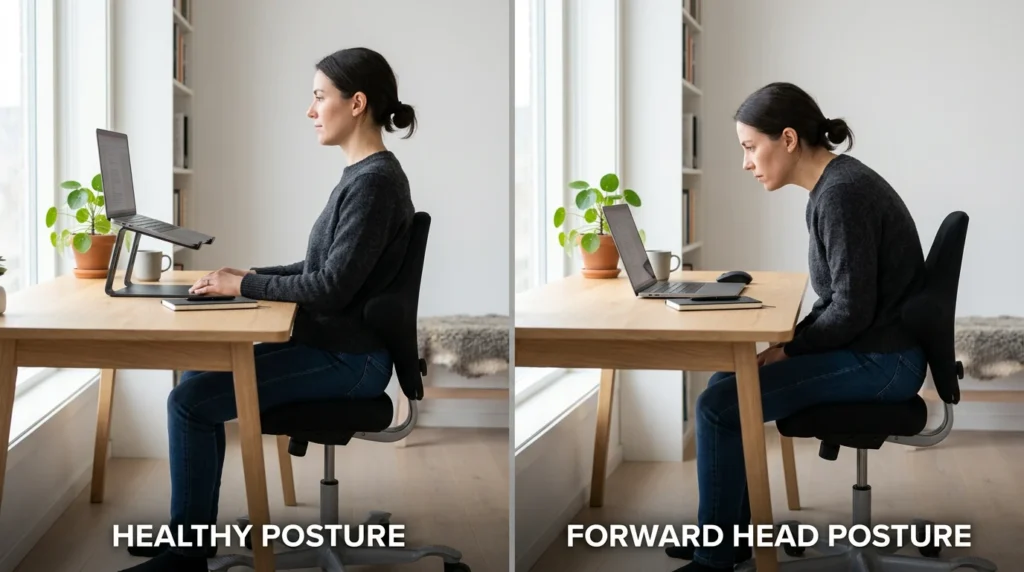
Tech neck develops when you hold your head in a forward and downward position for extended periods — essentially what happens whenever you’re looking at a laptop screen that sits at keyboard level. It isn’t a dramatic injury. It’s thousands of small loading events on the muscles and discs in your neck, repeated daily over months and years.
Posture tends to start reasonably well in the morning and quietly deteriorate across the day. By hour three, your chin may have drifted several inches toward the screen without you realizing it. Laptop posture is largely invisible until it isn’t.
Symptoms — What to Look For
The symptoms tend to build in a recognizable pattern:
- Stiffness or soreness at the base of the skull and upper neck, typically worst after long screen sessions
- Tension headaches originating at the back of the head — the ridge where your skull meets your neck
- Tightness across the upper shoulders, especially the ridge running from neck to shoulder
- A deep aching between the shoulder blades
- A visible forward head position — ears noticeably in front of the shoulders when viewed from the side
- In longer-term cases: a rounded prominence at the base of the neck, sometimes called a neck hump
- Numbness or tingling into the arms — this warrants a visit to a doctor rather than self-treatment
The tension often becomes most noticeable right after closing the laptop at the end of the day, when you finally stand up and realize how stiff everything feels.
Why Laptop Use Creates a Particular Problem
Your head weighs around 10–12 pounds when balanced directly over your spine. That’s the manageable baseline. But when it tilts forward — even moderately — the effective load on the muscles and discs supporting it increases substantially. Researchers have estimated roughly 27 lbs of force at 15 degrees of forward tilt, rising to close to 49 lbs at 45 degrees (Hansraj, 2014). Most laptop users operate somewhere in that 30–45 degree range for the majority of their workday.
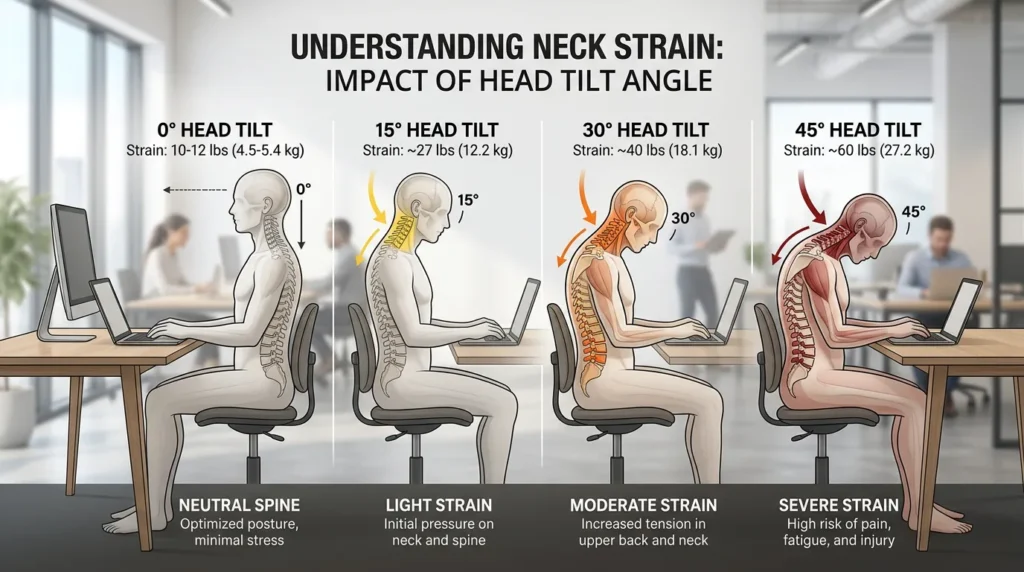
Before reading further: sit in your normal working position for a moment — not corrected, just how you naturally end up. Notice where your chin is relative to your screen. That gap between where you naturally sit and where you’d ideally be is what this guide is about.
Phone vs. Laptop — Different Problem, Different Fix
Phone-related and laptop-related neck strain share symptoms but come from different places. Phone issues are largely behavioral — people hold their phones too low, and the fix is mostly habit. Laptop issues are structural: the screen is physically attached to the keyboard, which creates a mechanical compromise that habits alone can’t fully resolve. That distinction matters more than people realize. More on that below.
Can Tech Neck Be Reversed? (Yes — With Realistic Expectations)
For most people, yes — but the timeline varies considerably depending on how long the pattern has been established and how consistently both the setup and exercise components are addressed.
A more honest framing: tech neck isn’t one condition, it’s a spectrum. The early-stage version — tightness, soreness, morning stiffness — tends to respond well within a few weeks of consistent effort. Visible postural changes take longer, often several months. Structural changes like a neck hump require the most sustained commitment and are measured in months to years.
- Pain & muscle tension: Often improves within 1–4 weeks with daily exercises and a corrected setup.
- Forward head position: Typically takes 3–6 months of consistent chin tucks and workspace correction.
- Neck hump: The longest timeline — 6–18 months is realistic for meaningful reduction.
- Is it permanent? Rarely, when addressed. Severe, long-term disc degeneration without any intervention is the exception rather than the rule.
Fix #1 — The Setup Change That Stops the Damage
Use the monitor height calculator to estimate a practical screen-center height and viewing distance before fine-tuning the setup by comfort.
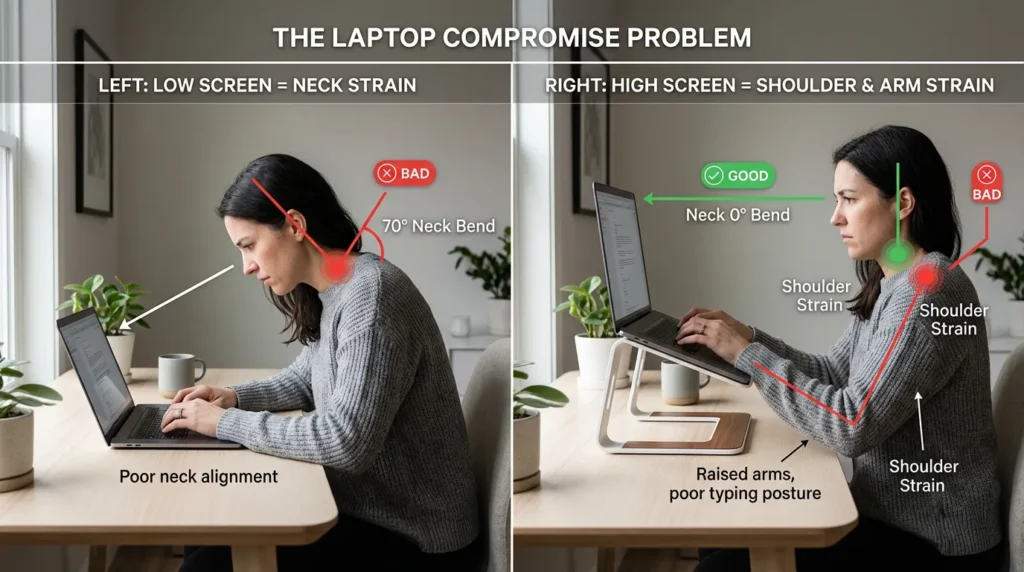
Every laptop is built with the screen attached to the keyboard. That means when you position the keyboard at a comfortable height for typing, the screen ends up significantly below eye level. When you raise the screen — by propping the laptop up — the keyboard becomes awkward to type on. You can’t solve both simultaneously without separating them.
This is what might be called the laptop compromise problem — the structural reason laptop users are disproportionately affected by neck strain compared to those working at desktop setups. It isn’t about posture awareness or willpower. The hardware itself creates a situation where something is always being sacrificed. No amount of reminding yourself to sit up straight fully compensates for a screen that’s 10 inches too low.
The fix is simple but does require two things: a laptop stand to raise the screen, and an external keyboard to bring the typing position back to a comfortable level. Together, they decouple screen height from keyboard position and resolve the underlying compromise.

Why Exercises Alone Often Aren’t Enough
If you do the exercises below consistently but don’t change your setup, you’ll likely feel some improvement — the exercises genuinely help. But there’s a limit to how much exercises can help if your daily setup never changes. Think of it as treating a blister with better bandaging while continuing to wear the shoe that caused it. That’s the problem.
Dining tables are one of the more common culprits — no monitor positioning, poor chair support, and a fixed laptop height that usually ends up well below eye level. If you regularly work from a kitchen table or a couch, factor that into your expectations.
5-Step Setup Checklist
- Place your laptop on a stand and raise it until the top edge of the screen is at or just below eye level when sitting with your back supported. The first instinct is usually not to raise it quite enough — go higher than feels natural at first.
- Connect an external keyboard and position it so your elbows sit at around 90–100 degrees, wrists roughly neutral and forearms close to parallel with the floor.
- Screen distance of 20–28 inches works for most people. If you’re leaning in to read, try increasing the font size rather than moving the screen closer.
- Check your chair — feet flat, lower back supported. A rolled towel behind the lumbar spine works well as a temporary solution if your chair lacks support.
- Take a side-profile photo of yourself at your desk. The result is usually a surprise — the head almost always sits further forward than it feels like it does.
It’s common to feel slightly strange when first using a laptop stand at the right height — the screen can seem further away or higher than expected. That adjustment usually takes just a few days.
Related: Best Laptop Stands for Neck Pain (2026): Ergonomic Picks That Actually Help
Fix #2 — The 5-Minute Daily Exercise Routine
These exercises work best as a short daily routine rather than an occasional fix. Consistency matters far more than intensity. People who stay consistent for two to four weeks typically notice meaningful improvement in tension and morning stiffness.
One thing worth knowing before you start: good exercise form here should feel sustainable, not forced. If anything feels sharp or causes pain rather than a mild stretch, ease off.
Exercise 1 — Chin Tucks (The Most Important One)
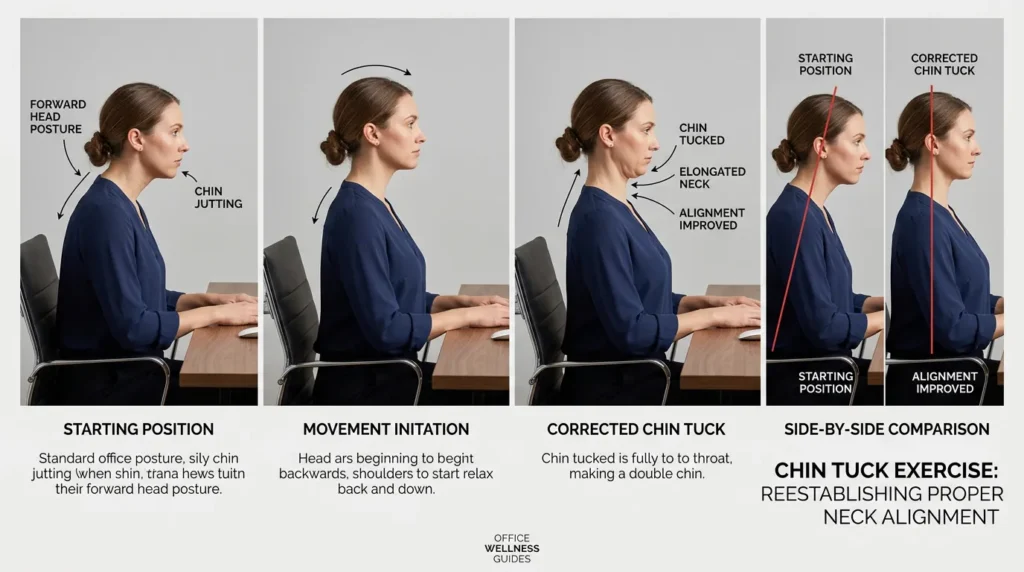
Chin tucks are the most evidence-supported exercise for neck strain of this type. They strengthen the deep muscles at the front of the neck that tend to become underactive when the head drifts forward — the muscles that should be keeping your head stacked over your spine.
- Sit or stand upright, looking straight ahead
- Without tilting your head up or down, draw your chin straight back — aiming for a slight “double chin” effect
- You should feel a gentle stretch at the base of your skull, not strain
- Hold 3–5 seconds, release slowly
- 10 reps, 2 sets — and ideally once an hour at your desk
Chin tucks should feel subtle, not aggressive. If you’re feeling strain rather than a mild stretch, you’re going too far back.
Exercise 2 — Suboccipital Release
The muscles at the very base of the skull are often the first to tighten and are frequently the source of tension headaches that feel like they originate behind the eyes or across the forehead.
- Lie on your back, fingers interlaced behind your skull, fingertips resting on the bony ridge at the base
- Let the weight of your head rest into your hands for 60–90 seconds — you’re not pressing, just allowing the weight to do the work
- 1 x 90-second hold
Exercise 3 — Upper Trapezius Stretch

The upper trapezius — the ridge from neck to shoulder — is almost always overworked in this pattern. Stretching it helps release the compensatory holding that builds up across a workday.
- Sit upright, right hand placed behind your back or on your seat
- Tilt your head to the left, left ear toward left shoulder
- For more depth, lightly rest your left hand on top of your head — don’t pull
- Hold 20–30 seconds each side, 2 rounds
Exercise 4 — Thoracic Extension Over Chair
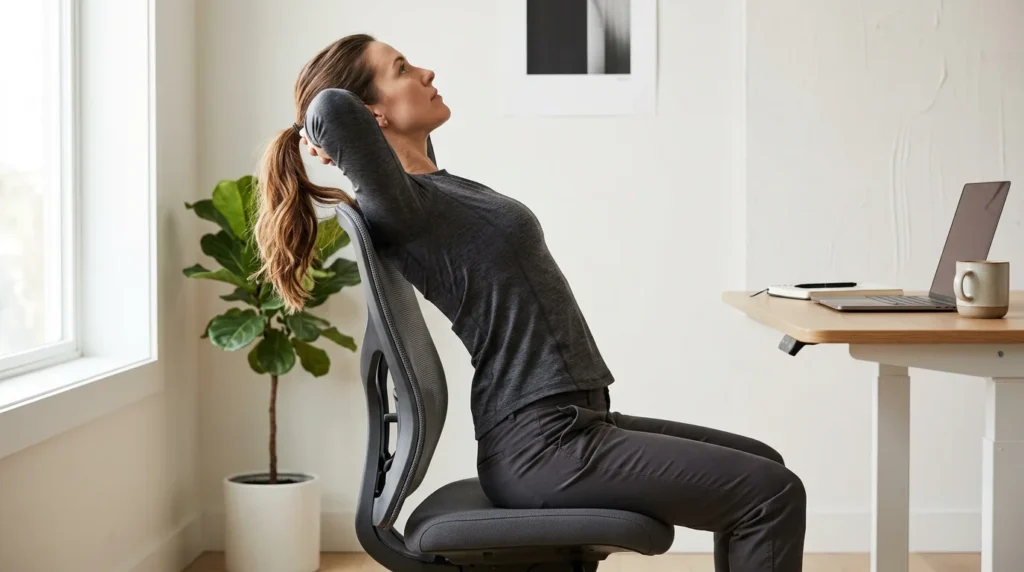
Neck issues don’t exist in isolation — the upper back tends to round forward as part of the same pattern. This exercise addresses that directly and often provides immediate relief.
- Sit toward the front of a firm chair, hands clasped behind your head
- Gently arch your upper back over the top of the chair back
- Hold 5–10 seconds, return slowly
- 8–10 reps, 1–2 sets
You may feel a bit awkward reaching backward at first — that’s often a sign that thoracic mobility is genuinely reduced. It typically loosens up within a week of daily practice.
Exercise 5 — Doorframe Chest Opener
A forward head position is almost always paired with tight chest and front shoulder muscles that pull everything inward. This stretch helps counter that pattern.
- Stand in a doorframe, forearms resting on the frame at 90 degrees
- Gently lean your body forward until you feel a stretch across the front of the chest and shoulders
- Keep shoulders relaxed down — avoid shrugging
- Hold 30 seconds, 2–3 rounds
Routine summary: Chin tucks: 10 reps x 2 (~2 min) | Suboccipital release: 90 sec | Upper trap stretch: 30 sec each side | Thoracic extension: 10 reps | Chest opener: 30 sec x 2 | Total: roughly 6–7 minutes
How to Address the Neck Hump Specifically
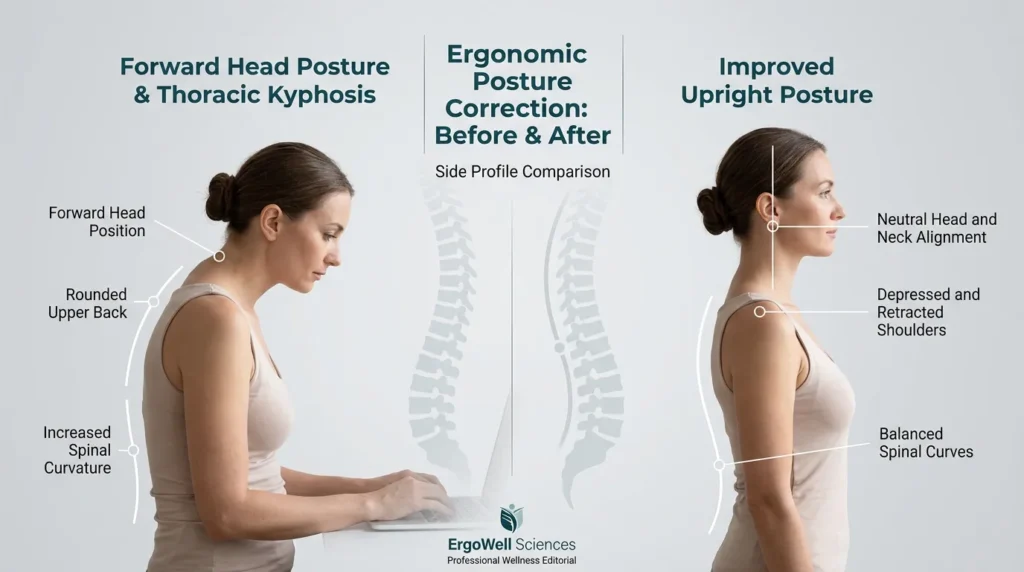
The raised area at the base of the neck — sometimes called a dowager’s hump or C7 prominence — develops when the upper back rounds forward and the lowest vertebra of the neck begins to protrude. In many cases, some soft tissue also accumulates in the area due to the sustained posture and tension pattern. For some people, this is the moment the issue starts feeling real — noticing a visible rounding at the base of the neck in photos or reflections. It can be jarring. Worth knowing: in most cases it isn’t a bone deformity, and it often responds to the right combination of exercise and posture correction over time.
In most cases this isn’t a bone deformity — it’s a posture-driven soft tissue change, which means it can often be reduced with consistent work over time. But it requires the longest timeline of anything discussed here: meaningful change often becomes visible around the 6-month mark, with fuller correction taking 12–18 months in more established cases.
Exercises That Target It
Chin tucks and thoracic extension are the two most important for this specifically — they work in combination to address both the neck curve and the upper back rounding that underlies the hump. Add scapular retractions (squeeze shoulder blades together, hold 5 seconds, 15 reps x 3 sets daily) to address the forward-shoulder component that typically accompanies it.
The setup correction matters here more than anywhere else. The exercises will have limited long-term effect if the daily posture loading continues unchanged. You can’t out-exercise eight hours of forward head position.
Is the Hump Permanent?
In most people without an underlying medical condition: no. But it does require the most patience of any stage — significant improvement is possible, but results are measured in months rather than weeks.
Daily Habits That Help
- Phone position. Phones tend to get held at chest height or lower. Even raising it toward face level makes a difference over time. Scrolling in bed with the phone held flat against your stomach is one of the more loading positions for the neck.
- The 20-20-20 rule. Every 20 minutes, look at something roughly 20 feet away for 20 seconds. Originally designed for eye strain, it works equally well as a posture reset — any break from sustained forward focus helps.
- Sleep position. Side sleepers should use a pillow that keeps the head level — not tilted up or dropped down. Stomach sleeping involves sustained neck rotation and is worth avoiding where possible.
- The wall test. Stand with heels, hips, and shoulder blades against a wall. Your head should reach it too — or nearly. A significant gap indicates how far forward your head habitually rests. A few minutes of this daily builds useful body awareness.
- Hourly chin tucks. Setting a reminder to do five chin tucks every hour is simple and more effective than people expect. It’s a posture reset that is easy to maintain once it’s established.
One thing many people unknowingly undo: working from bed or the couch in the evening. Even if your daytime setup is good, an hour of laptop use lying down or semi-reclined can load the neck considerably. It’s worth being conscious of.
When to See a Doctor?
The vast majority of neck strain from laptop use is musculoskeletal and responds to the approaches above. But some symptoms warrant professional evaluation rather than self-treatment:
- Pain that radiates from the neck into the arm, hand, or fingers — particularly if sharp or shooting
- Numbness or tingling in the hands or fingers
- Grip weakness
- Symptoms worsening rather than improving, or coming on suddenly
- Neck pain following a fall or impact
This guide addresses the common, gradual-onset presentation of neck strain from laptop use — not structural problems that need clinical diagnosis.
Frequently Asked Questions
How long does it actually take to feel better?
The soreness and tension that most people feel day-to-day can meaningfully improve within a few weeks — provided the exercises are consistent and the setup is addressed. Visible posture changes take longer, usually a few months. The neck hump is measured in months to a year or more. It depends significantly on how long the pattern has been established.
Is tech neck permanent?
In the vast majority of cases, no. The longer it’s been established without intervention, the slower the change — but it’s rarely truly permanent. Severe, long-term disc degeneration without treatment is the exception.
Which exercise makes the biggest difference?
Chin tucks, consistently. They target the specific muscular imbalance underlying the problem — weakened deep neck flexors paired with overactive upper neck muscles. Doing them hourly throughout the workday tends to be more effective than doing a larger set once daily.
Does a laptop stand actually help?
Yes — but only meaningfully when paired with an external keyboard. Raising the screen without separating the keyboard just creates a different compromise: uncomfortable typing height and elevated shoulders. The combination resolves the underlying structural problem. Research on screen positioning suggests that correct eye-level viewing can substantially reduce the load on the neck.
Can this cause headaches?
Yes, commonly. The tension headaches associated with neck strain typically originate from the muscles at the base of the skull and radiate forward — often felt behind the eyes or across the forehead. Addressing the neck tension usually resolves this type of headache over time.
Is there a difference between tech neck and text neck?
Essentially the same thing. “Text neck” was the earlier term, focused on phone use. “Tech neck” is broader and has become the more common term. Same underlying mechanism, slightly different typical cause.
How do I know if it’s something more serious?
Tech neck typically causes diffuse aching, stiffness, and tension-type headaches. Red flags: sharp pain radiating into the arm or hand, numbness or tingling in the fingers, grip weakness, or symptoms that worsen rapidly. These warrant a visit to a doctor for proper assessment.
The Bigger Picture
Recovering from laptop-related neck strain isn’t about achieving perfect posture and maintaining it indefinitely. That’s not a realistic goal, and it’s hnot particularly useful to frame it that way.
Because neck position is only one part of the workstation, review your complete workstation with the free ergonomic assessment to identify the highest-priority setup changes.
The more useful aim: reduce the average load on your neck across a workday — which means some combination of a better setup, regular movement, and a few minutes of targeted exercise. None of these have to be perfect. Progress maintained at 70% consistency over months is more valuable than a perfect week followed by abandonment.
Even partial improvements to the setup tend to produce a noticeable difference within a few weeks. Start with the setup change and one exercise — chin tucks are the obvious starting point — and build from there based on what you notice. The neck responds well to reduced load and regular movement. Small, consistent changes tend to compound.