


Table of Contents
If typing sets off tingling fingers or an aching wrist, the right keyboard for carpal tunnel and wrist pain is one of the few pieces of equipment you can actually change. Keyboard geometry genuinely does change what your wrists and fingers are asked to do all day. What no keyboard can do is treat carpal tunnel syndrome, and claims that one can are not supported by the evidence.
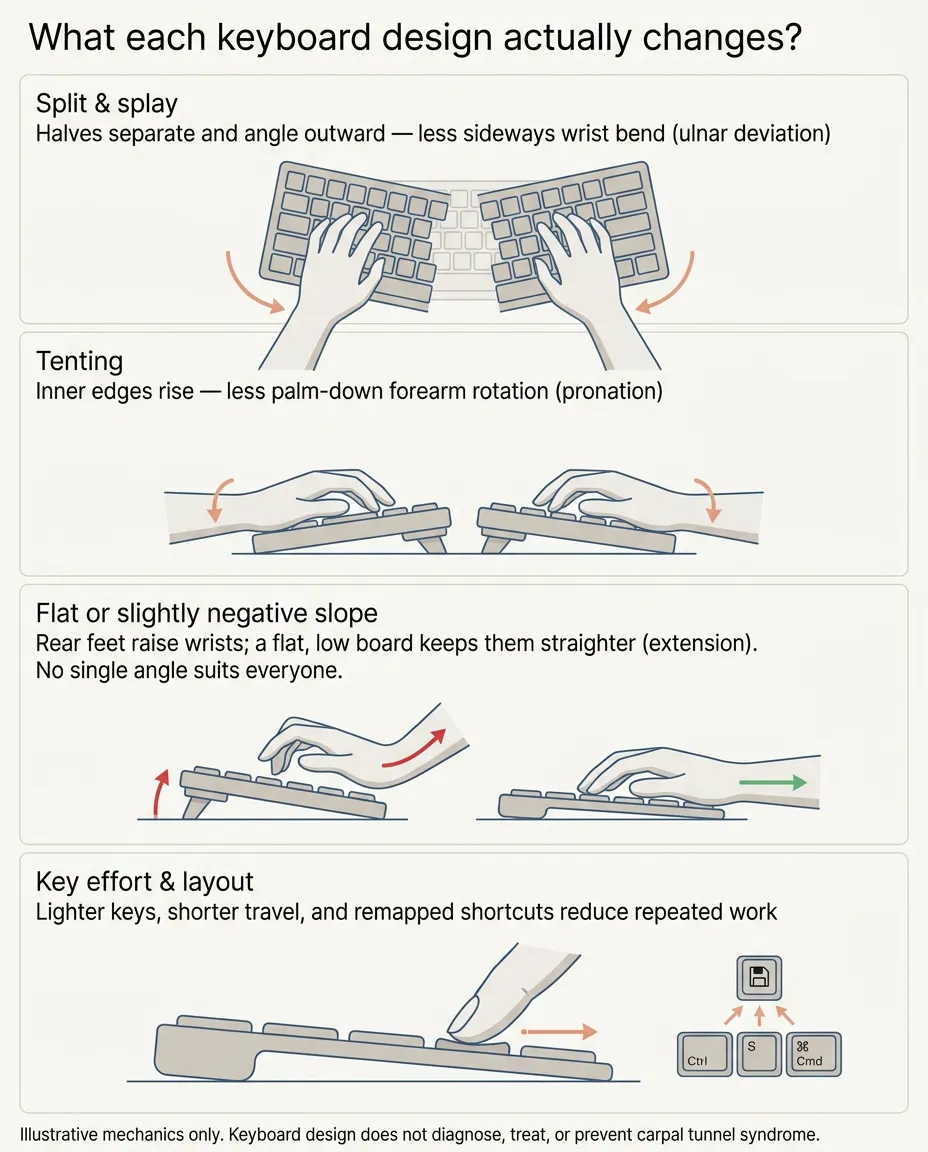
This guide compares ergonomic keyboards by mechanism instead of marketing labels. Split and splayed layouts address one problem (sideways wrist bend). Tented designs address another (forearm rotation). Flat or negative-slope boards address a third (upward wrist bend). Low-force keys and curved “wave” boards address effort and transition comfort. Which one deserves your money depends on which demand you need to change and how much relearning you’ll tolerate. The same logic applies whether your issue is diagnosed carpal tunnel, general wrist pain, or a repetitive strain problem that flares when deadlines pile up.
What typing actually asks of your wrists?
Four mechanical demands matter here. Wrist extension: the upward bend when a keyboard’s back edge sits higher than the front, or when you type with low, dropped wrists. Ulnar deviation: the outward sideways bend that happens when two shoulder-width hands squeeze onto one narrow row of keys. Forearm pronation: the palm-down rotation involved when typing on a flat horizontal keyboard. And sustained workload: thousands of keystrokes, plus the pressure of resting your wrists against a hard desk edge between them. Different keyboard designs reduce different demands; none of them reduces all four, and none of them diagnoses or treats a medical condition.
If you’re not sure what’s driving your symptoms, start with our plain-English guide to how carpal tunnel develops at a computer, or compare your symptoms with common patterns in our educational self-check. And see a clinician promptly for persistent numbness, weakness, clumsiness, worsening symptoms, or symptoms that wake you at night; equipment choices come after evaluation, not instead of it.
Disclosure: This article contains affiliate links. As an Amazon Associate I earn from qualifying purchases. ErgoLivingSpace may also earn commissions from other qualifying purchases, at no extra cost to you.
Find your starting point
| Your situation | Start with |
|---|---|
| You want real, adjustable separation on a familiar key layout | Kinesis Freestyle2 with VIP3 |
| You want the gentlest possible change from a normal keyboard | Logitech ERGO K860 |
| You want a low-cost first step to test whether geometry helps you | Logitech Wave Keys |
| You type heavily and want light mechanical switches plus macros | Kinesis Freestyle Edge RGB+ |
| You want to fine-tune splay and tenting independently | Goldtouch Elite |
| You’re ready to retrain your hands completely | Kinesis Advantage360 |
Quick comparison
On a phone, swipe inside the table to view every column.
The keyboards, in the order most people should consider them
1. Kinesis Freestyle2 with VIP3 tenting: best adjustable split starting point
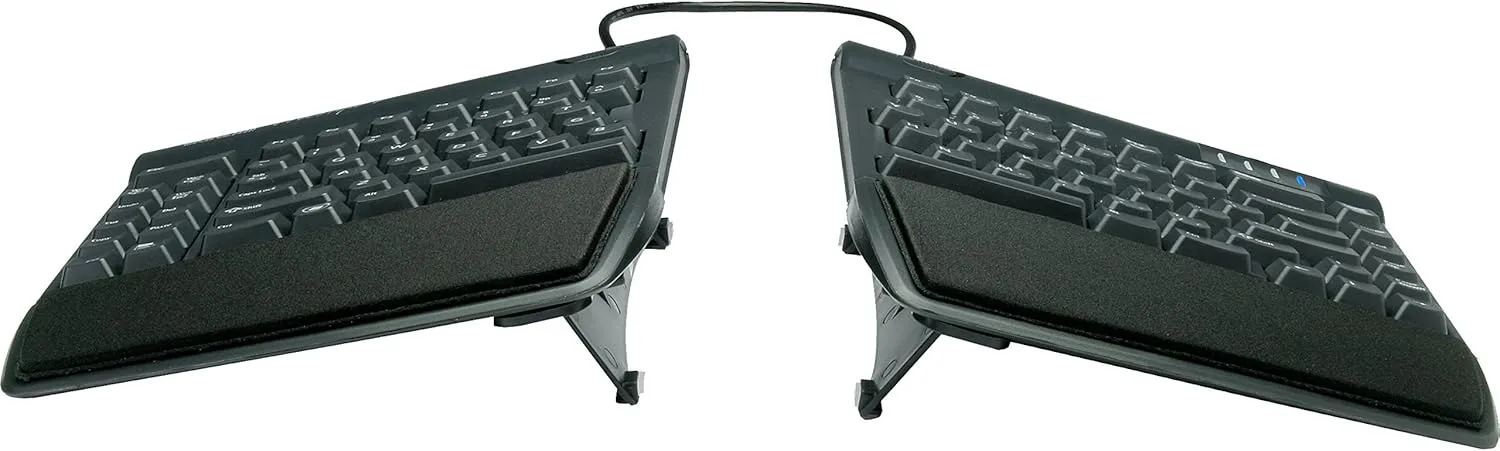
The Freestyle2 is two independent key modules joined by a cable, and that one idea addresses a common limitation of straight keyboards: each half can be aligned more closely with its own forearm, potentially reducing the outward wrist angling that comes from two hands meeting at one narrow row of keys. The standard model separates up to nine inches (a 20-inch version exists for very broad shoulders or unusual setups), and a pivot tether lets you splay the halves at an angle rather than keeping them parallel.
The VIP3 kit is the part not to skip. It adds cushioned palm supports and three tenting positions (5, 10, and 15 degrees) which raise the inner edges so your forearms sit less palm-down. Combined with the board’s zero-degree slope (most keyboards rise toward the back; this one doesn’t), the design tackles sideways bend, rotation, and upward bend in one package. Kinesis describes the switches as low-force tactile membrane switches; they feel light and slightly cushioned rather than clicky. A manufacturer-hosted workplace study conducted by Atlas Ergonomics (80 employees over seven months) reported that participants returned to full productivity after an adaptation period and that about half showed a decrease in ulnar deviation. Those findings are supportive, but they are published by Kinesis and say nothing about treating symptoms.
Who it may fit: touch-typists who want genuine, adjustable geometry change on a familiar QWERTY layout at a mid-range price.
Who should skip it: anyone who wants tenting without buying a kit-equipped configuration, or heavy shortcut users who want programmable keys, the Edge RGB+ below serves them better.
Trade-off: it’s a system, not a single object, buy the pre-assembled VIP3 bundle to avoid accessory confusion.
Adaptation: modest; the layout is standard, so most people mainly need time to find their preferred separation and tent height, working “out and up” gradually.
Check the current Amazon listing for Kinesis Freestyle2 with VIP3
2. Logitech ERGO K860: easiest transition from a standard keyboard
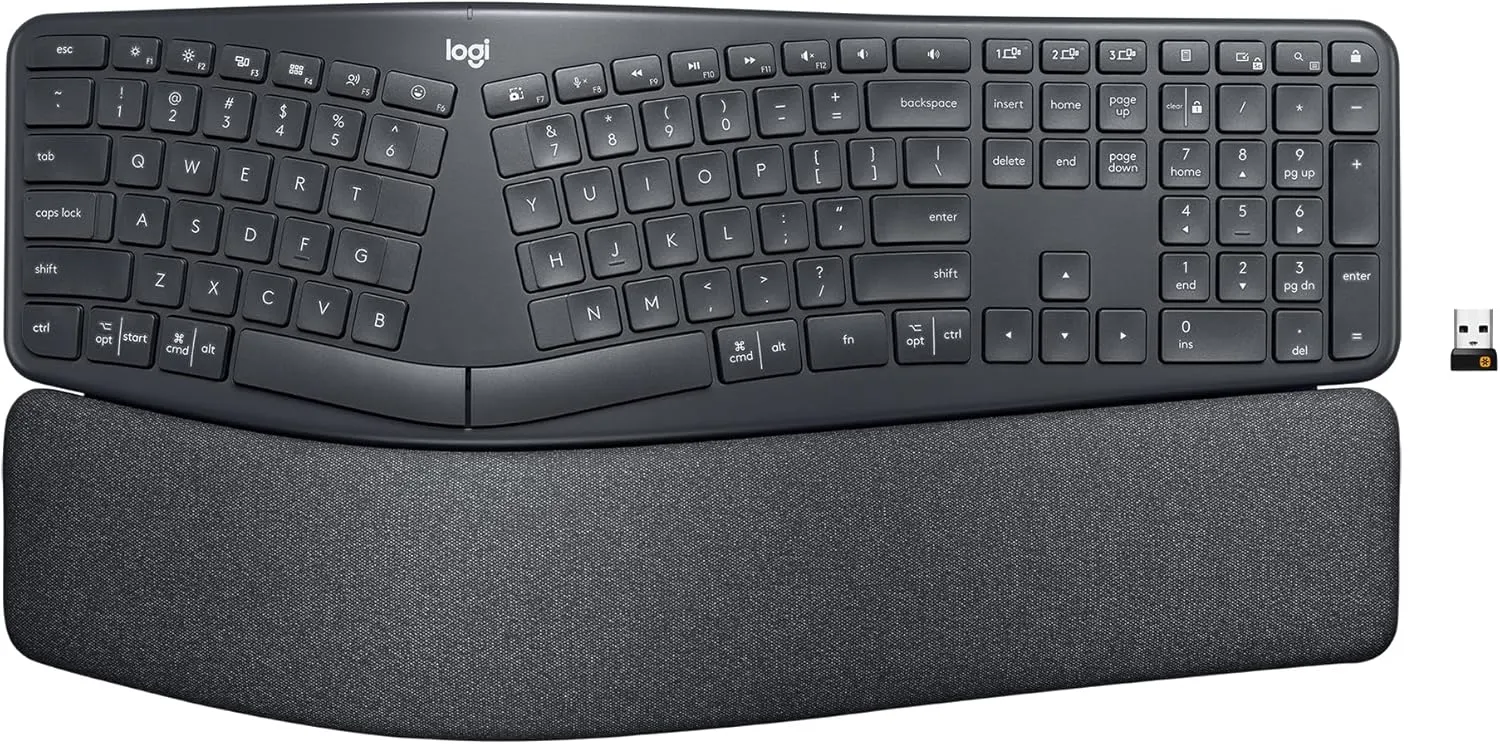
The K860 is for people who want an ergonomic geometry change without adopting a two-piece board. Its curved, fixed split rises gently in the middle and angles each hand’s keys a few degrees outward, a softened version of what a true split does, with no assembly and a relatively familiar learning curve. The pillowed palm rest is built in, and front lift-feet under the palm rest let the board sit flat or angle slightly away from your wrists instead of toward them, which is the direction that matters for upward wrist bend.
Be clear-eyed about what it doesn’t do: the split distance is fixed and narrower than shoulder width, there’s no tenting, and the full-size layout with integrated number pad makes it a wide board. It moves your wrists toward neutral rather than letting you dial neutral in. If your priorities are a modest geometry change, no assembly, and a generally low adaptation demand, that’s often the right trade.
Who it may fit: first-time ergonomic keyboard buyers who want a comfortable, low-adaptation change; shared-desk and multi-device users (Bluetooth plus receiver).
Who should skip it: anyone whose discomfort clearly worsens with sideways wrist bend, a fixed narrow split can’t be widened; the Freestyle2 can.
Trade-off: fixed geometry, wide footprint.
Adaptation: low, the layout and typing motion stay familiar.
Check the current Amazon listing for Logitech ERGO K860
3. Logitech Wave Keys: the low-cost first experiment
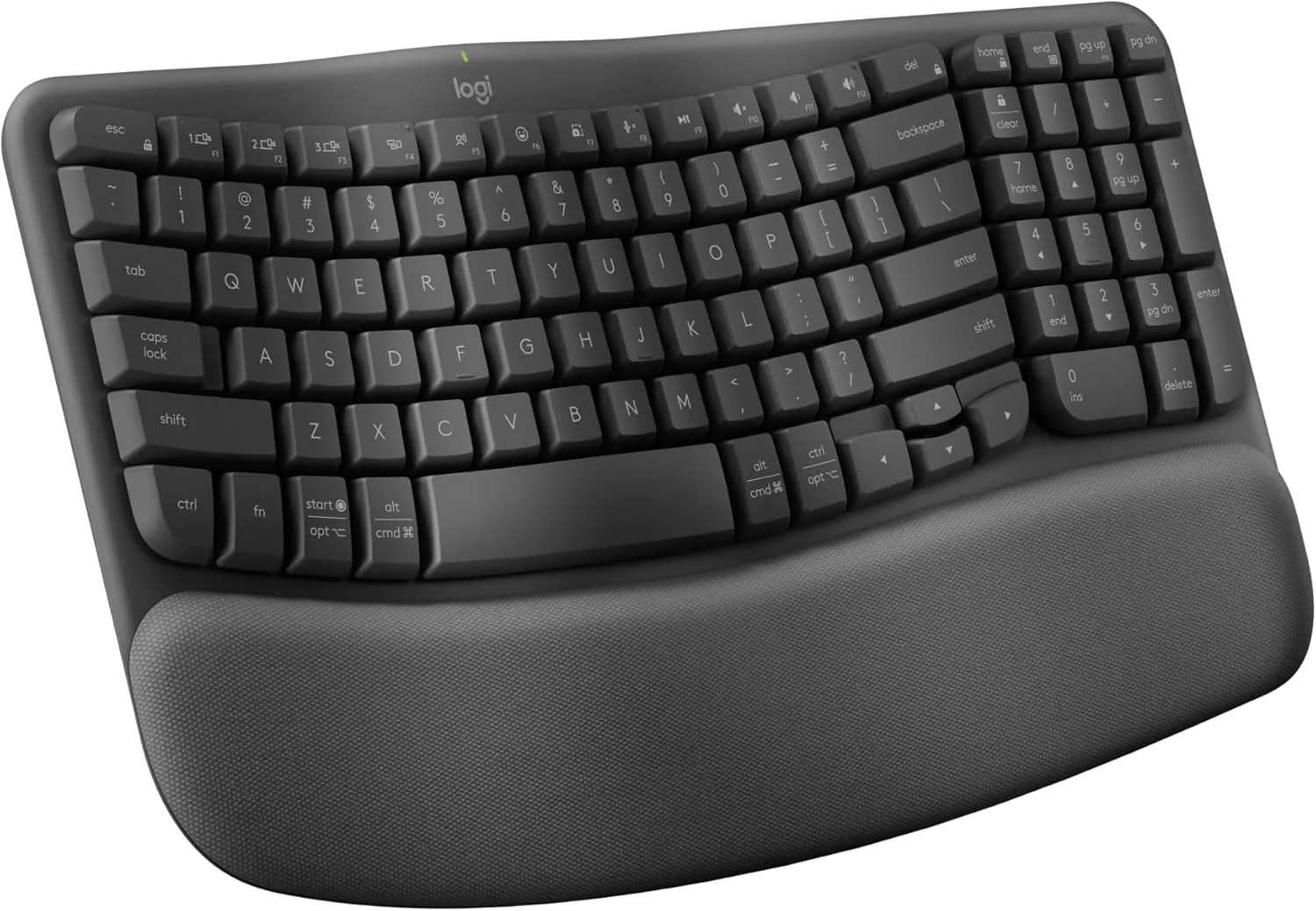
The honest pitch for Wave Keys: it changes your typing geometry the least of anything in this guide, and that’s exactly why it’s here. As the budget-oriented option in this lineup, it lets you test whether any contour-plus-palm-support change improves your comfort before you commit to a more expensive board. The wave-shaped key deck staggers key heights to relax hand posture slightly, the three-layer cushioned palm rest gives your palms somewhere soft to land between bursts of typing, and the compact footprint keeps your mouse closer than a full-width board would.
One practical caution that applies to most compact keyboards: the rear flip-out feet raise the back edge, which increases upward wrist bend. If wrists are your problem, leave those feet folded flat.
Who it may fit: budget-first buyers, laptop users adding their first external keyboard, or anyone who wants more certainty before choosing a true split.
Who should skip it: anyone who already knows they need genuine separation or tenting, this board provides neither, and buying it first only postpones the keyboard that does.
Trade-off: minimal geometry change by design.
Adaptation: generally low, the layout stays conventional.
Check the current Amazon listing for Logitech Wave Keys
4. Kinesis Freestyle Edge RGB+: best mechanical adjustable split
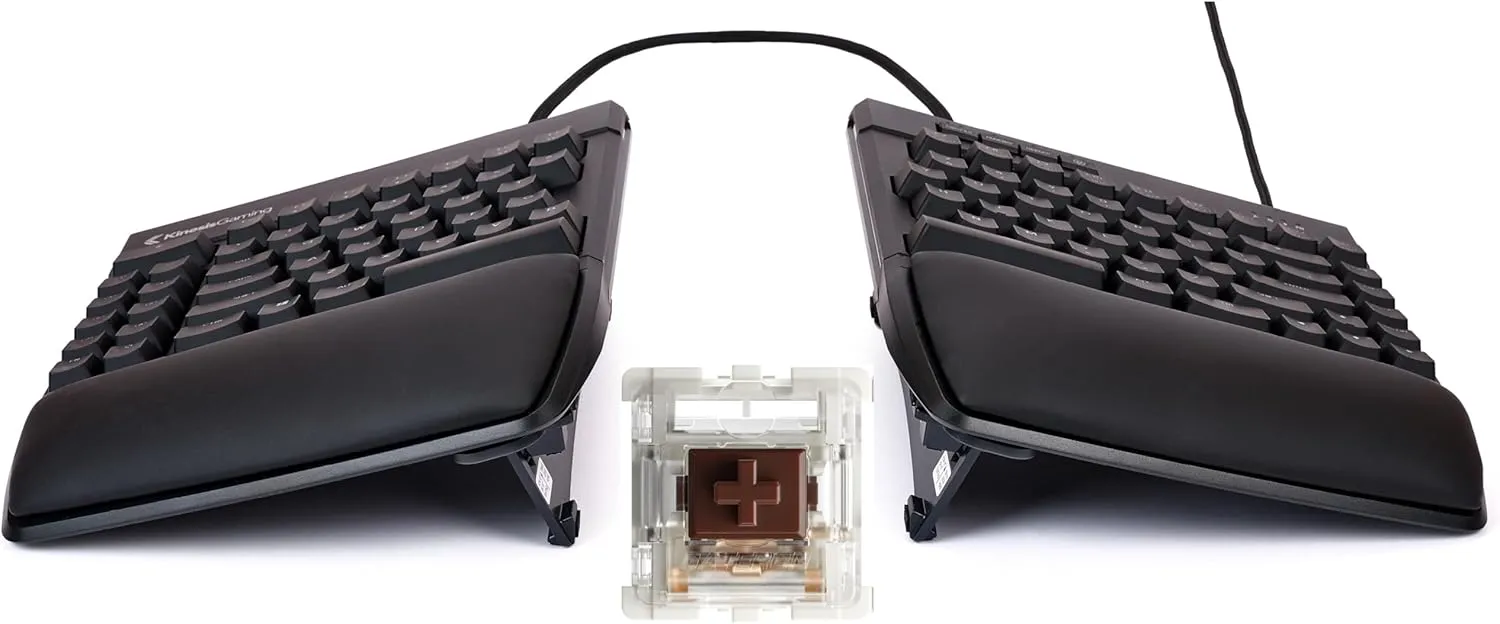
The Edge RGB+ is the Freestyle idea rebuilt for people who type for a living. Same core geometry, two modules, adjustable from about 12 up to 21.5 inches of separation, zero-degree slope, with the Lift Kit tenting (three heights) and cushioned palm supports now included in the box rather than sold separately. What changes is what’s under the keycaps: hotswap mechanical switches with published specs, Gateron Brown tactile at 55 grams or Gateron Red linear at 45 grams, both 4.0 mm travel. If a switch feel doesn’t suit your fingers, you can replace the switches themselves without soldering.
The other workload tool here is programmability. Onboard remapping and macros up to 300 characters mean a repeated phrase, an awkward key combination, or a five-step sequence can become one keypress, a genuine reduction in keystroke volume for coders, editors, and data workers, no software installation required.
Who it may fit: heavy daily typists who want adjustable split geometry and light, serviceable mechanical switches; anyone whose workflow has repetitive sequences worth automating.
Who should skip it: numpad-dependent workers (it’s tenkeyless), wireless-only desks (it’s wired), and anyone who would rather prove the adjustable-split concept with the lower-priced Freestyle2 first.
Trade-off: price, cabling, and a gamer-adjacent aesthetic (the RGB lighting can be switched off).
Adaptation: low for the layout itself; give yourself time to experiment with separation and tent height.
Check the current Amazon listing for Kinesis Freestyle Edge RGB+
5. Goldtouch Elite: independently adjustable splay and tenting
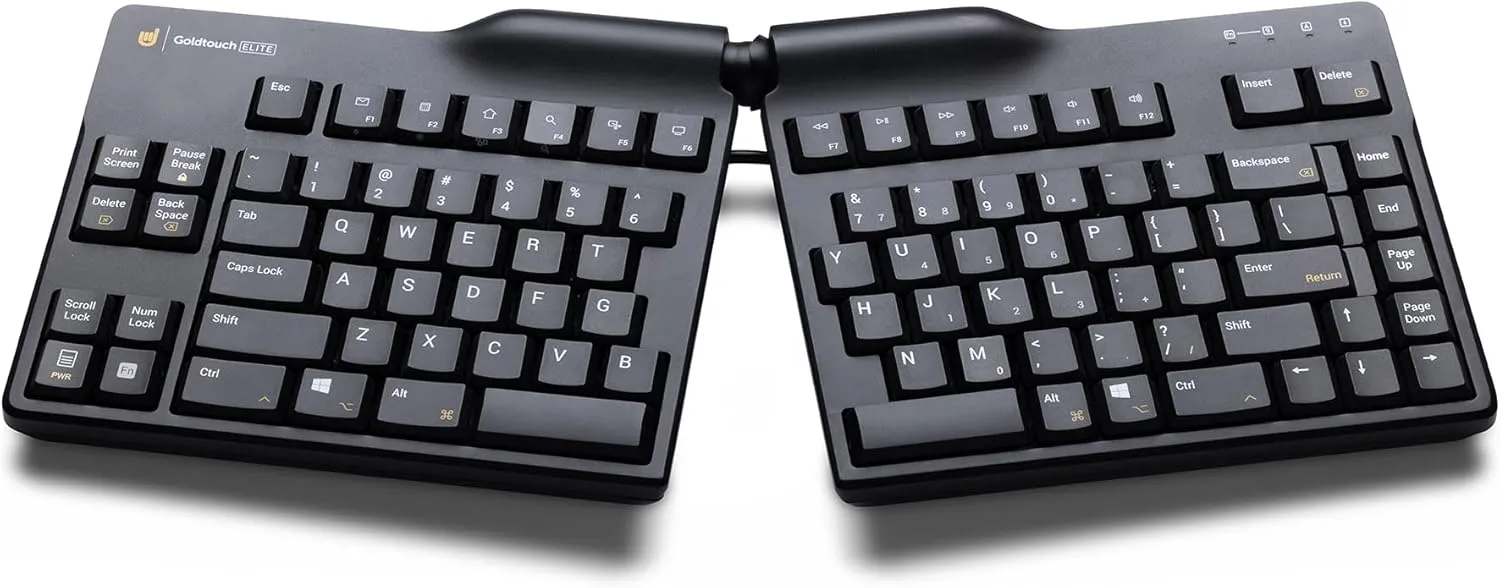
Every other adjustable board here treats splay and tenting as separate accessories or fixed steps. The Goldtouch Elite’s defining feature is a locking ball-joint hinge at the center: squeeze the lever, set the horizontal splay and the vertical tent independently (Goldtouch lists a 0–30° splay range and a 0–60° tent range for the current model), and lock it again. That continuous, two-axis adjustment lets you match the board to your own proportions rather than the reverse.
The compromises are real. There’s no palm rest, the two halves can’t fully separate (they’re hinged, not corded), and the styling is plain office equipment. The adjustment lever also requires deliberate tightening, so confirm that the keyboard holds your chosen angle during the return window. It is a tool you tune, not a plug-and-forget purchase.
Who it may fit: detail-oriented adjusters who want to find their exact angle combination, especially people whose comfortable splay and comfortable tent don’t match any preset.
Who should skip it: anyone who wants maximum separation (the hinge limits width) or out-of-the-box simplicity.
Trade-off: adjustment fiddliness and spartan comfort features.
Adaptation: moderate, expect a tuning period of small, one-change-at-a-time adjustments.
Check the current Amazon listing for Goldtouch Elite
6. Kinesis Advantage360: for readers prepared for a major layout change
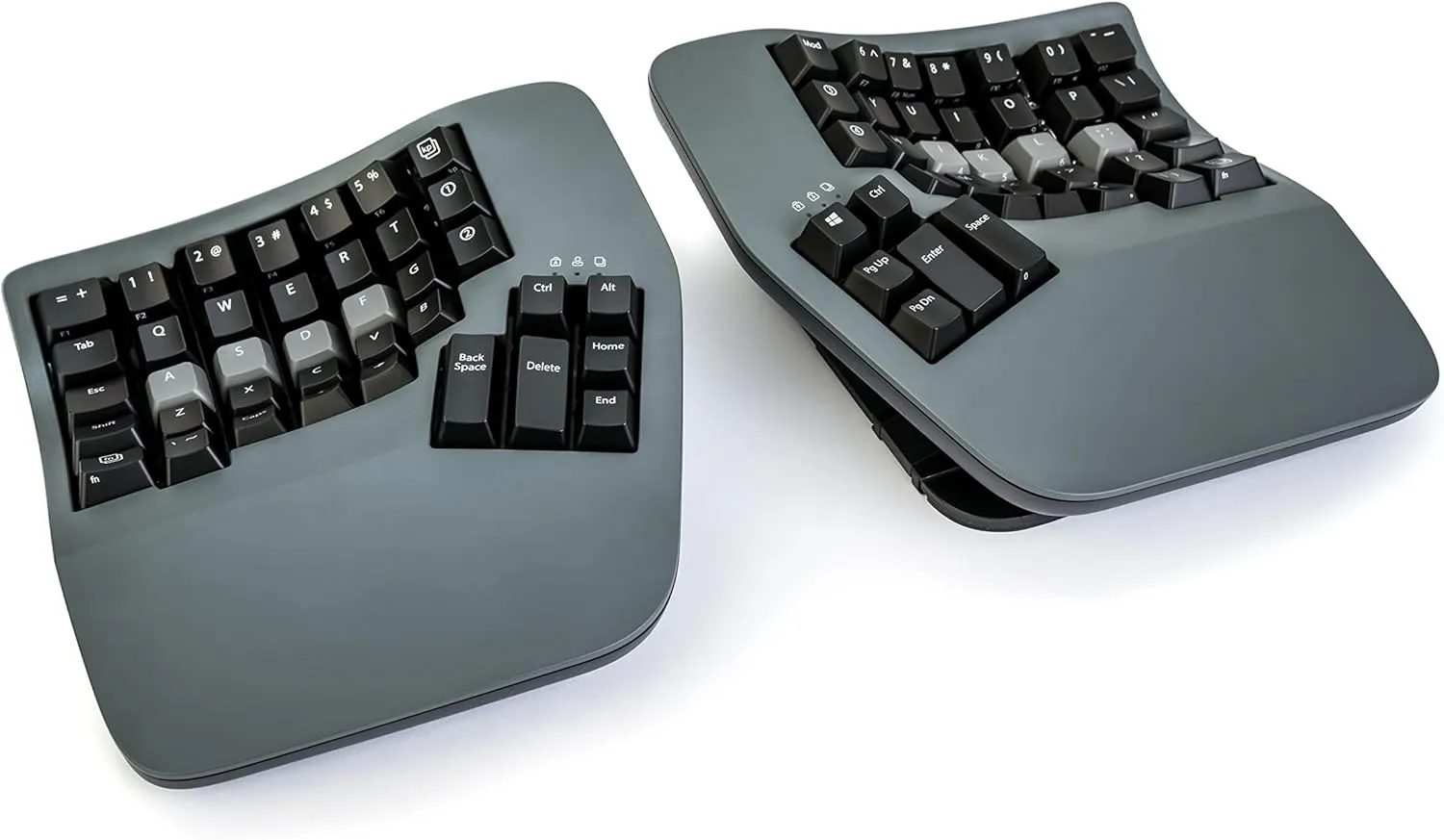
The Advantage360 abandons the assumption that a keyboard should be flat and row-staggered. Two fully separated modules, adjustable tenting, and concave keywells that curve the keys around your fingers’ natural arc, arranged in straight columns rather than staggered rows, so fingers can travel shorter, straighter paths, and thumbs take over a cluster of high-frequency keys from the pinkies. It is the most extensive geometry change in this lineup, it’s fully programmable, and the Professional model adds Bluetooth and open-source firmware.
It is the premium-priced option here, and the adaptation is not a footnote: expect a meaningful learning period during which typing speed may temporarily decrease while your hands relearn where everything lives and a real commitment, because this is not a board you casually alternate with a laptop keyboard. That’s why it’s listed last, not because it’s worst, but because it should be a deliberate second or third move, not a first experiment.
Who it may fit: people who’ve already validated that geometry changes help them, type professionally, and want the most extensive option in this lineup rather than an entry point.
Who should skip it: first-time buyers, anyone who shares machines, anyone unwilling to accept a temporary drop in typing speed.
Trade-off: price and a genuine retraining project.
Adaptation: high; adaptation varies by user; introduce the layout gradually where practical.
Check the current Amazon listing for Kinesis Advantage360
Worth knowing about, no affiliate relationship: two enthusiast favorites, the MoErgo Glove80 and the ZSA Voyager, offer contoured or low-profile columnar split designs sold directly by their makers. We earn nothing mentioning them; if you’re already considering a columnar design, they belong on your comparison list alongside the Advantage360.
How to Choose a Keyboard for Carpal Tunnel: The Buying Guide
Fixed vs adjustable split. A fixed split (K860) bakes one geometry in; you’re relying on the manufacturer’s chosen angle suiting your proportions. An adjustable split (Freestyle2, Edge RGB+) lets you move the target, worth the extra setup whenever sideways wrist bend is your main complaint, because bodies vary far more than keyboard designs do.
Split distance and splay. The goal is forearms that run straight from elbow to hand. Adjust the separation until each forearm can approach its keyboard half without an obvious sideways wrist bend; angling (splaying) the halves matters as much as separating them. Start narrow and widen gradually.
Tenting. Tenting raises the inner edges so your forearms rotate less palm-down. More is not automatically better: higher tent angles trade stability and familiarity for additional rotation change. Most boards in this guide offer moderate tenting; steeper vertical angles exist as specialty accessories (Kinesis’s Ascent kit, for example, supports 20–90°). There is no universally correct angle: increase gradually and keep the lowest setting that feels neutral to you.
Keyboard slope: why flatter positioning often matters. Most keyboards slope up toward the back, which tends to bend the wrists upward; occupational-safety guidance, OSHA’s computer-workstation resources, for example, favors flat or slightly negative keyboard positioning. This is also where your desk setup matters as much as the board: keyboard geometry can’t compensate for a work surface at the wrong height, so set your keyboard height and tilt correctly first.
Key effort and travel. Lighter switches reduce the force each of your thousands of daily keystrokes requires. Tactile switches signal the moment of activation, which may help some typists press with less force. Where manufacturers publish numbers (Kinesis lists 45 g and 55 g options on the Edge RGB+), you can compare directly; where they don’t, “low-force” is a design claim, not a measurement. Low-profile keys shorten travel but aren’t automatically gentler, feel matters more than category.
The number pad question. A numpad isn’t a wrist issue directly, it’s a reach issue for your mouse arm and a layout constraint. Tenkeyless boards free up desk space if you do not need one. (If shoulder and neck tension is your bigger complaint, that whole trade-off is covered in our ergonomic keyboards for neck and shoulder pain guide, a different selection problem from this one.)
Palm rests are for pauses. CCOHS guidance says hands should stay elevated above a palm support while typing and rest on it only during pauses. Cushioned supports earn their keep between typing bursts. During active typing, wrists should float; planting them concentrates contact pressure exactly where you don’t want it. If your current setup leaves your wrists on a hard desk edge, a separate wrist rest is a cheaper fix than a new keyboard.
Programmability. Remapping and macros are underrated ergonomic features: every awkward two-hand chord you eliminate is workload that never happens. Heavy shortcut users should weight this heavily (Edge RGB+, Advantage360).
Hand size and adaptation. There is no reliable rule mapping hand size to a keyboard category, test reach and comfort directly against your own hands. Whatever you buy, change one variable at a time and give each change enough real working time before judging it; adaptation varies by user.
What a keyboard cannot fix: a chair at the wrong height, a pointing device that reintroduces the same awkward postures (your mouse deserves the same scrutiny as your keyboard), too few breaks, or a medical condition that needs a clinician. Equipment is one factor among several.
Common buying mistakes!
Buying by diagnosis label instead of mechanism, “carpal tunnel keyboard” printed on a box tells you nothing about split, tent, or slope. Assuming every split keyboard tents, several popular splits sit completely flat unless you add a kit. Confusing quiet switches with light ones: silence and actuation force are unrelated. Leaving the rear feet flipped up out of habit, a common self-inflicted wrist-extension mistake. Starting with the most demanding layout: if the premium-priced Advantage360 is your first experiment and it doesn’t suit you, you’ve made the most expensive possible first test when a budget-oriented board could have answered the same question. Expecting the keyboard to compensate for a too-high desk or a sinking chair. Treating the palm rest as a shelf for active typing. And assuming mechanical automatically means safer: switch feel is preference plus force, not medicine.
Frequently asked questions
Does an ergonomic keyboard help with carpal tunnel?
It can change the wrist postures and typing effort associated with symptoms, and in small clinical trials some symptomatic users reported improved comfort over several months with alternative-geometry keyboards. But systematic reviews call the evidence limited, and no keyboard treats or prevents carpal tunnel syndrome. Fair framing: a well-chosen keyboard may reduce specific typing demands or awkward wrist positions; it does not treat the underlying condition.
Is a split keyboard better for wrist pain?
It’s better for the specific problem splits address: the outward wrist bend a single narrow board forces. If your discomfort traces to that sideways angle, separation and splay are the most direct way to change that posture. If your issue is upward bend or resting pressure, slope and palm-rest habits matter more than splitting.
Is a flat keyboard better for carpal tunnel?
Flat, or sloped slightly away from you, generally keeps wrists straighter than a board raised on rear feet, and occupational-safety guidance points in that direction. That’s a posture statement, not a treatment claim; “flat” also won’t help if the whole desk is too high.
Do I still need a wrist rest?
Often useful, never mandatory. Its job is supporting palms during pauses and keeping wrists off hard desk edges, not holding your wrists up while you type. Boards with integrated supports (K860, Freestyle2 VIP3) cover this; for others, see our wrist rest guide.
Can typing cause carpal tunnel?
The honest answer: the research linking typing itself to carpal tunnel syndrome is weaker and messier than most people assume; health factors and other exposures matter substantially. What’s better established is that awkward sustained wrist postures and high repetition are associated with discomfort and strain. Reducing them is worthwhile regardless of where the diagnosis ultimately lands; our carpal tunnel and computer work guide covers the evidence in detail.
What else should I change besides the keyboard?
Three things, in order: your keyboard and mouse height (the setup foundation everything else sits on), your pointing device (vertical mice for wrist pain address the same pronation problem tenting does), and your break pattern. If symptoms persist through all of that, that’s your cue for professional evaluation, not more shopping.
The bottom line
For readers who want meaningful adjustable separation and tenting without changing to a columnar layout, the Kinesis Freestyle2 with the VIP3 kit is the strongest starting point in this lineup: adjustable separation, adjustable tenting, a flat slope, and a familiar layout, at a mid-range price. If you want the gentlest on-ramp instead, the Logitech ERGO K860 offers a fixed curved split with a relatively familiar learning curve. The Logitech Wave Keys is the budget-oriented way to test whether contour and palm support help you at all before spending more. A columnar board like the Advantage360 is justified when you’ve already confirmed geometry changes help, you type for a living, and you’re prepared for a meaningful learning period. And if your symptoms are persistent, worsening, waking you at night, or bringing numbness and weakness with them, the next purchase that matters isn’t a keyboard: it’s a professional evaluation.