


This guide is designed for people whose symptoms may be related to computer work. It does not replace medical advice, but it will help you understand the condition, identify warning signs, improve your workstation, and know when professional evaluation is appropriate.
If your hand goes numb halfway through a workday, or you wake up at 2 a.m. shaking out fingers that have fallen asleep, you’ve probably already typed “is this carpal tunnel from computer work” into a search bar. It’s a fair question – and a more complicated one than most articles let on.
The short version: carpal tunnel syndrome (CTS) is compression of the median nerve at the wrist. It causes numbness, tingling, or pain in the thumb, index, middle, and part of the ring finger – never the pinky. Computer work is rarely the sole cause, but poor wrist posture, mouse use, and long uninterrupted sessions can absolutely aggravate it, especially if you already have other risk factors. Most cases respond well to early ergonomic changes, night splinting, and, if needed, a short medical treatment path. This guide walks through the real evidence, three self-tests you can do in the next two minutes, how to tell carpal tunnel apart from similar-looking problems, and a 30-day plan to actually address it.
Quick Symptom Checker
Which best matches what you’re feeling?
- Thumb, index, and middle finger numbness → This may be carpal tunnel syndrome. Keep reading.
- Little finger numbness → Carpal tunnel is less likely. Jump to Is It Carpal Tunnel, Cubital Tunnel, De Quervain’s, or Tech Neck?
- Pain starts in your neck and travels down your arm → You may be dealing with tech neck or cervical nerve compression. See the same section.
- Pain only when using the mouse → Jump straight to Fixing Your Workstation.
What Is Carpal Tunnel Syndrome (and What It Isn’t)?
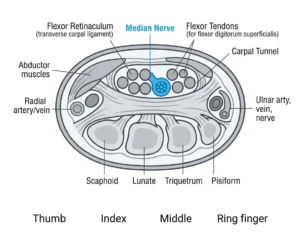
The carpal tunnel is a narrow passage on the palm side of your wrist, bordered by small wrist bones and a tough ligament. The median nerve runs through it, along with nine tendons. When the tissue around those tendons swells or the tunnel narrows, the nerve gets compressed.
Because the median nerve only supplies feeling to specific fingers, the symptom pattern is very specific: numbness, tingling, or pain in the thumb, index finger, middle finger, and half of the ring finger. The pinky is supplied by a different nerve entirely, so pinky numbness points away from carpal tunnel and toward something else (more on that below).
CTS is not a catch-all term for “sore wrists.” Tendonitis, De Quervain’s tenosynovitis, cubital tunnel syndrome, and referred pain from the neck can all feel similar at a desk but involve completely different structures – which is exactly why self-diagnosis trips so many people up, and why a dedicated section on telling them apart is worth your time later in this guide.
Does Computer Work Actually Cause Carpal Tunnel? The Real Evidence
This is the most misunderstood part of the whole topic, and most articles pick a side instead of showing you the actual picture.
What the major medical sources agree on: Mayo Clinic notes that some evidence links mouse use to carpal tunnel syndrome, but not keyboard use specifically. HSS (Hospital for Special Surgery) goes further, stating that heavy keyboard use has never been proven to be a direct cause of CTS. A widely cited one-year prospective study published in JAMA followed computer users and concluded that computer use does not represent a severe occupational hazard for developing CTS on its own.
What complicates that picture: other case-control research has found that people using computers for 12+ hours a day show meaningfully higher rates of CTS than lighter users. NIOSH and OSHA don’t frame computer work as a standalone cause either – they classify it as an ergonomic risk factor, meaning it matters in combination with force, repetition, awkward wrist posture, and duration, not in isolation.
The honest takeaway: for a wrist with no other risk factors, moderate computer use is unlikely to cause carpal tunnel syndrome by itself. But if you already have a smaller carpal tunnel by anatomy, diabetes, hypothyroidism, a prior wrist injury, or you’re pregnant, poor ergonomics and long uninterrupted computer sessions can meaningfully accelerate or worsen symptoms. In practice, this means the fix isn’t “quit using computers” – it’s identifying and correcting the specific postures and habits that are adding pressure on top of whatever your baseline risk already is, which is exactly what the rest of this guide on carpal tunnel from computer work will help you do.
Symptom Timeline: How It Progresses at a Desk Job
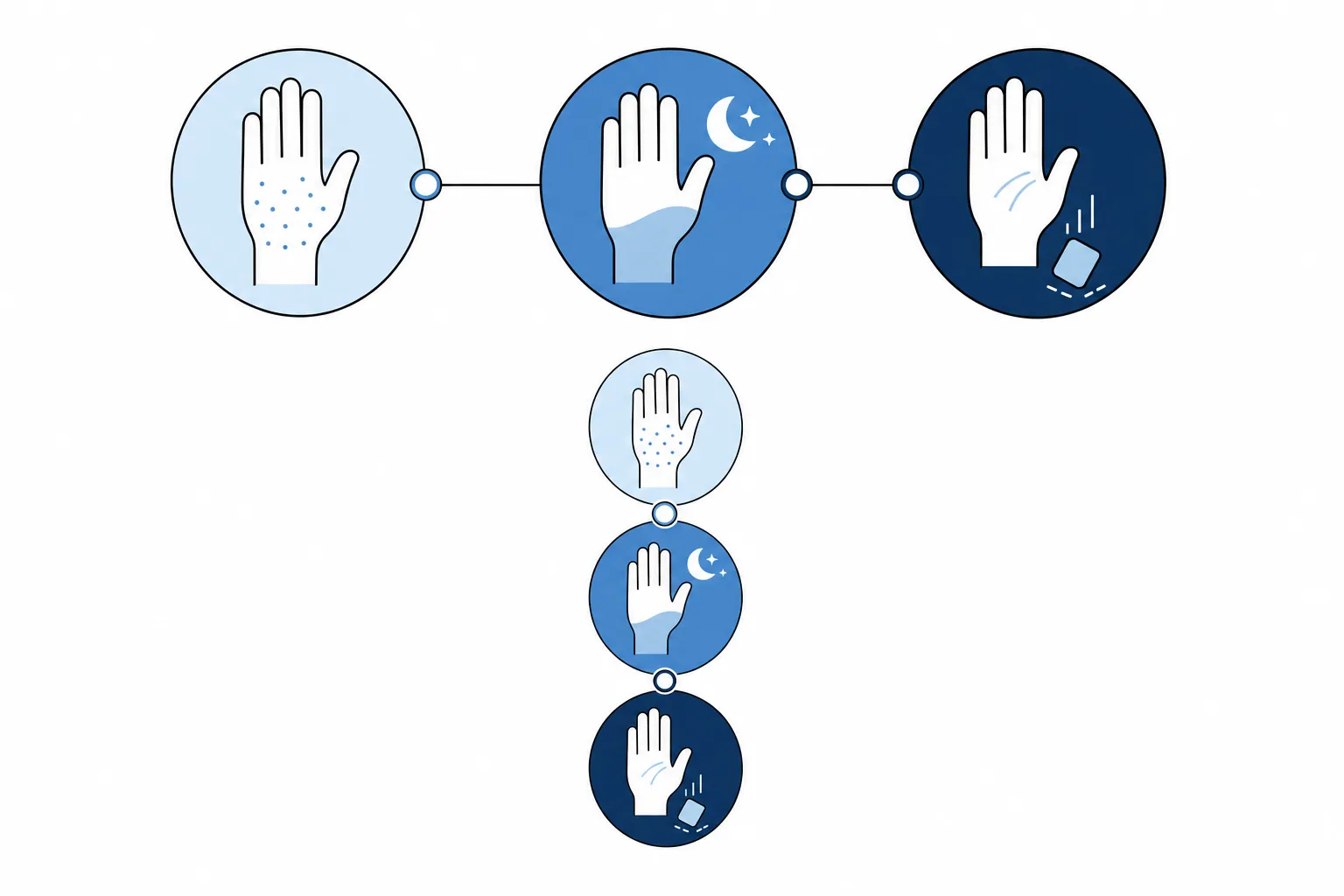
Carpal tunnel symptoms usually build gradually rather than appearing all at once, and where you are on this timeline affects what you should do next.
Early stage: Occasional tingling or numbness during or right after typing or mouse use. Shaking out your hand makes it go away. Symptoms are inconsistent and easy to dismiss.
Moderate stage: Numbness wakes you up at night – often described as a “sleepy hand” you have to shake out to get feeling back. Symptoms start showing up outside of work too: holding a phone, driving, reading a book. You might notice slightly weaker grip.
Severe stage: Numbness becomes constant rather than coming and going. You start dropping objects or fumbling with buttons and small tasks. In advanced, long-untreated cases, the muscle at the base of the thumb can visibly flatten or shrink (thenar wasting) – a sign that nerve damage has progressed and shouldn’t wait any longer for evaluation.
Progression isn’t guaranteed or linear – some people plateau at the early stage for years, especially once ergonomic changes are made. But if you recognize yourself in the moderate or severe stage, treat the self-tests below and the “when to see a doctor” guidance as your next steps, not optional extras.
Self-Tests You Can Do Right Now
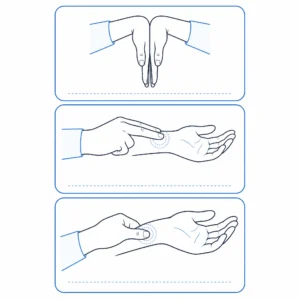
These three tests take about two minutes combined. None of them is a diagnosis on its own – they’re a way to gauge how likely carpal tunnel is before deciding your next move.
Phalen’s test. Press the backs of your hands together with your wrists bent, fingers pointing down, elbows out, for about 60 seconds. A positive result is tingling or numbness in the thumb, index, and middle fingers before the minute is up.
Tinel’s sign. Lightly tap the inside of your wrist, right over the carpal tunnel, with two fingers. A positive result is a tingling or “electric” sensation shooting into the thumb, index, and middle fingers.
Carpal compression test. Press your thumb firmly into the middle of the inside of your wrist for 30 seconds. A positive result is numbness or tingling in the same finger pattern, usually appearing faster than with Phalen’s test.
How to read your results: one positive test is worth noting but not conclusive – these tests produce false positives, especially Phalen’s. Two or more positive tests, especially combined with the moderate-to-severe symptoms described above, meaningfully raise the likelihood of carpal tunnel syndrome and are a good reason to move on to the Professional Diagnosis and Treatment section. The only test that can actually confirm CTS is a nerve conduction study, which a doctor would order.
Is It Carpal Tunnel, Cubital Tunnel, De Quervain’s, or Tech Neck?
If your symptoms involve the pinky, start higher in the arm, or are concentrated at the base of the thumb, carpal tunnel may not be the main issue.
| Condition | Nerve / Area | Fingers Affected | Common Triggers | What It Usually Suggests |
|---|---|---|---|---|
| Carpal Tunnel Syndrome | Median nerve at the wrist | Thumb, index, middle, and half of the ring finger | Wrist flexion, mouse use, nighttime symptoms | Numbness/tingling in the median nerve pattern |
| Cubital Tunnel Syndrome | Ulnar nerve at the elbow | Pinky and the other half of the ring finger | Bent elbows, leaning on elbows, sleeping with arms bent | Ulnar nerve irritation, not carpal tunnel |
| De Quervain’s Tenosynovitis | Thumb-side wrist tendons | Base of thumb and thumb-side wrist, not finger numbness | Pinching, gripping, scrolling, lifting | Tendon irritation rather than nerve compression |
| Tech Neck / Cervical Nerve Irritation | Neck / cervical nerve roots | Pain or tingling may travel down the arm, less finger-specific | Looking down at laptop/phone, forward head posture | Possible neck-related nerve irritation |
This table is for orientation only. It cannot diagnose the cause of numbness or pain. Persistent, worsening, or constant symptoms should be evaluated by a qualified healthcare professional.
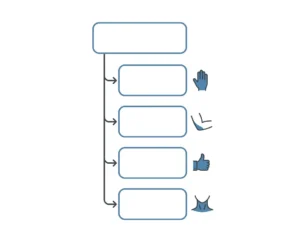
A simple way to narrow it down: check which fingers are numb first. Thumb/index/middle points to carpal tunnel; pinky/ring points to cubital tunnel. If the pain doesn’t follow a finger pattern at all and instead seems to start higher up – neck, shoulder, upper arm – the more likely culprit is posture-related nerve irritation in the neck, not a wrist problem at all. If you suspect that’s you, How to Fix Tech Neck covers that condition specifically. If your pain is concentrated at the base of the thumb rather than in the fingers, De Quervain’s – not carpal tunnel – is the more likely explanation, and it calls for a different set of adjustments than anything in this guide.
Professional Diagnosis and Treatment
When to stop self-managing and get evaluated: numbness that’s now constant rather than coming and going, visibly dropping objects or losing fine motor control, symptoms that haven’t improved after 2–4 weeks of the ergonomic changes and self-care below, or any visible flattening of the muscle at the base of your thumb. None of these should wait for a “better time.”
What a clinician actually does: a physical exam (often including the same tests above, performed more rigorously), and, if the diagnosis isn’t clear-cut or surgery is being considered, a nerve conduction study/EMG to measure how well signals are traveling through the median nerve.
The non-surgical treatment ladder, in the order most guidelines recommend it:
- Activity and ergonomic modification – addressed in detail later in this guide.
- Night splinting, keeping the wrist in a neutral position. The NHS notes this is often needed for up to six weeks before improvement is noticeable – it’s not a one-night fix.
- Over-the-counter anti-inflammatories for symptom comfort, not as a cure.
- Corticosteroid injection, which reduces swelling around the nerve and is generally tried before surgery is discussed.
Surgery – carpal tunnel release – is reserved for cases that don’t respond to the above, or that are already severe at diagnosis. The 2024 American Academy of Orthopaedic Surgeons (AAOS) guideline confirms that open and endoscopic release produce similarly good long-term outcomes, so the choice often comes down to surgeon experience and your specific case rather than one technique being universally superior.
One detail that surprises a lot of patients: the same AAOS guideline explicitly recommends against wearing a wrist splint or sling for a prolonged period after surgery, since extended immobilization can delay recovery rather than help it. If your surgeon isn’t sending you home in a bulky wrist brace, that’s not an oversight – it’s current best practice.
It’s also worth knowing that the same guideline found limited evidence that several commonly recommended non-surgical treatments – exercise, massage, laser therapy, kinesiology taping, and a few others – meaningfully improve outcomes once CTS is already diagnosed. That doesn’t mean these are useless (more on where they do help below); it means they shouldn’t be relied on as a substitute for splinting, injections, or surgery in a confirmed, persistent case.
The 30-Day Recovery & Ergonomic Reset Plan
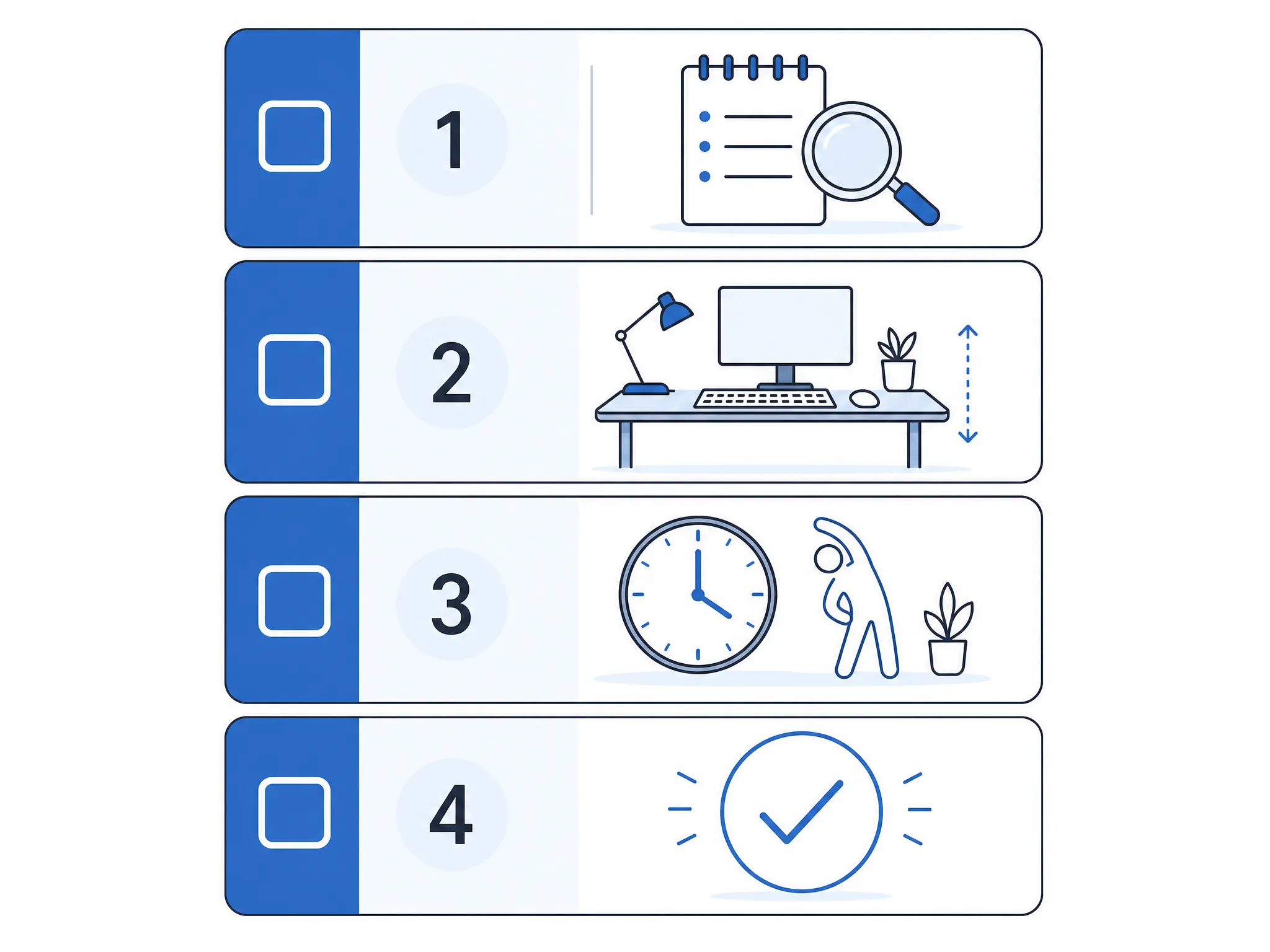
Most people who catch carpal tunnel symptoms early can meaningfully improve them without surgery, but “try to use my mouse less” isn’t a plan for carpal tunnel from computer work. Here’s a structured one.
Week 1 – Audit and baseline. Don’t change anything yet except tracking. Note when symptoms happen, how intense they are (1–5), and what you were doing. This baseline is what tells you in three weeks whether anything is actually working.
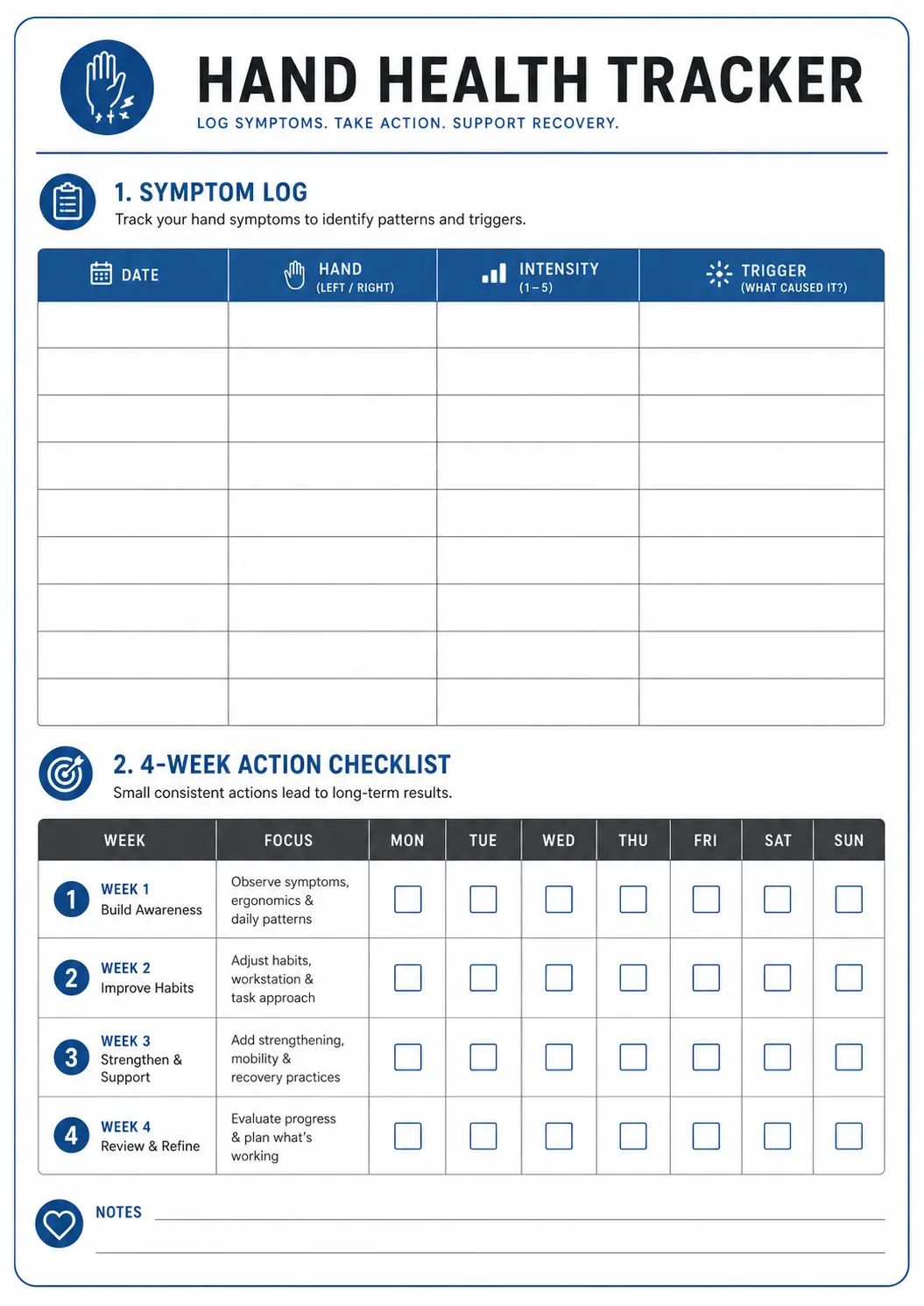
Printable Symptom & Recovery Checklist
Use this one-page tracker to log symptoms, workstation changes, and weekly progress during your 30-day reset.
Week 2 – Fix the workstation. Implement the ergonomic changes in the next section: wrist position, keyboard/mouse placement, monitor height, chair and elbow angle. If nighttime symptoms are present, start wearing a neutral-position wrist splint to bed. Begin gentle nerve glide exercises (below) if they don’t increase symptoms.
Week 3 – Build in recovery time. Add short movement breaks every 30–60 minutes. Reassess your symptom log against week 1 – are episodes less frequent, shorter, or less intense? If mouse-specific pain is still the main issue, this is the point to look at the product recommendations in the next section.
Week 4 – Decision point. Compare your log across the full month. Clear improvement means keep going and consider these changes permanent. No improvement, or new symptoms like constant numbness or weakness, means it’s time to move to the Professional Diagnosis and Treatment section rather than extending the trial further.
Printable Symptom & Recovery Checklist: a one-page log with space to track daily symptoms and a checkbox version of the four weeks above is available as a free download – useful on its own, and reusable if you’re also working through neck or hand pain from the rest of this site. [Checklist image/PDF to be added.]
Fixing Your Workstation: The Ergonomic Levers That Matter
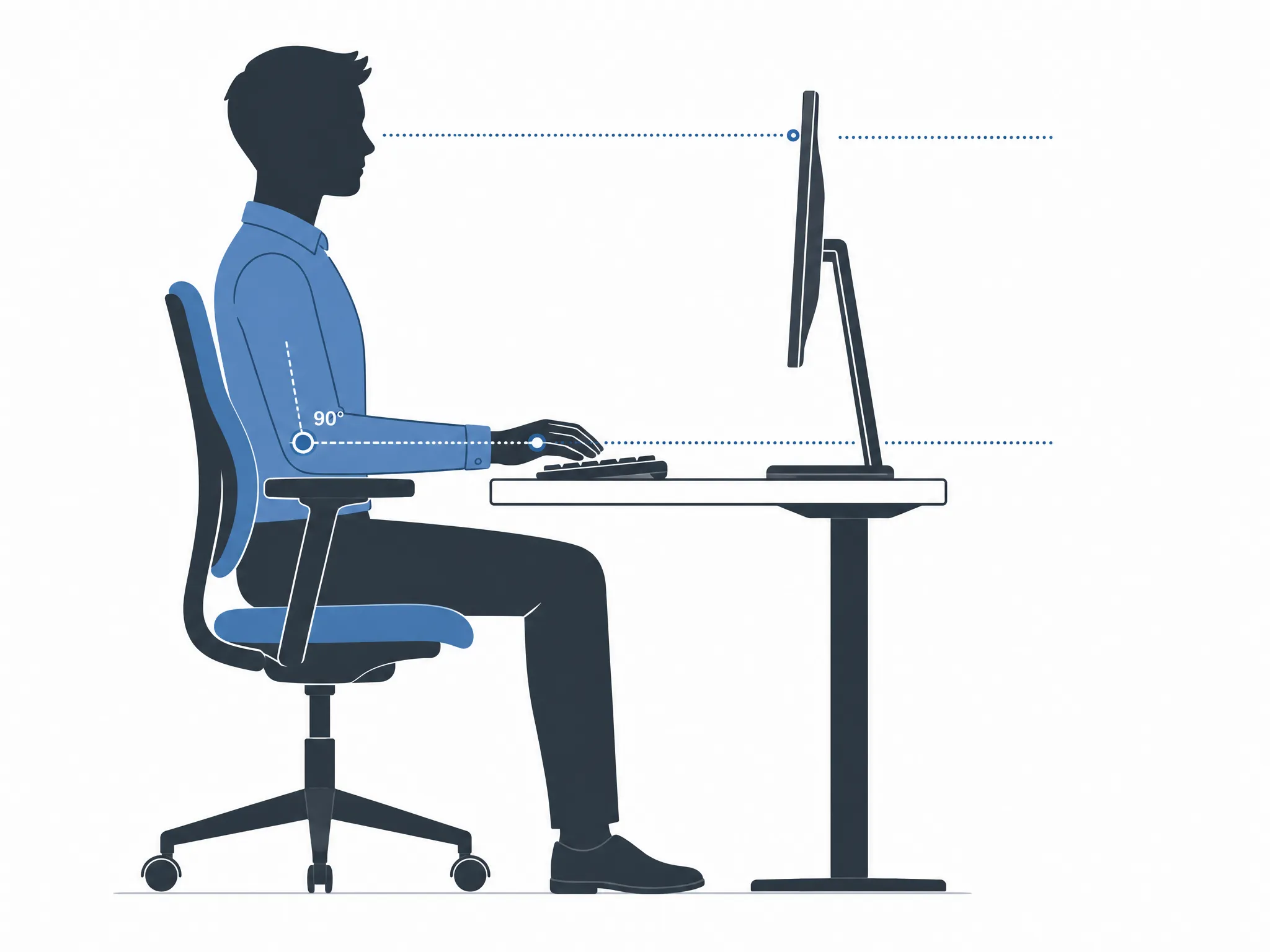
The goal is a wrist that stays in a straight, neutral line – not bent up, down, or to either side – for the vast majority of your working time.
- Elbows near 90 degrees, close to your body, so your forearms don’t have to reach up or down to the keyboard.
- Wrists floating just above the keyboard, not resting on the desk edge or a hard wrist rest while actively typing – pressing wrists into a hard surface for hours adds direct pressure right over the carpal tunnel.
- Keyboard and mouse close together and at the same height, so you’re not twisting or reaching sideways to switch between them.
- Monitor at eye level, roughly arm’s length away, so you’re not tilting your head and shoulders forward – a posture that also compounds nerve tension further up the arm.
If your setup is a laptop with no external accessories, most of these are physically impossible to achieve at once, which is worth fixing before anything else – see Laptop Ergonomics and Best Ergonomic Laptop Stand for Desk Work. For monitor height and arm positioning specifically, Ideal Monitor Height and Best Monitor Arm for Desk Work go into the setup details this section only summarizes.
Choosing the Right Mouse, Keyboard & Wrist Rest for Your Symptom Pattern
Once the fundamentals above are in place, the right accessory can meaningfully reduce the wrist strain that remains. Before comparing products, you can choose an ergonomic mouse by the movement or contact point that bothers you; then match your situation to the guide that covers it in depth rather than guessing:
| Your symptom pattern | What tends to help | Full guide |
|---|---|---|
| Numbness mainly during/after mouse use | Vertical mouse or trackball, which reduces forearm rotation and wrist deviation | Best Mouse for Carpal Tunnel |
| General wrist ache across the whole workday | Ergonomic mouse shapes built for sustained comfort, not just symptom spikes | Best Ergonomic Mouse for Wrist Pain |
| Hand and finger fatigue, gripping pain | Lighter-grip vertical mice and trackballs sized for smaller hands | Best Ergonomic Mouse for Hand and Finger Pain |
| Wrist and neck strain together | Split ergonomic keyboards that also improve shoulder position | Best Ergonomic Keyboards for Neck Pain |
| Resting wrists on the desk edge out of habit | A properly shaped wrist rest used during pauses, not while actively typing | Best Wrist Rest for Keyboard |
One caution worth repeating here: a wrist rest is meant to support your wrist between typing bursts, not to be leaned on continuously while your fingers are moving – used the second way, it can add exactly the kind of sustained pressure over the carpal tunnel that this whole guide is about avoiding.
Exercises & Stretches: What’s Actually Backed by Evidence
It’s worth being upfront about something most wellness content glosses over: the 2024 AAOS guideline found limited evidence that exercise programs improve long-term outcomes once carpal tunnel syndrome is already diagnosed. That’s a meaningful distinction from prevention, where gentle mobility work is still widely and reasonably recommended by ergonomics researchers, including NIOSH, as part of a broader risk-reduction approach.
In practice, this means: don’t treat stretching as a substitute for splinting, ergonomic correction, or medical evaluation if symptoms are already moderate or severe. Do use it as a low-risk, low-cost part of prevention and day-to-day comfort.
- Median nerve glide: Extend your arm, palm up, fingers relaxed. Slowly bend your wrist so fingers point down, then extend them up. Repeat 5–10 times, gently – this should never reproduce sharp tingling.
- Wrist flexor/extensor stretch: Extend one arm, palm up, and gently pull the fingers back with the other hand until you feel a mild stretch in the forearm; hold 15–20 seconds; repeat with the palm facing down.
- Tendon glide (finger fist): Straighten your fingers, then curl them into a hook, then a full fist, then straight again – a few slow, deliberate cycles a couple of times a day.
Stop any of these immediately if they increase numbness or tingling rather than easing tension – that’s a sign to consult a professional rather than push through it.
Why Does Recovery Sometimes Fail?
Most people who don’t improve aren’t doing “nothing” – they’re often doing the wrong thing consistently. A few patterns come up repeatedly:
Believing the keyboard is the sole villain. As covered earlier, keyboard use alone has weak evidence as a direct cause – so replacing only the keyboard while ignoring mouse habits, wrist rest use, and monitor height often produces disappointing results.
Pushing through the pain. Continuing high-volume typing or gripping through numbness doesn’t “toughen up” the nerve – it keeps it under pressure, which is the opposite of what recovery requires.
Leaning on a wrist rest while typing. As noted above, this is one of the most common ergonomic mistakes – a wrist rest used the wrong way can add pressure rather than remove it.
Trusting a stress ball or grip strengthener to fix it. There’s no solid evidence that squeezing exercises relieve carpal tunnel symptoms, and for some people the repeated gripping motion aggravates them.
Fixing only the hands and ignoring the rest of the setup. Wrist position depends on elbow height, which depends on chair height, which depends on monitor position – treating the mouse in isolation while the monitor is still too low or the chair too high frequently limits how much relief any single change can deliver.
Stopping the changes once symptoms ease. Ergonomic corrections aren’t a course of treatment you complete and move on from – they’re the new baseline. Reverting to old habits once the pain fades is the most common reason symptoms come back a few months later.
Special Cases: Pregnancy, Laptop-Only Setups, Left-Handed Users, Small Hands, Bilateral Symptoms
Pregnancy. Fluid retention during pregnancy can compress the median nerve, and carpal tunnel symptoms are common in the third trimester. The NHS notes this often resolves on its own after delivery – but ergonomic changes and a night splint are still reasonable and safe in the meantime.
Laptop-only, remote, or hybrid setups. A laptop’s built-in keyboard and trackpad force a flatter, more twisted wrist position than an external setup ever would. If you’re laptop-only, the fixes in this guide matter more, not less – start with a stand, external keyboard, and external mouse before anything else.
Left-handed users. Most “ergonomic” mice are designed right-hand-first, and using a mirrored grip on a right-handed shape can create new strain rather than reduce it. Left-handed-specific or ambidextrous vertical mice and trackballs are worth seeking out specifically rather than adapting a right-handed model.
Smaller hands. Oversized ergonomic mice and heavily split keyboards can force overstretching, which defeats the purpose. Sizing matters as much as the ergonomic category – check hand-size guidance in the product guides linked above rather than assuming “ergonomic” automatically means “correctly sized for you.”
Symptoms in both hands. Bilateral carpal tunnel symptoms are more often associated with systemic factors – pregnancy, diabetes, thyroid conditions, or general overuse – than with desk setup alone, since most single-desk ergonomic problems tend to affect a dominant hand more than the other. Bilateral symptoms are a good reason to loop in a doctor sooner rather than later.
Returning to Computer Work Without Symptoms Coming Back
Whether you’re returning after a period of rest, a splinting course, or surgery, going straight back to a full day of uninterrupted typing is one of the most common ways symptoms return.
Stage the return. Start with shorter sessions and more frequent breaks than you think you need, and extend gradually over one to two weeks rather than resuming a full workload on day one.
Have the workstation ready before you’re back, not after. Every ergonomic change in this guide should already be in place before you resume full hours – retrofitting your setup after symptoms flare again is a much harder position to recover from.
Talking to your employer. If your role is largely computer-based, a reasonable conversation about equipment (an ergonomic mouse, keyboard, or monitor arm) or a temporarily adjusted workload is a normal accommodation request in many workplaces. Specific rights and processes vary by country and employer, so treat this as a starting point for that conversation rather than legal guidance.
Keep the habit, not just the equipment. The single biggest predictor of recurrence isn’t the gear you have – it’s whether movement breaks, neutral wrist position, and periodic reassessment stay part of your routine once the original symptoms fade. Revisit your symptom log every few months, especially after any major change in workload, role, or equipment.
Sources & Methodology
Reviewed for accuracy by the ErgoLivingSpace Editorial Team. This guide synthesizes publicly available clinical guidance rather than replacing it, drawing on: Mayo Clinic (Carpal Tunnel Syndrome – Symptoms & Causes, Diagnosis & Treatment), the American Academy of Orthopaedic Surgeons (2024 Clinical Practice Guideline on Management of Carpal Tunnel Syndrome), the NHS (Carpal Tunnel Syndrome), MedlinePlus (Carpal Tunnel Syndrome), NIOSH (Elements of Ergonomics Programs), OSHA (Ergonomics), and peer-reviewed research including Andersen et al., JAMA (2003) and Bhanderi et al., PMC (2017). This article is for educational purposes and does not replace personalized medical advice – see a qualified healthcare provider for diagnosis and treatment decisions.
What to Read Next?
- If your symptoms flare mainly with mouse use → Best Mouse for Carpal Tunnel
- If your wrist is mostly just achy, all day → Best Ergonomic Mouse for Wrist Pain
- If you’re also dealing with neck pain → How to Fix Tech Neck
- If you work primarily on a laptop → Laptop Ergonomics