

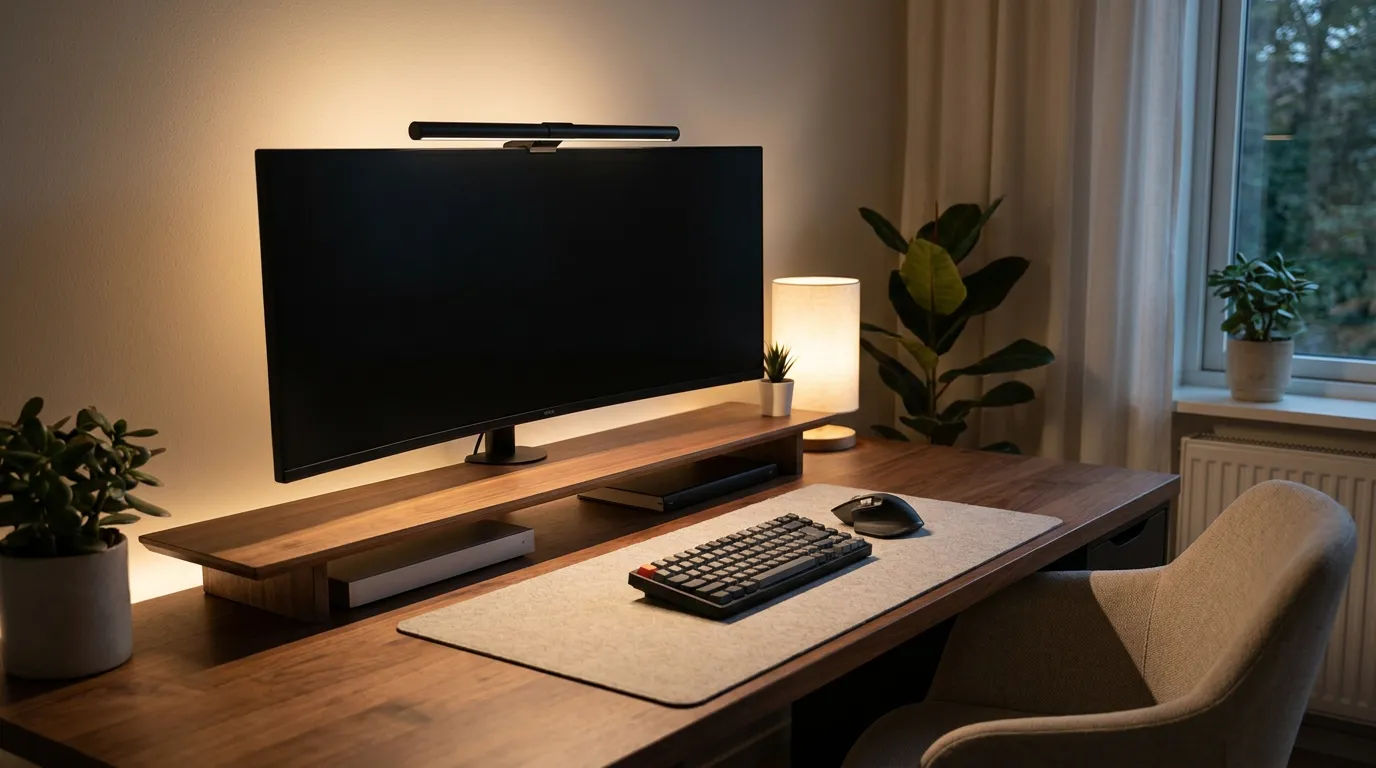
Best monitor light bar picks for 2026 can make long screen sessions more comfortable by adding clean, downward desk lighting without screen glare.
Table of Contents
Disclosure: ErgoLivingSpace independently researches and recommends products. We may earn a commission from qualifying purchases made through links on this page, at no extra cost to you.
If your screen looks great but your eyes feel fried by mid-afternoon, the problem usually isn't your monitor – it's the lighting around it. Overhead office lights cast harsh reflections across the glass. A traditional desk lamp eats space and throws glare straight back at you. A monitor light bar solves both problems at once: it clips to the top of your screen and pushes warm, even light down onto your desk and keyboard, with none of it bouncing back into your eyes.
That simple idea is why monitor light bars have quietly become one of the most popular desk upgrades for programmers, office workers, gamers and creatives. They free up desk space, reduce the contrast between a bright screen and a dark room, and make long sessions noticeably more comfortable. But the category has exploded, and the gap between a thoughtfully engineered bar and a cheap LED strip is enormous.
We tested dozens of monitor light bars and narrowed the list down to the six models we'd confidently recommend in 2026. Below you'll find clear picks by budget and use case, balanced in-depth reviews, a full at-a-glance comparison table, the mistakes to avoid, and a practical buying framework – everything you need to choose your screen light bar with confidence.
The short version: Most people should buy the BenQ ScreenBar Halo 2 if budget allows, or the Quntis Monitor Light Bar Pro+ for the best value. Want the cheapest reliable bar from an established brand? The Xiaomi Mi Computer Monitor Light Bar. Full reasoning below.
Quick Recommendations
| Category | Pick | Why | Ideal user | Price range |
|---|---|---|---|---|
| Best Overall | BenQ ScreenBar Halo 2 | Truly glare-free asymmetric optics, wireless puck, motion sensor, rear bias light | Anyone who wants the best and will keep it for years | $$$ (~$180–225) |
| Best Value | Quntis Monitor Light Bar Pro+ | Wireless remote, bright, auto-dimming and curved support at half the premium price | Home offices and dual-monitor desks | $$ (~$55-70) |
| Best Budget | Xiaomi Mi Computer Monitor Light Bar | Ra95 light and a clean metal build from a brand that's reliably in stock | First-timers who still want quality | $ (~$40-50) |
| Best for Gaming | Quntis RGB Pro+ | Real task light plus 15-mode RGB bias glow in one bar | Gamers who want function and atmosphere | $$ (~$60-65) |
| Best for Mac Setup | BenQ ScreenBar Pro | USB-C, auto on/off motion sensor, minimalist look that suits a Mac desk | Mac and modern USB-C setups | $$$ (~$125–155) |
| Best for Curved Monitors | ONWAY Curved Monitor Light Bar | Curve-matched body, webcam-friendly base, wireless remote | 34" ultrawide and curved gaming screens | $$ (~$45-55) |
Prices fluctuate on Amazon; treat the ranges above as a guide, not a guarantee.
In-Depth Reviews: The Best Monitor Light Bars
Every bar here is currently in stock on Amazon US, has a track record of strong reviews, and earns its place by solving the core job – lighting your desk without glaring your screen. For each, we focus on the things that actually matter: brightness, color rendering (CRI), glare control, clamp quality, color temperature, power type and monitor compatibility.
1. BenQ ScreenBar Halo 2 – Best Overall
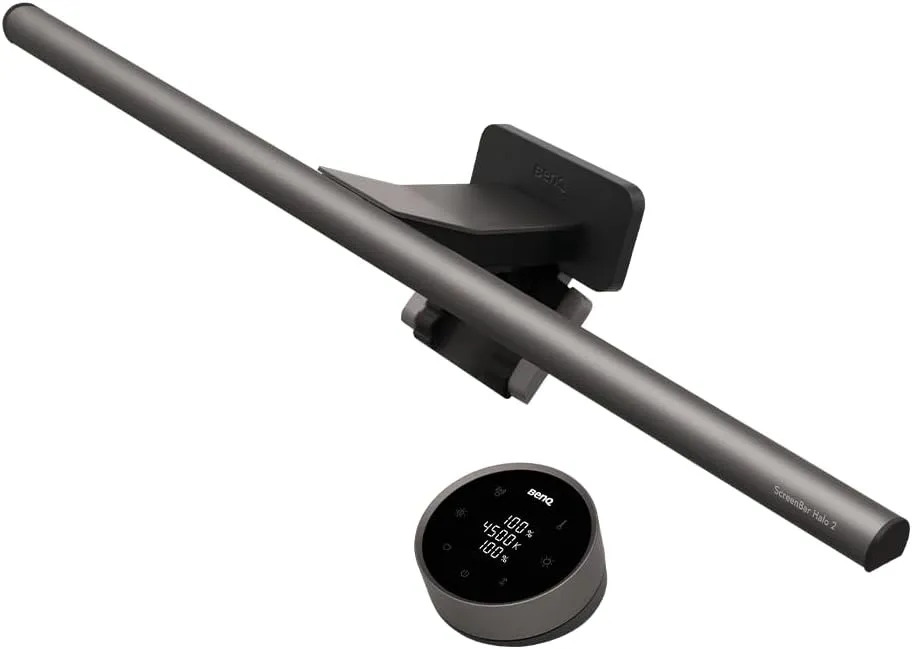
The Halo 2 is the bar the rest of the category is measured against. Its asymmetric "ASYM-Light" optics are the best at directing light forward onto your desk while keeping it off the screen – glare is a non-issue even on glossy panels. It pushes roughly 1,000 lux directly in front of you and holds around 500 lux across a wide 85 x 50 cm pool, so the whole desk is evenly lit. Color rendering sits above CRI 95, so paper, skin tones and product photos look accurate. The full 2700K-6500K range covers warm evening work through cool daytime focus, and a rear bias light softens the contrast between a bright screen and a dark wall. The wireless puck is genuinely better than touch controls, a motion sensor turns it on as you sit down, and it clamps securely on flat panels and curved monitors from 1000R to 1800R.
Pros:
- Best-in-class glare control
- CRI 95+
- superb wireless puck
- rear bias lighting
- curved support
Cons:
- The most expensive option here
- rear light is subtle
- overkill for casual users
Best for: People who use a screen 6+ hours a day and want the definitive bar. Why we recommend it: it nails every fundamental – light quality, glare control and controls – and the difference is felt every session, not just on a spec sheet.
2. Quntis Monitor Light Bar Pro+ – Best Value
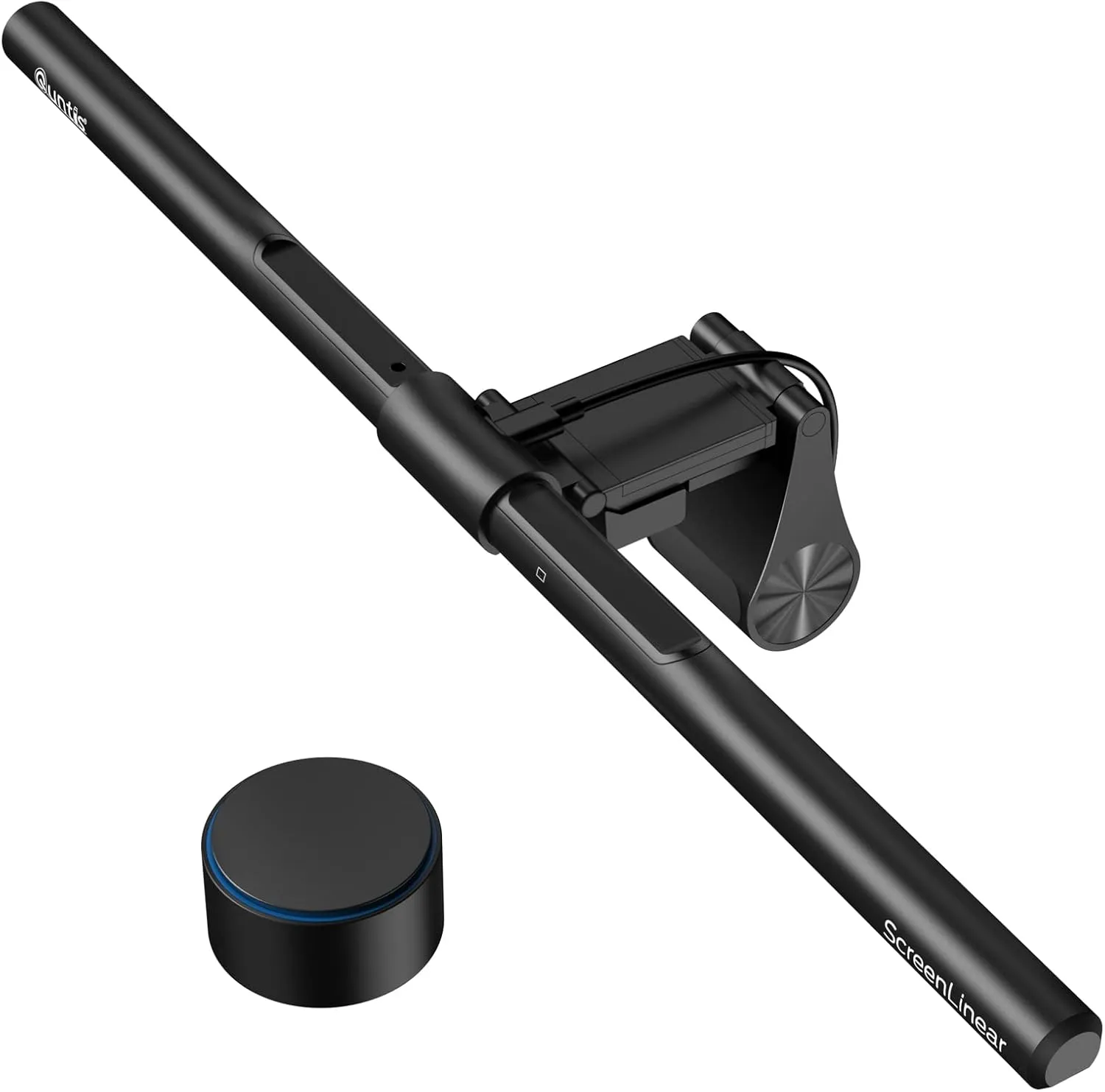
Quntis has become the value champion, and the Pro+ is why. You get a wireless remote, ambient auto-dimming, USB power and CRI 95 light across a 3000K-6500K range – the features that matter most, at roughly half the price of a premium bar. It's bright, too: a >=1200-lux output lights a wide desk comfortably even in a dark room, and stepless dimming lets you dial in the exact level. The weighted clip is a highlight, gripping panels from very thin up to 2.36" and holding firm on curved screens where flimsier clips slide. For multi-screen desks it's especially clever – pair two bars and the remote controls them together, so you're never reaching across the desk to adjust each one. The trade-offs versus BenQ are real but minor: glare control is a notch less refined and the housing feels less premium in the hand. For most home offices, none of that will matter day to day.
Pros:
- Wireless remote
- bright (>=1200 lux)
- ambient auto-dimming
- CRI 95
- fits curved and thick monitors
- excellent price
Cons:
- Glare control slightly below BenQ
- build feels less premium
- USB-A rather than USB-C
Best for: Home offices, everyday document work and dual-monitor setups that want 90% of the premium experience for far less. Why we recommend it: it delivers remote control, real brightness and good color at a genuinely friendly price – the smart-money pick.
3. Xiaomi Mi Computer Monitor Light Bar – Best Budget
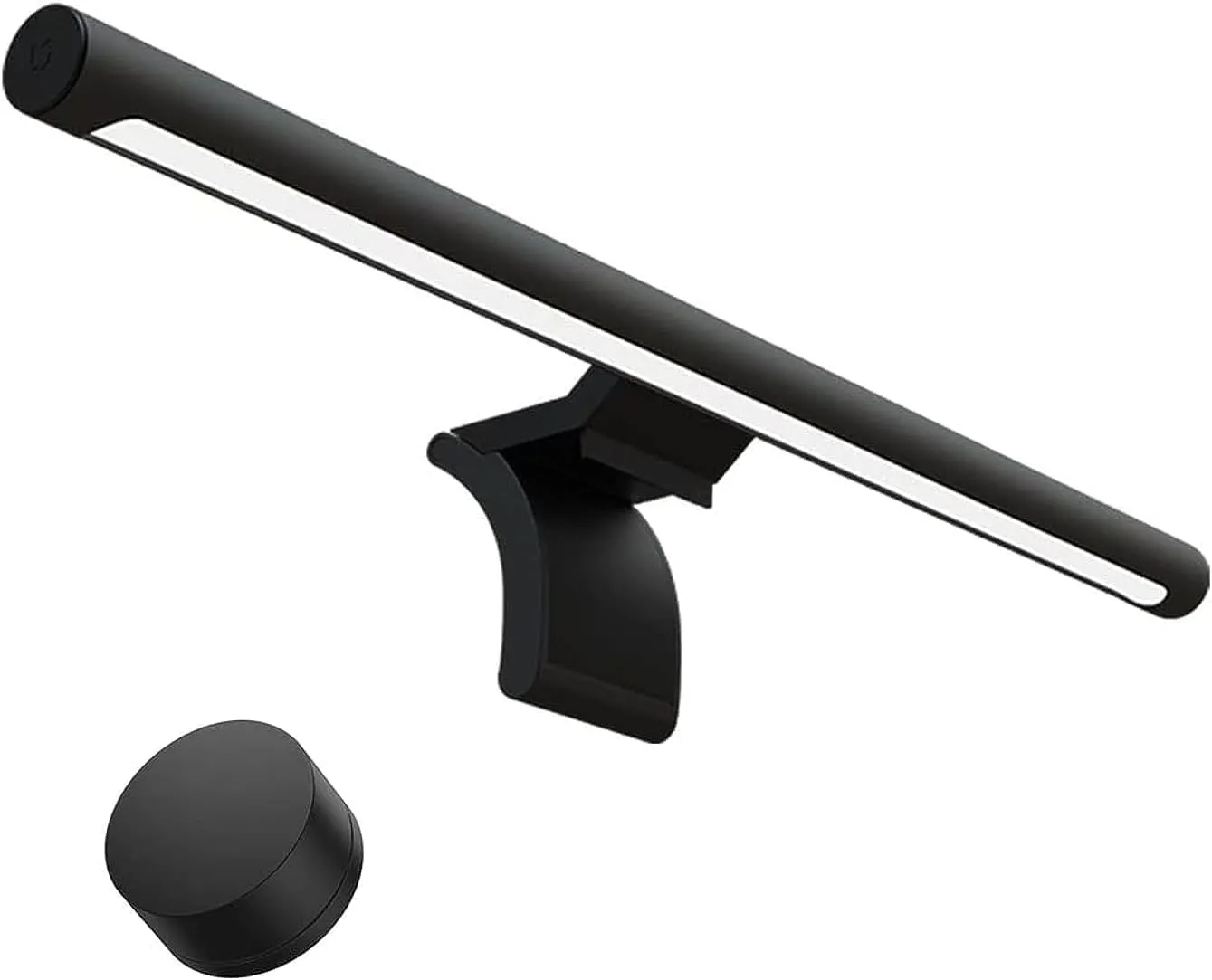
If you want a quality bar without spending much, this is the one we trust to actually be on sale and in stock when you click buy – a real concern in a category where cheaper brands vanish for weeks at a time. Xiaomi's bar is also the best-looking budget option by a distance: the metal body is genuinely handsome and pairs beautifully with a minimalist desk, and a magnetic rotating mount makes angling it effortless. The light is Ra95 with the full 2700K-6500K range and around 270 lumens, controlled by a tidy wireless dial that sits on the desk. It's not as bright as a BenQ or Quntis and there's no ambient auto-dimming, so you'll set brightness manually – but the light it produces is clean, flicker-free and reflection-free, which is exactly what a budget computer monitor light should get right. On a standard flat 24-27" monitor it punches well above its price.
Pros:
- Reliably in stock with a displayed price
- premium metal design
- Ra95 light
- wireless dial
- magnetic tilt mount
Cons:
- Lower brightness
- no auto-dimming
- best on flat, standard-depth monitors only
Best for: First-timers, students and minimalists who want quality light on a budget. Why we recommend it: it's the most affordable bar from an established brand that you can count on buying today, and the light quality is excellent for the money.
4. Quntis RGB Pro+ – Best for Gaming
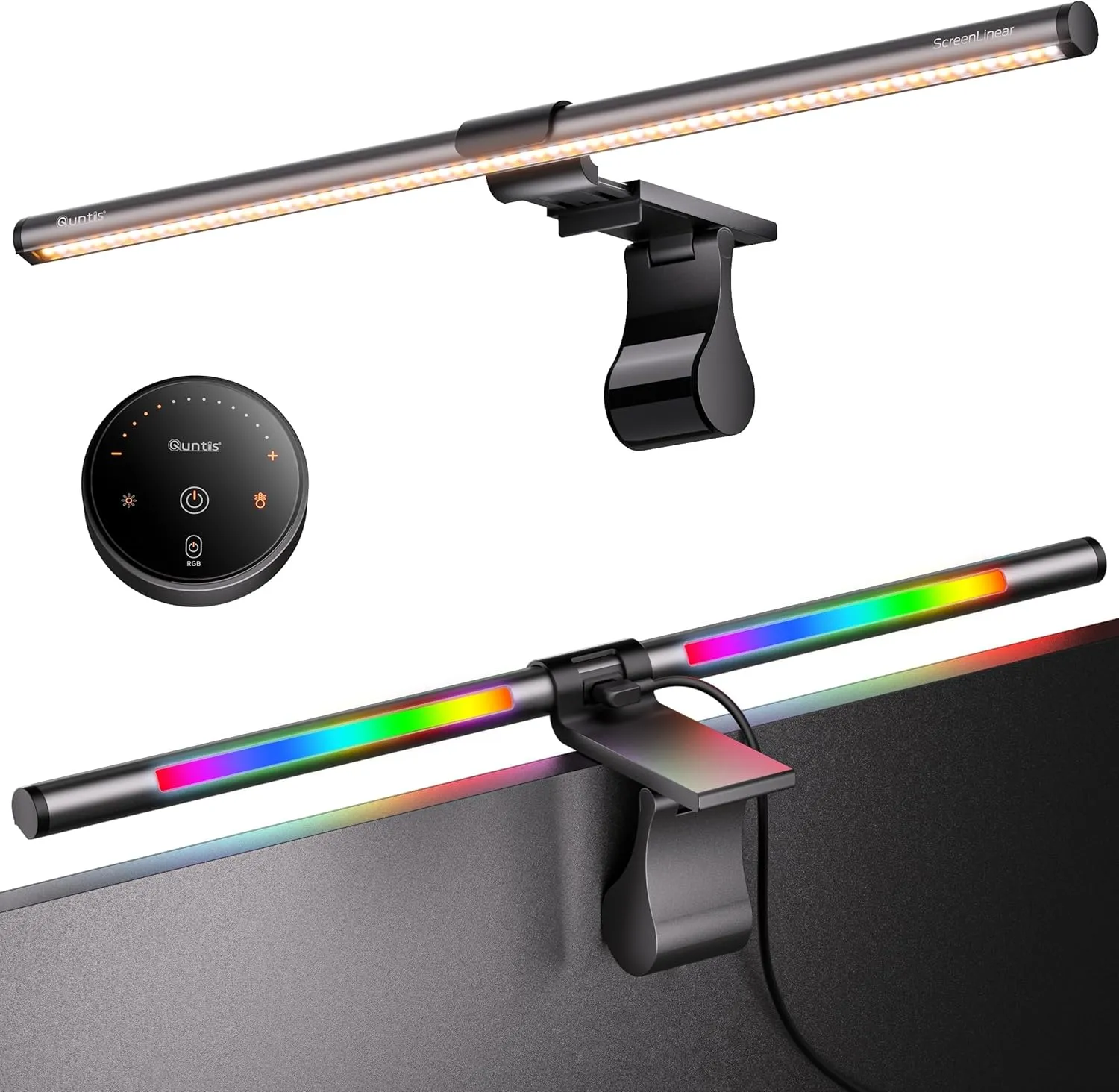
This is the value Pro+ in a gamer's wardrobe: the same Ra95 front task light plus 15 RGB backlight modes that wash color across the wall behind your monitor. The point is that it pulls genuine double duty – the front light keeps your desk usable for work and reading, while the rear RGB delivers the ambient glow a battlestation wants after hours. It's powered via USB-C, the cable is a generous 1.8m so it reaches a tower on the floor, and the wireless remote handles four color temperatures, 100 brightness steps and the RGB effects without you touching the bar. The upgraded clip fits effectively any monitor, flat or curved. Unlike the standard Pro+ it leans on the remote rather than ambient auto-dimming, but for a gaming desk where you're already tweaking lighting by mood, that's a fair trade. It's one of the few bars that won't make you choose between eye-care lighting and a setup that looks the part.
Pros:
- Functional Ra95 task light and 15-mode RGB bias lighting
- USB-C
- long 1.8m cable
- full wireless control
Cons:
- RGB is a want, not a need
- busier look
- relies on the remote rather than ambient auto-dimming
Best for: Gamers who want one bar that handles both work and play. Why we recommend it: proper eye-care task lighting without giving up the ambient color a gaming setup wants.
5. BenQ ScreenBar Pro – Best for Mac Setup
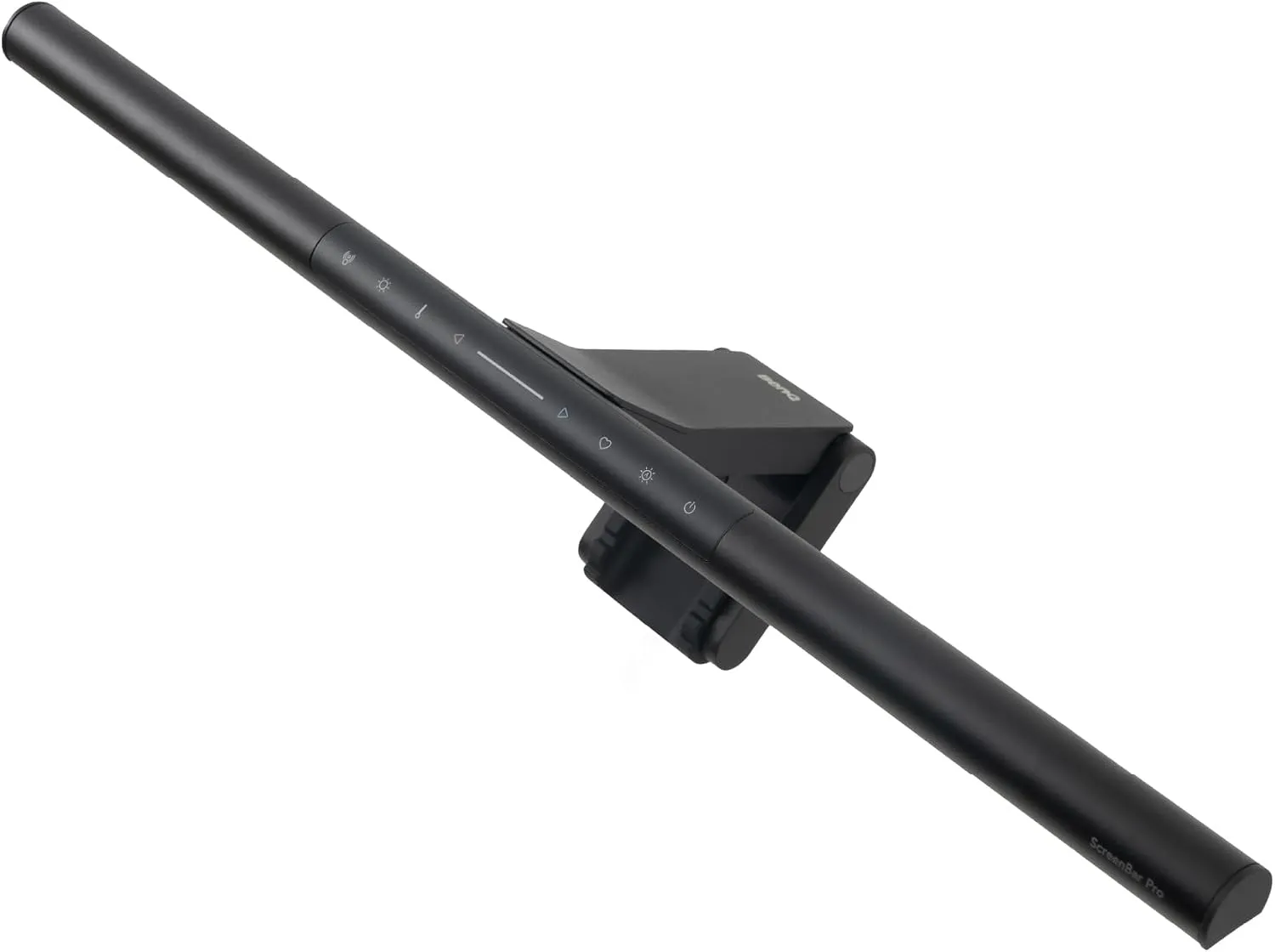
The ScreenBar Pro is the cleanest-looking bar BenQ makes, which is exactly why it suits a Mac desk: a slim, understated profile that disappears above the screen, finished to match a minimalist setup. More importantly it's the modern-connectivity pick – it's powered by USB-C, so it plugs straight into a Mac-era monitor or hub without hunting for a spare USB-A port, and an automatic motion sensor switches the bar on and off as you sit down and leave. It keeps BenQ's excellent asymmetric optics and CRI ~95 light across the 2700K-6500K range, with coverage tuned wider for large and ultrawide displays, and it handles curved screens well. You lose the Halo's rear bias light and wireless puck (controls are on the bar), but if you don't need wall backlighting, this is arguably the smarter BenQ – the same trusted light engine with the connector and convenience features a contemporary desk expects.
Pros:
- USB-C
- auto on/off motion sensor
- minimalist design
- excellent CRI and glare control
- wide/ultrawide and curved coverage
Cons:
- No rear bias light
- touch controls rather than a puck
- premium price
Best for: Mac users and modern USB-C setups that value clean looks and convenience. Why we recommend it: BenQ's proven optics in the most desk-friendly, plug-and-go form.
6. ONWAY Curved Monitor Light Bar – Best for Curved Monitors
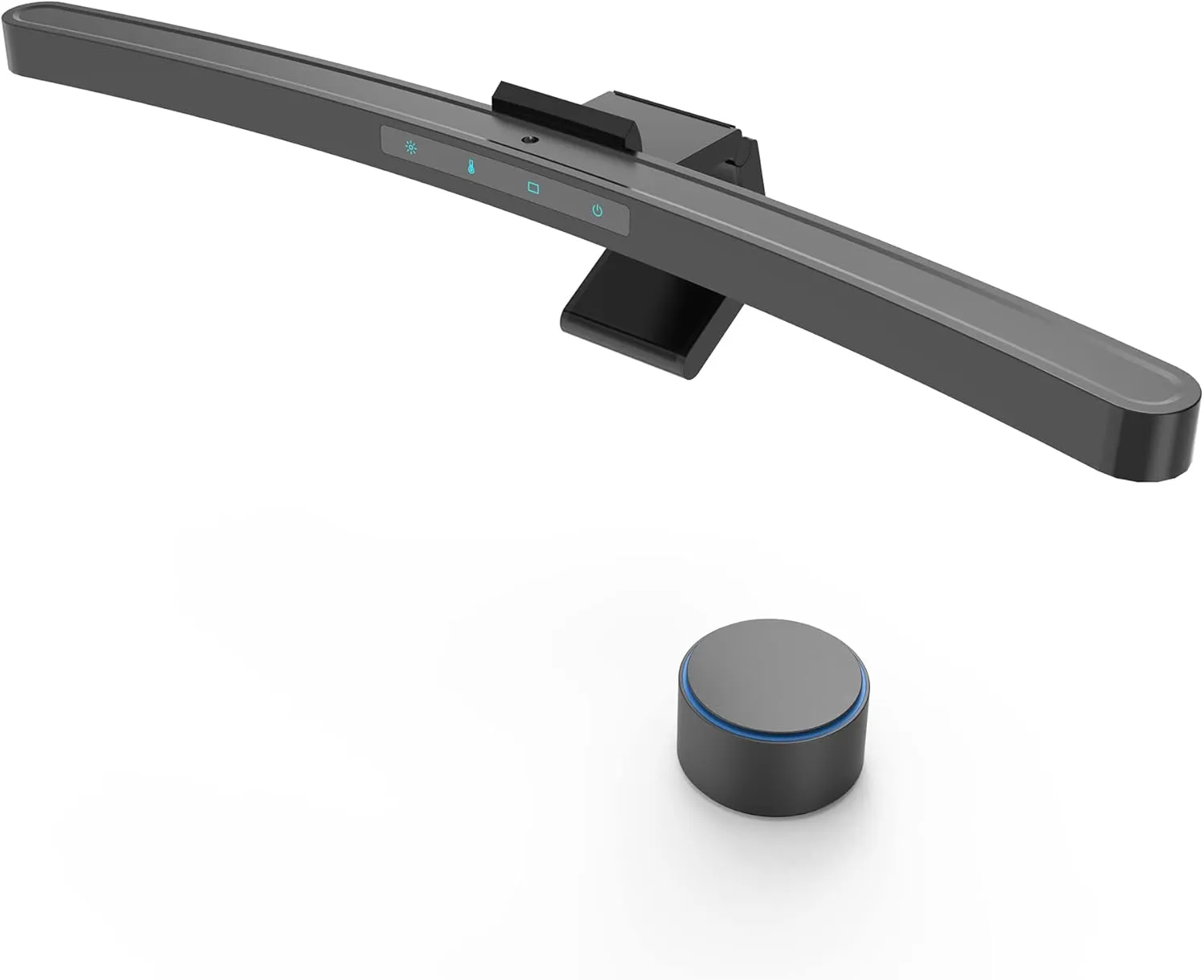
The ONWAY is purpose-built for curved and ultrawide screens (27-34", 1000R/1800R), with a body that follows the curve so light lands evenly across the desk rather than pooling in the center – the single biggest problem when you put a flat bar on a curved monitor. It uses an 88-LED, 45° asymmetric design with Ra95 rendering and roughly 275 lumens, plus ambient auto-dimming and a wireless remote so you can adjust it without leaning in. The detail we appreciate most is the base: it's shaped to leave clearance for a webcam mounted on top of the monitor, which solves a real, common annoyance for people who are on video calls all day and otherwise have to choose between their camera and their light. An RGB variant is available if you want backlighting too. The brand is less established than BenQ or Quntis, and on a flat monitor it's less ideal than a flat-tuned bar – but for curved and webcam-heavy desks, it's the most thoughtfully designed option here.
Pros:
- Curve-matched body
- webcam-friendly base
- Ra95 light
- ambient auto-dimming
- wireless remote
- RGB option
Cons:
- Optimized for curved (less ideal on flat)
- brand less established
- mid brightness
Best for: Curved/ultrawide owners – especially those who also run a webcam. Why we recommend it: it's one of the few bars that genuinely accounts for both screen curvature and a top-mounted camera.
Monitor Light Bar Comparison Table
Here's how the six picks stack up at a glance. Ratings are our overall recommendation score out of 5, weighing light quality, glare control, features and value.
| Model | Brightness | CRI | Color Temp | Auto-Dimming | Remote | Curved Support | USB Power | Price Range | Rating |
|---|---|---|---|---|---|---|---|---|---|
| BenQ ScreenBar Halo 2 | ~1000 lux (center) | 95+ | 2700-6500K | Yes | Wireless puck | Yes (1000R-1800R) | USB-A | ~$180–225 | * 5.0 |
| Quntis Monitor Light Bar Pro+ | >=1200 lux | 95 | 3000-6500K | Yes | Wireless remote | Yes | USB-A | ~$55-70 | ****1/2 4.5 |
| Xiaomi Mi Computer Light Bar | ~270 lm (lower) | 95 (Ra95) | 2700-6500K | No | Wireless dial | No (flat only) | USB-A | ~$40-50 | **** 4.0 |
| Quntis RGB Pro+ | High (Ra95 front) | 95 (Ra95) | 3 temps + RGB | No (remote) | Wireless remote | Yes | USB-C | ~$60-65 | **** 4.0 |
| BenQ ScreenBar Pro | Wide, even | ~95 | 2700-6500K | Yes | No (touch + sensor) | Yes | USB-C | ~$125–155 | ****1/2 4.5 |
| ONWAY Curved Light Bar | ~275 lm | 95 (Ra95) | Adjustable | Yes | Wireless remote | Yes (1000R/1800R) | USB-A | ~$45-55 | **** 4.0 |
What Is a Monitor Light Bar?
A monitor light bar – also called a screen light bar or computer monitor light – is a slim LED lamp that clips or rests on the top edge of your monitor and shines downward onto your desk and keyboard. That's the whole idea, but the engineering that makes it work is the asymmetric optic.
In a normal lamp, light spreads in all directions, including back toward whatever's in front of it. Point that at a desk and a chunk of the light hits your screen and bounces into your eyes as glare. A monitor light bar uses an asymmetric lens that throws light forward and down, away from the screen. The result: your desk and documents are lit, but the panel stays dark and reflection-free.
Because it sits on the monitor, it also takes up zero desk space – no base, no arm clamped to the edge, no cable snaking across your work surface. Most draw power straight from a USB port on the monitor or computer, so there's no extra wall plug either. That combination – directional glare-free light plus a vanishing footprint – is what a regular desk lamp simply can't match.
Do Monitor Light Bars Reduce Eye Strain?
Eye strain at a desk is largely about contrast and glare, and an LED monitor light targets both. When you work on a bright screen in a dim room, your pupils are caught between the glowing panel and the dark surroundings, constantly readjusting. Adding even, ambient light around the screen reduces that contrast, which many people find noticeably more comfortable over a long session.
Glare is the second factor. Reflections from overhead lights or a window force your eyes to work harder to read through them. Because a light bar's asymmetric optic keeps light off the screen, it adds illumination without adding reflections. Good bars are also flicker-free and use higher-CRI light, both of which contribute to comfortable viewing.
An honest caveat: lighting is one piece of an ergonomic workstation, not a cure. A light bar can't fix a monitor that's too low, a chair that doesn't support you, or marathon sessions without breaks. Pair it with a properly positioned screen (see our guides below) and the 20-20-20 habit for the best results. We avoid medical claims – what we can say is that reducing glare and contrast tends to make extended screen time feel easier.
Monitor Light Bar vs Desk Lamp
The most common question we get is whether a light bar is really better than the desk lamp you already own. For lighting a workstation specifically, it usually is – here's the side-by-side.
| Factor | Monitor Light Bar | Desk Lamp |
|---|---|---|
| Screen glare | Asymmetric optics keep light off the screen | Often reflects into the screen unless carefully angled |
| Desk space | Zero – sits on the monitor | Takes up surface area with a base or clamp |
| Eye comfort | Even, downward light reduces contrast | Can create bright/dark patches and hotspots |
| Flexibility | Fixed downward lighting for the work zone | Highly adjustable; can light anything, anywhere |
| Power | Usually USB from monitor/PC, no wall plug | Typically needs a wall outlet |
| Price | ~$40 to ~$180 | ~$15 to $200+ |
| Best use case | Computer work, reading at the desk, video calls | Hobbies, crafts, task lighting away from the screen |
The takeaway: a desk lamp is more versatile, but a monitor light bar is purpose-built for the one job most of us need – comfortable, glare-free light while working at a screen – and it does that job better while reclaiming your desk. If you do detailed handwork or need light pointed in odd directions, keep the lamp. For computer use, the bar wins.
How to Choose the Right Monitor Light Bar
A handful of specs separate a great bar from a frustrating one. Here's what to weigh.
CRI (color rendering). Look for CRI/Ra 90 or higher; 95+ is excellent. Higher CRI means colors and text look natural rather than washed out – it matters for reading documents and for any creative work.
Brightness. Measured in lux or lumens. More isn't automatically better, but you want enough to light the desk in a dark room. Premium bars hit 500-1,200+ lux in the center; budget bars sit lower. Stepless dimming lets you dial it in.
Color temperature. A 2700K-6500K range is ideal: warm (2700-3000K) for evenings, neutral (~4000K) for general work, cool (5000-6500K) for daytime focus. Adjustable temperature is far more useful than a fixed one.
Automatic dimming. An ambient sensor that adjusts brightness to the room is a real quality-of-life feature – set it once and forget it. BenQ and Quntis do this well.
USB-C vs USB-A. USB-C is more convenient on modern monitors and laptops and is reversible; USB-A is universal and fine if your ports are older. Check what your monitor offers.
Controls. Touch controls on the bar are cheapest but mean reaching toward the screen. A wireless remote or puck is more pleasant and essential if you mount the bar high or run dual monitors.
Curved monitor compatibility. If you have a curved or ultrawide screen, confirm the bar supports your curvature (commonly 1000R-1800R) or uses a curve-matched body, or the light will pool unevenly.
Webcam compatibility. If a webcam sits on top of your monitor, look for a bar with a base that leaves clearance (the ONWAY is built for this) so the two don't fight for space.
Screen thickness / clamp quality. Check the supported thickness range against your monitor's top bezel. A good weighted, grippy clip holds steady; a flimsy one slides or tips. This is where premium bars quietly justify their price.
Common Mistakes When Buying a Monitor Light Bar
After years of testing these, we see the same buying errors again and again. Avoid these and you'll be happy with whatever you choose.
Buying for the RGB instead of the light. A wall of color looks great in product photos, but RGB backlighting is decoration – it does nothing for eye comfort. Choose based on the quality of the front task light first; treat RGB as a bonus, not a deciding factor. A bar with gorgeous RGB and a mediocre front light is still a mediocre light bar.
Ignoring CRI. Cheap bars often skip a CRI rating entirely, which usually means it's low. Light below CRI 90 makes text and documents look flat and slightly off-color, and the difference is tiring over a full day. Don't buy a bar that won't tell you its CRI.
Ignoring glare control. The entire point of a monitor light bar is the asymmetric optic that keeps light off the screen. Some budget "monitor lights" are really just thin LED strips that spray light everywhere – including back at the panel. If the listing doesn't mention asymmetric or anti-glare optics, assume it doesn't have them.
Overlooking monitor thickness. The clip has to fit your monitor's top bezel. Very thin OLED panels and very thick older monitors both fall outside some bars' supported range, and a clip that doesn't seat properly will tip or slide. Measure before you buy.
Buying a bar that's too dim. An underpowered bar in a dark room barely registers and leaves you disappointed. If you work in low light or want the bar to genuinely illuminate your desk, prioritize brightness (lux/lumens) and make sure it has stepless dimming so you can also turn it down.
Choosing aesthetics over lighting quality. A beautiful bar that produces harsh, dim or reflective light is a desk ornament. Looks matter – but they should be the tiebreaker between two good performers, never the reason you overlook poor light.
Best Monitor Light Bar by Use Case
If you'd rather skip straight to your situation:
| You are a… | Best pick | In one line |
|---|---|---|
| Programmer | Quntis Monitor Light Bar Pro+ | Bright, auto-dimming, remote-controlled light for long focus blocks |
| Office worker | Quntis Monitor Light Bar Pro+ | A bright, remote-controlled office monitor light with great value for everyday docs and spreadsheets |
| Document/paper reader | BenQ ScreenBar Halo 2 | CRI 95+ and wide, even coverage make print look true |
| Gamer | Quntis RGB Pro+ | Real task light plus RGB bias glow in one bar |
| Creator / designer | BenQ ScreenBar Halo 2 | Accurate color rendering for color-critical work |
| Mac user | BenQ ScreenBar Pro | USB-C, minimalist, auto on/off – built for a modern desk |
| Budget buyer | Xiaomi Mi Computer Light Bar | Quality Ra95 light and clean looks for the least money |
Setup Tips
A light bar is easy to get right, but a few details make a difference.
Where to position it. Center it on the top edge of your monitor so the light pools evenly in front of you. If you have a webcam, set the bar slightly off-center or choose a webcam-friendly model.
Brightness. Aim to match the bar's brightness roughly to your screen – a desk that's much brighter or much darker than the panel defeats the purpose. If your bar has auto-dimming, let it do the work.
Distance and angle. Most bars are pre-angled to throw light forward; just make sure the front edge isn't blocked and that no light clips the bottom of the screen.
Night use. Drop to a warm 2700-3000K in the evening to reduce cool blue light and keep the room calm.
Combine with monitor height. A light bar works best when your monitor is already at the right height – top of the screen near eye level. If yours sits low, fix that first (our height guide below) and the lighting falls into place.
Ambient room lighting. A light bar isn't meant to be your only light in a pitch-black room. A little soft ambient light behind the monitor further reduces contrast and eye fatigue – a rear bias light (Halo 2) or a simple lamp does this.
Frequently Asked Questions
Are monitor light bars worth it?
For most people who work at a computer for several hours a day, yes. They reduce screen glare, free up desk space and make long sessions more comfortable. If you only use your computer occasionally, a budget bar or your existing lamp may be enough.
Can a monitor light bar reduce eye strain?
It can help by cutting glare and reducing the contrast between a bright screen and a dark room – two common contributors to tired eyes. It's not a medical device and won't fix poor posture or a badly positioned monitor, but many users find extended screen time more comfortable with one.
Can a monitor light bar improve productivity?
Indirectly, yes. Better, glare-free lighting makes reading and writing more comfortable, which helps you stay focused longer without the fatigue that prompts breaks. A clear desk and consistent light also reduce small distractions. It won't transform your output, but a comfortable workspace is easier to stay in.
Do monitor light bars reduce blue light?
A light bar doesn't change the blue light coming from your screen, but quality bars are flicker-free and let you shift to a warm 2700-3000K tone in the evening, which lowers the cool blue content of the room lighting. Some, like the BenQ models, are also engineered to be blue-light-hazard-free. For screen blue light specifically, use your display's night mode.
Are monitor light bars safe for OLED monitors?
Yes – a light bar sits on the bezel and emits no heat or pressure on the panel, so it won't harm an OLED. The one thing to check is thickness: OLED monitors are often very thin, so confirm the bar's clip supports a slim bezel before buying. The light itself is completely safe for OLED.
Can a monitor light bar damage my monitor?
No. Light bars are lightweight, draw low power over USB, and use a padded clip designed for monitors. As long as your screen's top bezel falls within the bar's supported thickness range, there's no risk to the panel.
Do monitor light bars work on curved monitors?
Many do, but check the spec. Bars like the BenQ ScreenBar Halo 2 support 1000R-1800R curvature, and the ONWAY uses a curve-matched body. A flat-only bar (such as the Xiaomi Mi) on a curved screen will light the center more than the edges.
Can I use a monitor light bar with a webcam?
Yes, but they can compete for space on the top edge. Choose a bar with a slim or webcam-friendly base (the ONWAY is designed for this), or position the bar slightly to one side of the camera.
Do monitor light bars work with dual monitors?
Absolutely – use one bar per screen. A model with a wireless remote (like the Quntis Pro+) is ideal because you can control both bars together without reaching across the desk.
Is a monitor light bar worth it if I already own a desk lamp?
Often yes, because they do different jobs. A desk lamp lights tasks away from the screen but tends to reflect into the panel; a monitor light bar lights your work zone without glare and uses no desk space. Many people keep both – the lamp for hobbies, the bar for screen time.
How long do the LEDs last?
LED light bars are typically rated for tens of thousands of hours – many years of daily use – so the LEDs will almost certainly outlast your interest in the monitor itself. Build quality of the clip and controls matters more for longevity than the LEDs.
Final Recommendation
If you want the best and plan to keep it for years, buy the BenQ ScreenBar Halo 2 – its glare control, color accuracy and wireless puck make every session more comfortable, and it's the easiest bar to recommend without caveats. For the best balance of features and price, the Quntis Monitor Light Bar Pro+ delivers around 90% of that experience for roughly half the cost, and it's our pick for most home offices and dual-monitor desks.
On a Mac or modern USB-C setup, the BenQ ScreenBar Pro brings the same trusted optics in a cleaner, plug-and-go form. Gamers should look at the Quntis RGB Pro+ for task light plus ambient glow, and curved or webcam-heavy desks at the ONWAY Curved Monitor Light Bar.
And if you're testing the idea or watching your budget, the Xiaomi Mi Computer Monitor Light Bar gives you quality Ra95 light and a clean metal design from a brand you can actually count on buying today. Whichever you choose, the upgrade from overhead glare or a desk-hogging lamp to clean, downward, glare-free light is one of the most noticeable comfort improvements you can make to a workspace.
Who should buy what, in a sentence: Spend on the BenQ Halo 2 if screen time is your livelihood; buy the Quntis Pro+ if you want the smart-money pick; grab the Xiaomi Mi if you just want quality light for as little as possible.
Build the Rest of Your Ergonomic Setup
A light bar is one upgrade in a comfortable workspace. To get the full benefit, make sure the rest of your setup supports you too:
- Start with our ergonomic monitor setup guide for the complete picture.
- Get the screen to the right level with our guide to ideal monitor height.
- Running two screens? See how to arrange them in our dual monitor setup guide.
- Free your desk and fine-tune positioning with a monitor arm or a simpler monitor riser.
- Fighting neck pain? Our tech neck guide explains how screen height and posture connect.
- Working from a laptop? Don't miss our laptop ergonomics guide.
- Finish the chain from the floor up with the right foot rest.
ErgoLivingSpace independently researches and recommends products. We may earn a commission from qualifying purchases made through links on this page, at no extra cost to you. Our recommendations are based on hands-on ergonomics experience and product analysis, not on commissions.