

Getting your keyboard and mouse height for wrist and shoulder comfort right is the single most overlooked fix in home and office ergonomics. If your wrists ache by lunchtime, or your shoulders feel like they’ve been shrugged up around your ears since 9 a.m., the problem usually isn’t your keyboard or your mouse — it’s the height of both, and more specifically, the fact that most people treat them as two separate decisions instead of one matched pair.
We hear a version of the same story constantly: someone buys an expensive ergonomic mouse or a split keyboard, the pain doesn’t go away, and they assume the product failed them. In almost every case we’ve walked through, the product was fine. The height was wrong. A $150 vertical mouse sitting two inches higher than your keyboard will hurt your shoulder exactly as much as a $10 one in the same spot.
This guide fixes that. We’ll cover the actual mechanics of why height causes wrist and shoulder pain, exactly how to set your keyboard and mouse height (with real numbers, not just “somewhere comfortable”), a reference table you can match to your own height in seconds, the mistakes we see most often, and what to adjust first when you’re not sure where to start.
Scope: this guide covers keyboard and mouse positioning on the work surface. For how high the desk or work surface itself should be for your body, see our ideal desk height guide.
Table of Contents
The Short Answer
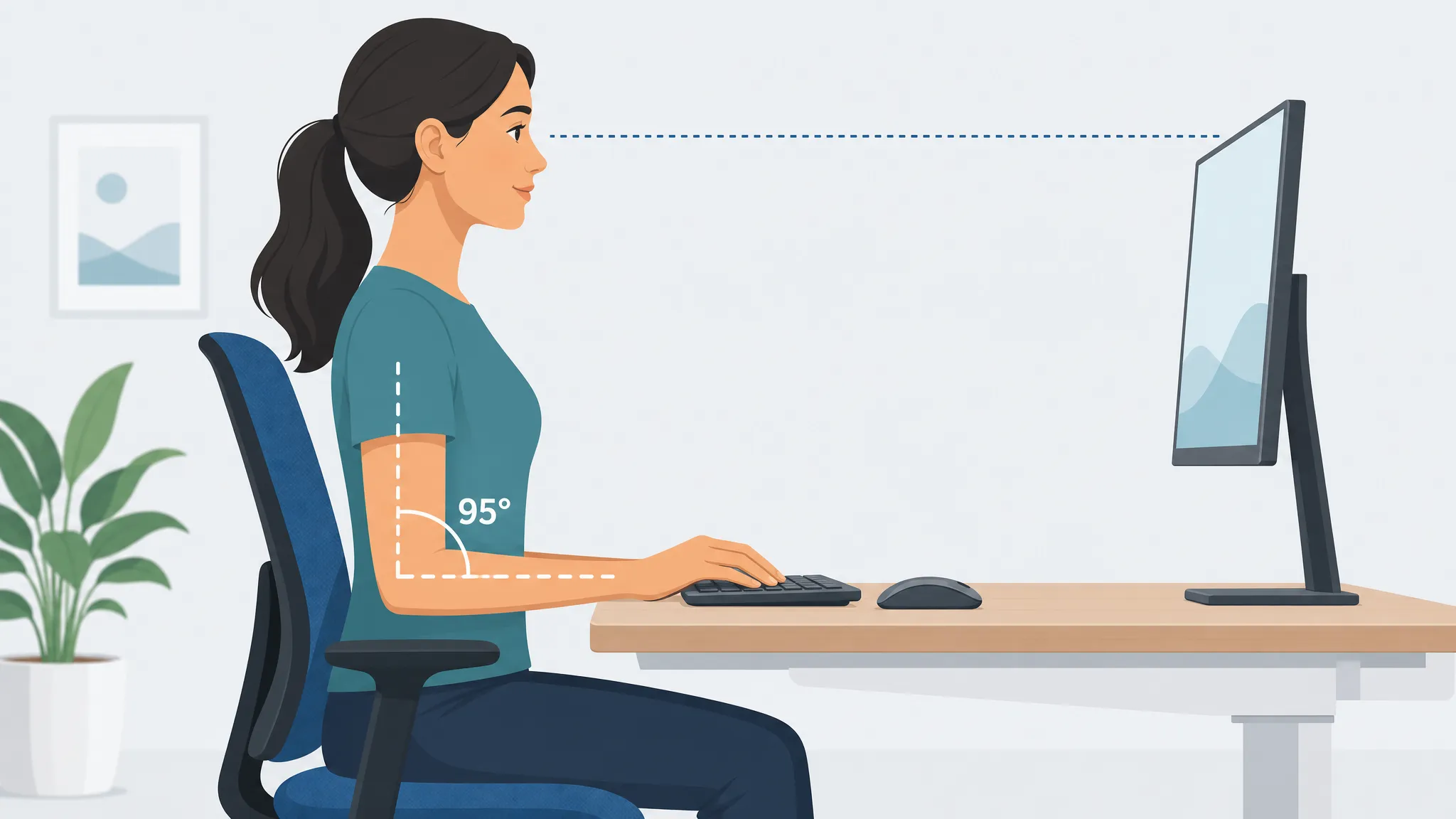
Your keyboard and mouse should sit at or just slightly below your seated elbow height, with your upper arms hanging naturally at your sides and your elbows bent between 90° and 100°, in line with OSHA’s guidance on good working positions. Your forearms should be roughly parallel to the floor, your wrists straight (not bent up, down, or to the side), and your mouse should sit immediately beside the keyboard, at the same height, not on a different shelf, tray edge, or desk level.
In practice, that means:
- Keyboard height: at or just below elbow height, flat or tilted slightly away from you (negative tilt), never propped up on its back feet.
- Mouse height: identical to the keyboard’s surface height, positioned within 10–20 cm (4–8 inches) of the keyboard’s edge.
- Chair height: set first, before anything else, it determines where your elbows naturally sit.
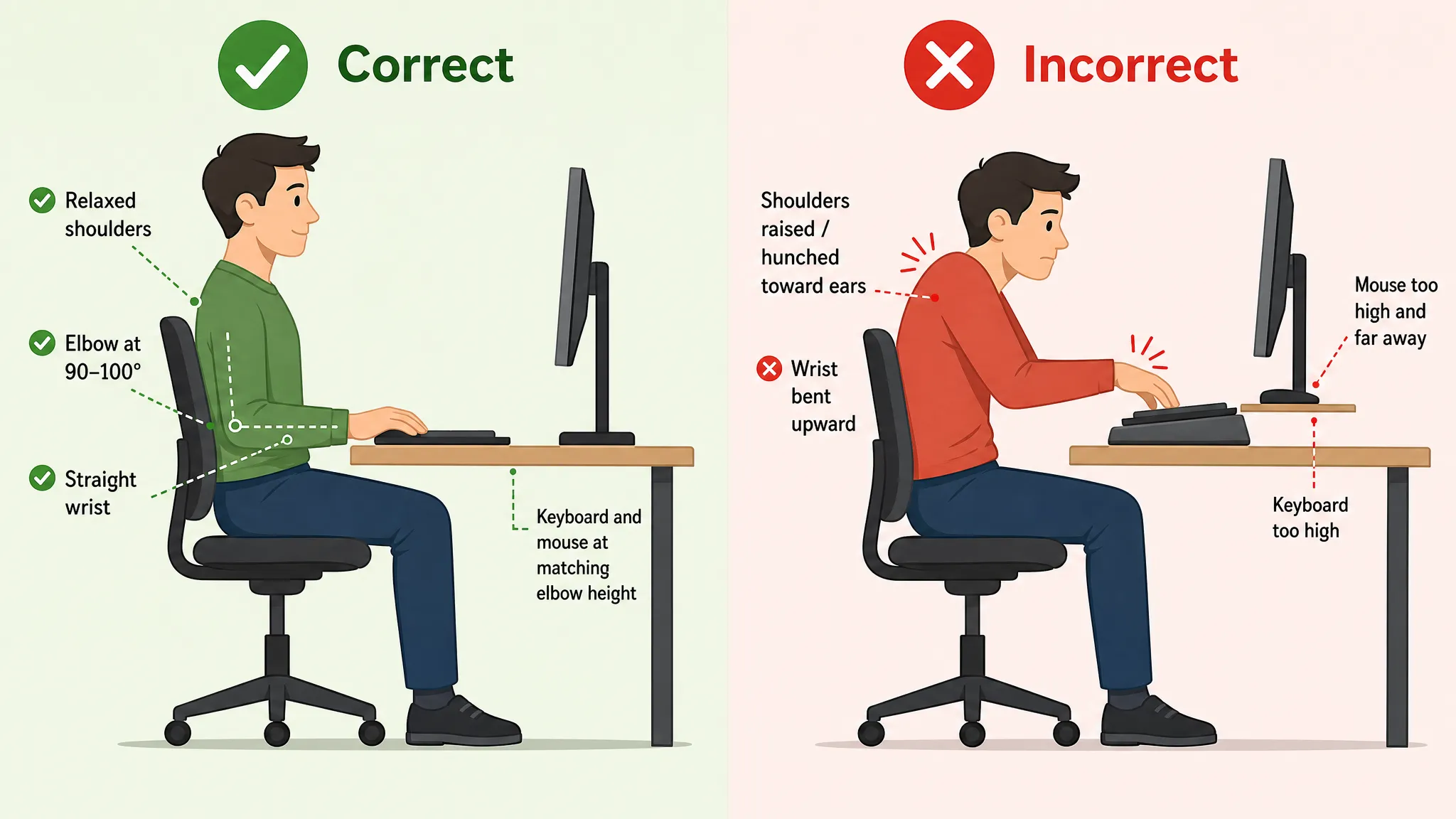
- Shoulders: relaxed and down, not lifted, hunched, or reaching.
If any one of those is off, your body compensates somewhere else, usually your wrists, your shoulders, or both. The rest of this guide walks through why, and exactly how to fix it for your body.
Why Keyboard and Mouse Height for Wrist and Shoulder Comfort Matters
Most ergonomic advice treats “keyboard height” as a wrist problem and stops there. That’s incomplete. Height affects two separate joint systems, and they fail in different ways.
How Height Affects Your Wrists?
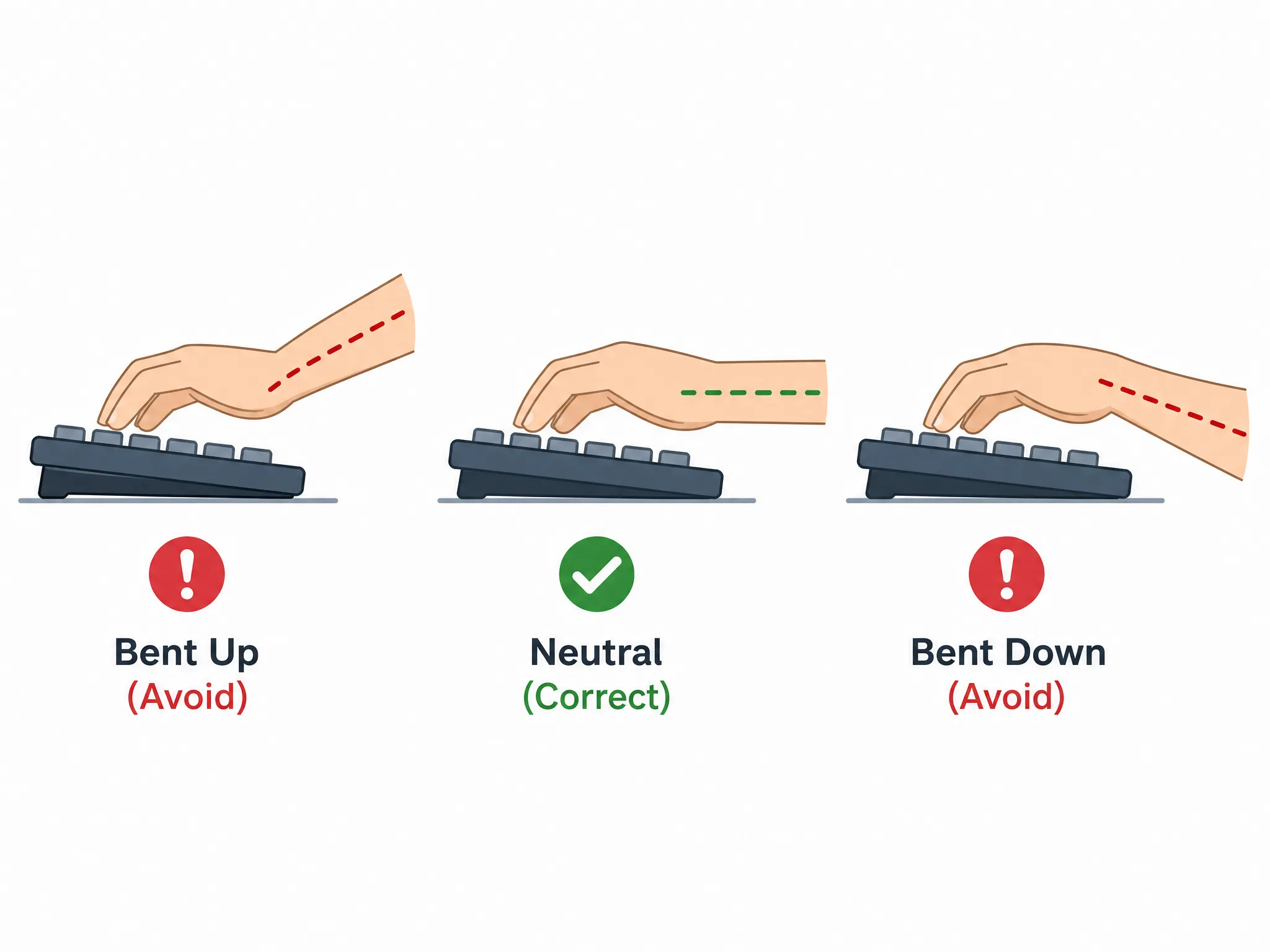
When your keyboard or mouse sits too high relative to your elbows, your wrists have to bend backward (extend) to reach the keys or buttons. Held for hours a day, that extension narrows the carpal tunnel, the passage in your wrist that the median nerve runs through, and increases pressure on it.
That’s the mechanical link between a too-high keyboard and the tingling, numbness, or aching most people associate with carpal tunnel syndrome. If you’re already dealing with those symptoms, our carpal tunnel from computer work guide covers self-tests and a recovery plan in more depth than we can here, this article focuses on the setup side of prevention.
Wrists fail in the opposite direction too. A keyboard that’s too low forces you to bend your wrists downward (flexion) to reach the keys, which loads the same tendons from the other side. Neither direction is “safer”, neutral is the only position that doesn’t cost you something over an 8-hour day.
How Height Affects Your Shoulders?
This is the half of the equation almost every other guide skips. When your mouse sits too far away, too high, or on a different level than your keyboard, your shoulder has to do work, something OSHA’s mouse-placement guidance specifically warns against, your wrist can’t compensate for: it abducts (moves away from your torso) and often elevates (shrugs) to keep your hand over the mouse.
That’s a fundamentally different failure mode than wrist extension, it loads your trapezius and rotator cuff instead of your median nerve, and it’s why “my wrists feel fine but my shoulders are killing me by 3 p.m.” is such a common complaint.
The two are connected, though: a keyboard set too high often drags the mouse up with it (since people naturally rest their mouse hand near their keyboard hand), which means a single height mistake can produce both a wrist problem and a shoulder problem at the same time, which is exactly why this guide treats them as one setup decision, not two.
What to Adjust First: Desk, Chair, or Keyboard?
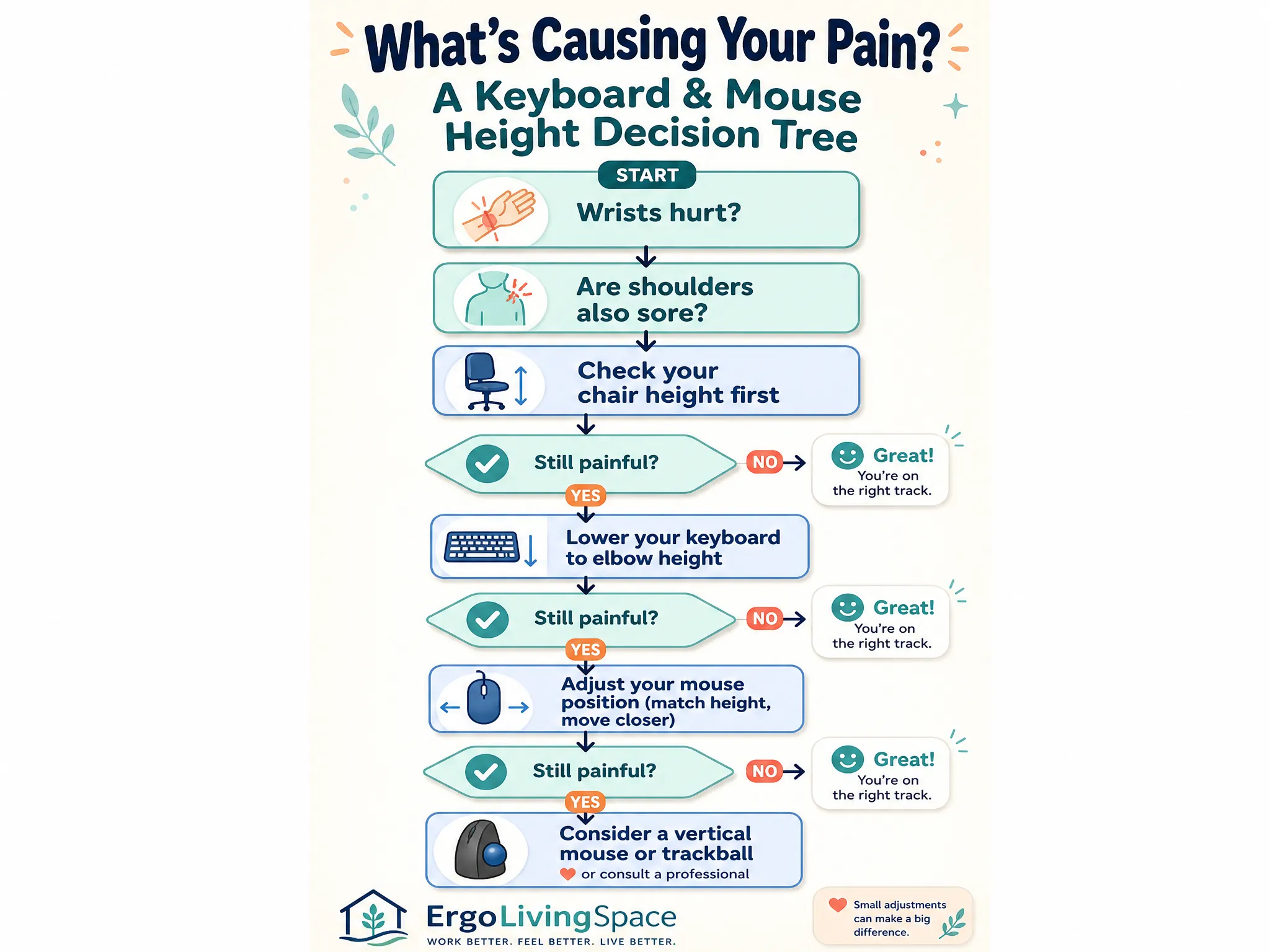
This is the question we get asked more than any other, and it’s also the one almost no other guide answers directly. Here’s the order that actually works, and why it has to go in this sequence:
Start with the desk height calculator to estimate compatible chair, seated-surface and standing-surface measurements before fine-tuning the keyboard tray.
- Chair first. Your chair height determines your knee angle and, indirectly, how your feet sit on the floor. Get this wrong and every adjustment after it is built on a bad foundation. Sit with your feet flat (use a footrest if they don’t reach) and your thighs roughly parallel to the floor.
- Keyboard height second. With your chair set, let your arms hang naturally, bend your elbows to 90–100°, and that’s your target keyboard height. If your desk is fixed and too high to hit that target, that’s what a keyboard tray is for, not raising your chair to compensate (which usually strands your feet).
- Mouse position third. Once the keyboard is right, the mouse simply matches it, same height, right beside it. There’s rarely a separate “mouse decision” to make if the first two steps are correct.
- Monitor last. Monitor height and distance matter enormously for neck and eye strain, but they don’t change your elbow angle or wrist position, so they come after, not before, you’ve solved keyboard and mouse height. If your neck is the bigger complaint, our ideal monitor height and monitor distance guides pick up exactly where this one leaves off.
The mistake we see constantly is people adjusting these in the wrong order, raising the chair to meet a too-high desk (stranding the feet), or buying a new mouse before checking whether the desk itself is the problem. Fix the sequence and most “which product should I buy” questions answer themselves.
(See the visual decision tree below for a version of this you can follow step by step, save, or pin for later.)
Step-by-Step: Setting Correct Keyboard Height
Step 1 : Set Your Chair and Elbow Angle
Sit all the way back so your lower back is supported. Adjust the chair until your thighs are roughly parallel to the floor and your feet are flat, on the ground or on a footrest. Let your arms hang loosely at your sides, then bend your elbows to 90–100°. Wherever your hands naturally land is your target height for the next step.
Step 2 : Match the Keyboard to Elbow Height
Raise or lower your keyboard (via desk height, a keyboard tray, or a sit-stand desk) until the home row of keys sits at that elbow height. Your forearms should be level or sloping very slightly downward toward the keys, never angled up.
Step 3 : Set Keyboard Tilt
Fold down the keyboard’s built-in feet. Those little legs exist to prop the back of the keyboard up, which tilts the keys toward you and forces your wrists into extension, the exact position you’re trying to avoid.
Keep the keyboard flat, or if it’s adjustable, apply a slight negative tilt (front edge higher than the back, sloping away from you), typically 0° to -10°. This is one of the most consistently under-followed pieces of advice in ergonomics, the feet are there by default, so most people never think to fold them down.
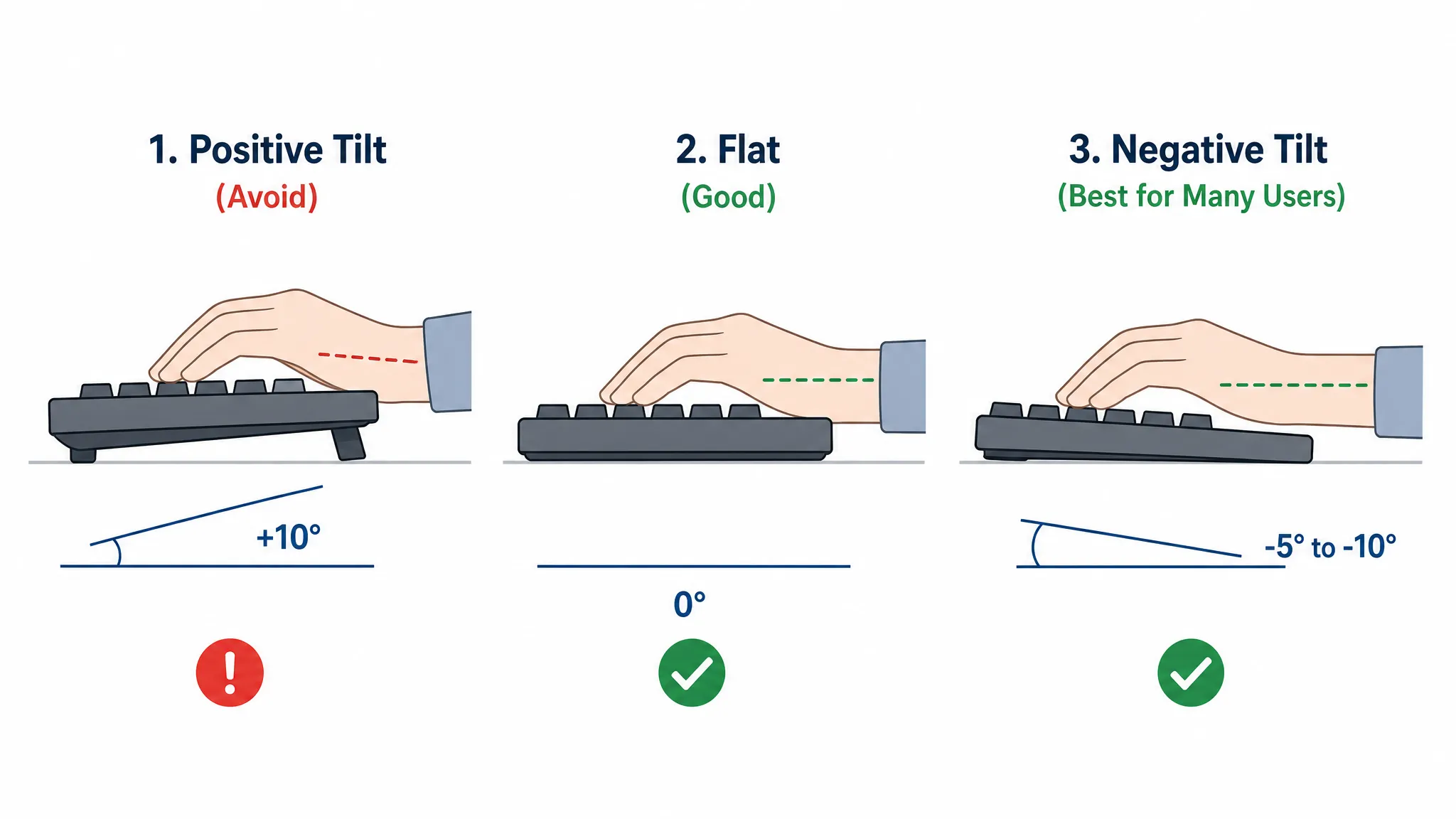
Step 4 : Use a Keyboard Tray If the Desk Is Too High
If your desk is a fixed, non-adjustable height and it’s too tall for your elbow height even with the chair set correctly, don’t compensate by raising the chair, that stops your feet from reaching the floor and just trades one problem for another. An adjustable keyboard tray lowers the whole keyboard-and-mouse platform below the desk surface, independent of the desk itself, which is usually the fastest fix for a desk that was never built with your height in mind.
Correct Mouse Height and Position
Match Mouse Height to Keyboard Height
This is the single most common gap we see, including in setups that otherwise look perfectly ergonomic: the keyboard is at the right height, but the mouse sits on the desk surface while the keyboard sits on a lowered tray, or vice versa.
Even a one-inch mismatch forces one arm to sit slightly higher than the other for hours at a time, which is a slow, quiet way to build shoulder asymmetry. If you use a keyboard tray, make sure it has a mouse platform at the same level, not just a mouse pad sitting separately on the desk above it.
How Far Should the Mouse Sit From the Keyboard?
Keep the mouse within 10–20 cm (roughly 4–8 inches) of the keyboard’s edge. Any farther and your shoulder has to abduct, move away from your body, to reach it, which is the shoulder-strain mechanism described earlier.
If you use a full-size keyboard with a number pad, your mouse is automatically pushed further from your body’s midline than it needs to be; a compact or tenkeyless keyboard (without the number pad) lets the mouse sit closer to center, which is a small change that measurably reduces reach on its own.
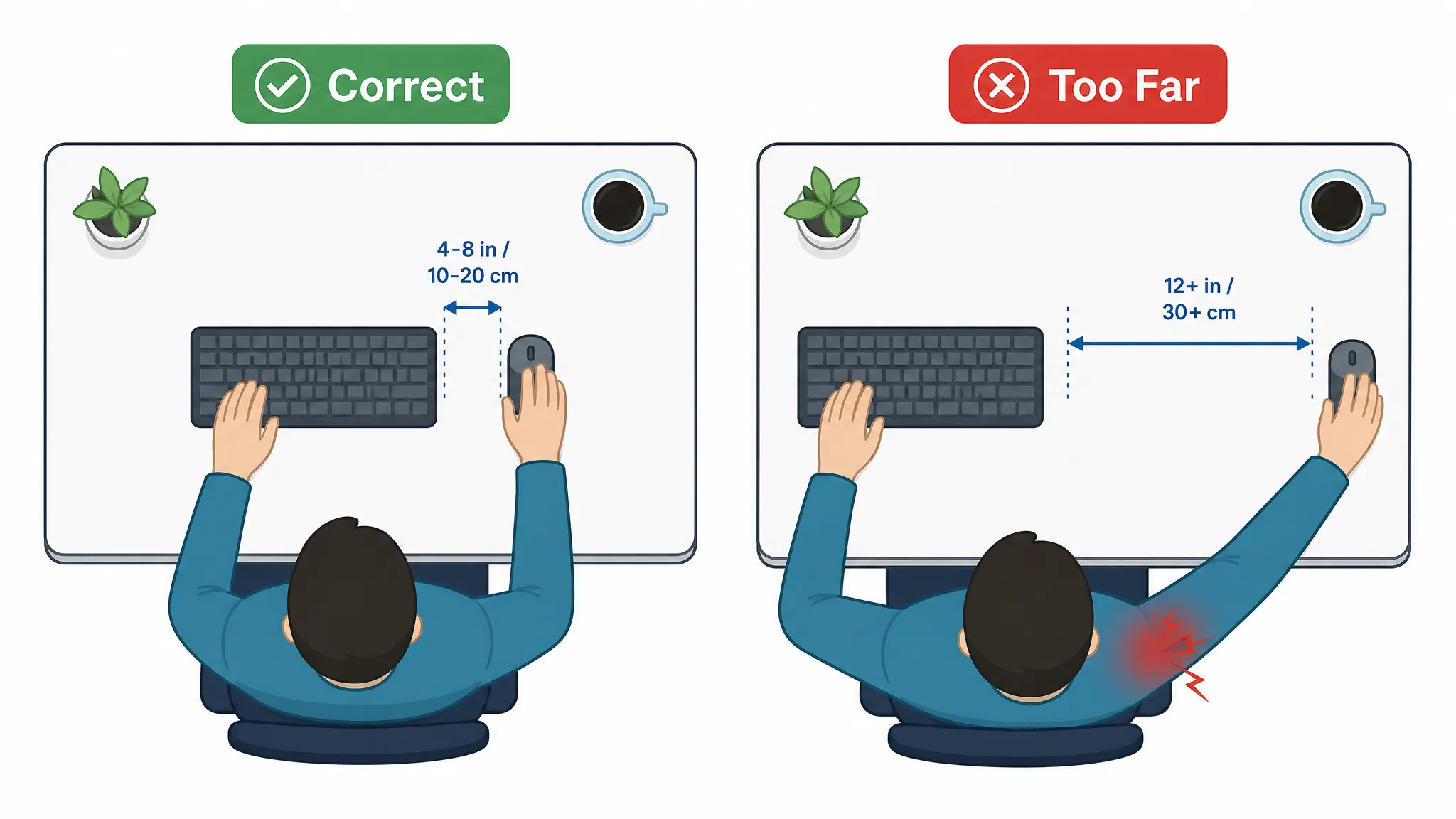
A Note on Body Size and Keyboard Width
Almost every ergonomic diagram assumes an average-size adult frame, and almost none of them account for what happens if you’re smaller than that. If you have a narrower shoulder width, a standard full-size keyboard can force your mouse hand out wider than your natural shoulder line just to clear the edge of the keyboard, which recreates the exact reaching problem described above, even if your desk height is perfect.
If this describes you, a compact keyboard or a split keyboard set to your own shoulder width solves it directly, and it’s worth trying before assuming a height adjustment alone will fix persistent shoulder tension.
When a Vertical Mouse or Trackball Solves a Height Problem?
If your mouse hand consistently sits lower than it should because of how a traditional mouse forces your forearm to rotate (pronate) downward, a vertical mouse keeps your hand in a more neutral, handshake-like position regardless of height adjustments. It’s not a substitute for getting the height right, but it’s a genuine fix for a specific mechanical problem that height alone can’t solve. Our ergonomic mouse for wrist pain and carpal tunnel mouse roundups cover specific picks if you’re at that stage.
Keyboard and Mouse Height Reference Table
Generic advice like “elbow height” is accurate but hard to act on without a tape measure and a test run. The table below translates that principle into an actual starting height for your body, in both imperial and metric, with a footrest recommendation built in.
Treat these as a starting point to fine-tune from, not a substitute for the elbow-angle check in Step 1, bodies vary in forearm and torso length even at the same height, so use this table to get within an inch of the right setup, then confirm with the actual elbow-angle test.
| User Height | Category | Chair (Seat) Height | Keyboard / Desk Height | Mouse Height | Footrest Needed? |
|---|---|---|---|---|---|
| 4’10″–5’0″ (147–152 cm) | Petite | 14–15 in / 36–38 cm | 22–23 in / 56–58 cm | Same as keyboard | Yes |
| 5’1″–5’3″ (155–160 cm) | Petite | 15–16 in / 38–41 cm | 23–24 in / 58–61 cm | Same as keyboard | Yes |
| 5’4″–5’6″ (163–168 cm) | Average | 16–17 in / 41–43 cm | 24–25 in / 61–64 cm | Same as keyboard | Often |
| 5’7″–5’9″ (170–175 cm) | Average | 17–18 in / 43–46 cm | 25–26 in / 64–66 cm | Same as keyboard | Sometimes |
| 5’10″–6’0″ (178–183 cm) | Average / Tall | 18–19 in / 46–48 cm | 26–27 in / 66–69 cm | Same as keyboard | Rarely |
| 6’1″–6’3″ (185–191 cm) | Tall | 19–20 in / 48–51 cm | 27–28 in / 69–71 cm | Same as keyboard | No |
| 6’4″+ (193 cm+) | Tall | 20–21 in / 51–53 cm | 28–29 in / 71–74 cm | Same as keyboard | No |
This table turns keyboard and mouse height for wrist and shoulder comfort into a two-minute setup instead of a guessing game. How to use this table: find your height range, set your chair to the listed seat height first, then your keyboard/desk to the listed range.
If your desk is fixed and doesn’t reach the number in the “Keyboard / Desk Height” column, that’s your sign you need a keyboard tray rather than a taller chair. Mouse height is always “same as keyboard”, it’s listed as its own column deliberately, because that’s the step people skip.
A note on the footrest column: if you’re under about 5’6″ and your desk isn’t height-adjustable, there’s a good chance the chair height that puts your elbows at the right level will leave your feet a few inches off the floor. A footrest isn’t a nice-to-have in that situation, it’s the only way to get the chair height right without sacrificing hip and knee alignment. Our foot rest under desk guide covers specific options if this applies to you.
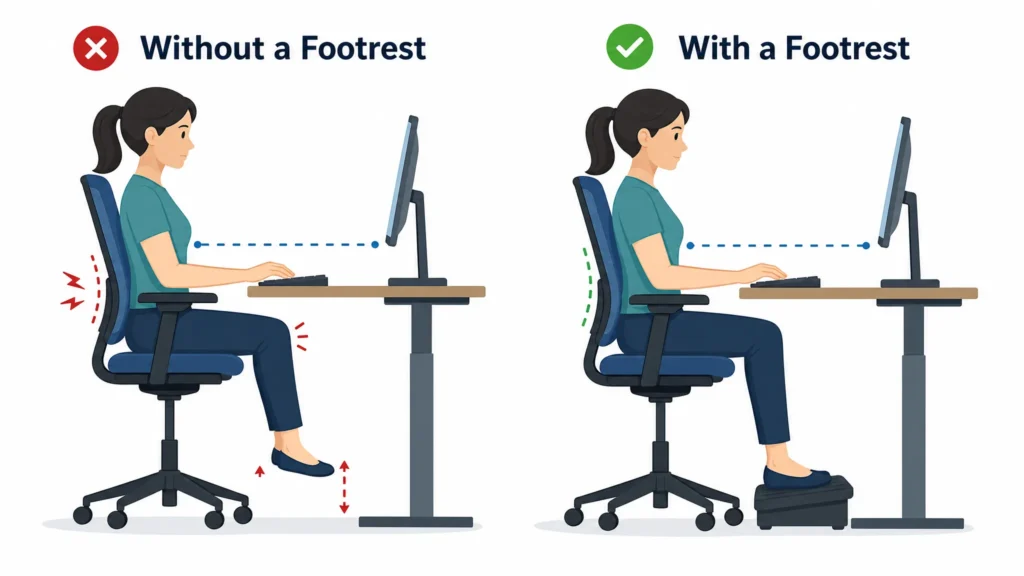
Special Setups
Laptop Keyboard and Mouse Height
A laptop’s built-in keyboard and trackpad are physically attached to the screen, which means you can get the screen at eye level or the keyboard at elbow height, never both at once, on a laptop alone. If you use a laptop for more than an hour or two a day, the fix is a laptop stand that raises the screen, paired with an external keyboard and mouse set at the correct height using everything above.
Our laptop ergonomics guide and best ergonomic laptop stands roundup go deeper on this specific setup, including which stands work best paired with an external keyboard and mouse.
Dual-Monitor and Keyboard Alignment
If you run two monitors, keep your keyboard centered on whichever screen you use most, not centered on the desk or the gap between the two screens. A keyboard centered on the wrong monitor quietly twists your torso for hours at a time, which adds a rotational strain on top of whatever height issues might already exist. See our dual monitor setup guide for the full alignment approach.
Standing Desk Keyboard Height
The 90–100° elbow rule doesn’t change when you stand, only the absolute height does, since your elbow height rises when you go from seated to standing. If you switch between sitting and standing through the day, expect your keyboard height to move by roughly 4–6 inches between the two, and treat every transition as a mini reset rather than assuming yesterday’s standing height still applies today.
Gaming Keyboard and Mouse Height
Gaming setups often push the mouse further from the body than typing does, because of how a mouse gets used for wide, fast movements rather than small typing motions. The same principles apply, same height, minimal reach, but pay particular attention to armrest height on a gaming chair, since a mismatched armrest can undo an otherwise correct desk and keyboard height by holding your elbow at the wrong angle regardless of where the keyboard sits.
Signs Your Keyboard or Mouse Height Is Wrong
If wrist or hand symptoms persist, the educational wrist and hand symptom self-test can help you compare broad patterns and review red flags. It is not a diagnosis or a substitute for clinical assessment.
Wrist and Carpal Tunnel Signs
Tingling or numbness in the thumb, index, or middle finger, especially at night or first thing in the morning, is a classic carpal tunnel signal, and keyboard or mouse height that forces wrist extension is one of the most common contributing setups we see. If this sounds familiar, our carpal tunnel from computer work guide has a proper self-test and recovery plan; this article’s job is prevention, not diagnosis.
Shoulder and Neck Signs
A dull ache at the base of the skull, shoulders that feel “up” by the end of the day even when you consciously relax them, or one shoulder feeling tighter than the other, all point toward a mouse or keyboard positioned too far away or too high, or a dual-monitor/keyboard misalignment. Our how to fix tech neck and ergonomic keyboards for neck pain guides pick up from here if this is your main complaint.
Elbow and Forearm Signs
Aching on the outer elbow (often mistaken for tennis elbow) or general forearm fatigue by mid-afternoon usually traces back to a mouse that’s too far away or positioned higher than the keyboard, forcing the forearm to stay partially extended and gripping for long stretches rather than resting in a neutral position.
Common Mistakes
These are the setup mistakes we see most often, roughly in order of how frequently they show up:
- Keyboard too high. The single most common mistake. Almost every standard desk (29–30 inches) is taller than the correct typing height for most adults, which means “just typing on the desk” is wrong for the majority of people by default.
- Positive tilt. Leaving the keyboard’s built-in feet flipped up angles the keys toward you and forces your wrists into extension, the opposite of what those feet are usually assumed to do.
- Mouse too far away. Any gap wider than about 8 inches between keyboard and mouse forces your shoulder to reach instead of your fingers to move.
- Mouse higher or lower than the keyboard. Especially common with keyboard trays that don’t include a matched mouse platform, the keyboard gets fixed, the mouse gets forgotten.
- Wrist resting on the desk or a wrist rest while actively typing. A wrist rest is for pauses between typing bursts, not a surface to type from, resting on it while moving your fingers compresses the same nerve you’re trying to protect.
- Elbows held too wide (“winged out”). Usually caused by armrests set too high or a keyboard placed too far to reach comfortably, which pulls the elbows away from the torso and loads the shoulder.
- Elbows held too tight against the torso. The opposite problem, often from a chair or desk that’s slightly too low, which restricts natural arm movement.
- Chair too low. Drops your elbow height below the keyboard, forcing your wrists to bend upward to reach the keys.
- Chair too high without a footrest. Fixes the elbow angle but strands your feet, which shifts strain to your lower back and hips instead of removing it.
- Keyboard placed too far from the desk edge. Forces you to lean or extend your entire forearm just to reach the home row, rather than resting your wrists in a neutral, supported position.
- Narrow shoulder width paired with a standard-width keyboard. Forces the mouse hand outward past a natural shoulder line just to clear the number pad, an underrated cause of one-sided shoulder tension that has nothing to do with height at all.
- No footrest when feet don’t reach the floor. Often overlooked because it feels like a minor detail, but it’s frequently the missing piece that lets someone raise their chair to the correct elbow height without new problems appearing elsewhere.
- Using a laptop’s built-in keyboard and trackpad all day. Physically ties keyboard height to screen height, which means one of the two is always wrong.
- Ignoring the negative tilt option on an adjustable keyboard or tray. Most people never explore past “flat,” even when a slight negative tilt would measurably reduce wrist extension.
- Setting up once and never re-adjusting. Chairs drift, desks get bumped, and sit-stand transitions reset nothing automatically, a setup that was correct in January can quietly become wrong by June without a single conscious change.
Quick Fix Table
| Problem | Likely Cause | Quick Fix |
|---|---|---|
| Shoulder pain | Mouse positioned too far from the keyboard | Move it within 4–8 inches of the keyboard’s edge |
| Wrist pain, top of wrist | Keyboard tilted upward (positive tilt) | Fold down the keyboard’s feet or apply negative tilt |
| Numbness or tingling in fingers | Wrists bending upward to reach a too-high keyboard | Lower the keyboard to elbow height; see our carpal tunnel guide |
| Wrist ache after long typing sessions | Resting wrists on the desk or a wrist rest while typing | Hover your hands; use the wrist rest only during breaks |
| Neck and upper-back tightness | Keyboard and mouse positioned too far from the body | Pull the keyboard closer, mouse directly beside it |
| Outer elbow pain | Mouse too far away or positioned above keyboard height | Lower and move the mouse closer to match keyboard height |
| Shoulders feel hunched by end of day | Desk too high for your height | Add a keyboard tray, or lower the chair and add a footrest |
| One-sided shoulder or neck ache | Mouse arm reaching further than the keyboard arm | Center the keyboard on your body; keep the mouse level with it |
| Dangling feet, sore knees or lower back | Chair raised to match a too-high desk | Add a footrest so feet stay flat and supported |
| Forearm fatigue or burning | Constant reaching or hovering without breaks | Alternate mouse types occasionally and take short movement breaks |
Products That Fix Keyboard and Mouse Height Problems
You don’t need to buy anything to fix most of what’s in this guide, chair height, tilt, and distance are free adjustments. But a few products solve specific mechanical problems that positioning alone can’t:
A keyboard tray with a matched mouse platform is the fastest fix when your desk itself is too high and isn’t adjustable, it’s the single highest-leverage purchase for the most common mistake on this list. A footrest solves the dangling-feet problem that comes with fixing chair height on a fixed-height desk; see our foot rest guide for picks.
A vertical mouse or trackball helps when forearm rotation, not height, is the remaining issue, our ergonomic mouse for wrist pain, carpal tunnel mouse, and mouse for hand and finger pain roundups cover specific models matched to different pain patterns.
A wrist rest helps during typing pauses specifically, not during active typing, and our wrist rest for keyboard guide explains sizing and placement in more detail. If you work primarily from a laptop, a laptop stand paired with an external keyboard and mouse is close to mandatory rather than optional, see our laptop stand roundup.
One honest note: not every source agrees on keyboard trays. Some ergonomics writers recommend avoiding them altogether, arguing they’re hard to set up at the correct height and can be restrictive.
In our experience, that criticism applies to undersized trays without a proper mouse platform, a well-sized tray with height and tilt adjustment, paired with a matched mouse surface, solves more problems than it creates. A poorly chosen one can absolutely make things worse, which is why the sizing and mouse-platform details matter more than the decision to use a tray at all.
Setup Checklist
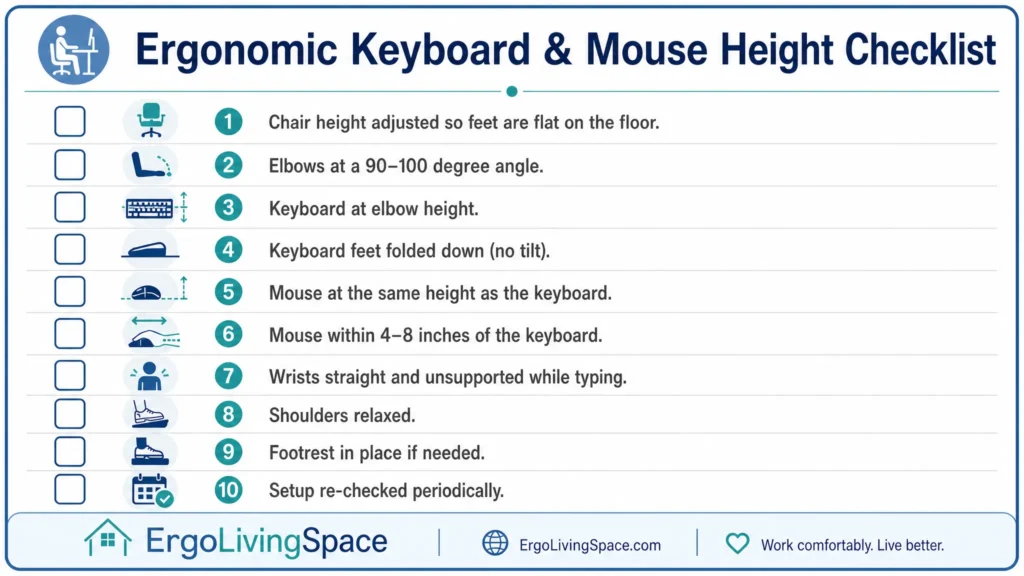
Run through this once you’ve made adjustments, and again every few months:
- Chair height set so feet are flat (floor or footrest) and thighs are roughly parallel to the ground
- Elbows bent 90–100° with upper arms hanging naturally at your sides
- Keyboard at or just below elbow height
- Keyboard’s built-in feet folded down (flat or slight negative tilt)
- Mouse at the exact same height as the keyboard
- Mouse within 4–8 inches of the keyboard’s edge
- Wrists straight and unsupported while actively typing
- Shoulders relaxed, not shrugged or reaching
- Footrest in place if feet don’t reach the floor at the correct chair height
- Setup re-checked after any change in chair, desk, or sit/stand position
FAQ
What height should my keyboard be at?
At or just slightly below your seated elbow height, with your elbows bent 90–100° and your upper arms hanging naturally at your sides. For most adults sitting at a standard chair, that works out to roughly 22–29 inches (56–74 cm) depending on your height; see the reference table above for a starting point matched to yours.
What is the correct height for a keyboard?
The same as elbow height, not desk height, the two are only the same if your desk happens to be the right height for your body, which for most people it isn’t by default.
What is the ideal keyboard height?
Whatever height keeps your wrists straight and your forearms roughly parallel to the floor without lifting your shoulders. There’s a range, not a single universal number, which is why the reference table gives a band rather than one figure.
Should your keyboard be flat or raised?
Flat, or with a slight negative tilt (front edge higher than the back). Avoid the positive tilt created by a keyboard’s built-in flip-out feet, it’s one of the most common and most avoidable mistakes on this list.
Is it better to tilt or flat keyboard?
Flat is a safe default. A slight negative tilt can further reduce wrist extension for some people, but a positive tilt (feet up) should be avoided in almost every case.
What is the best height for keyboard and mouse?
The same height as each other, positioned at your seated elbow height, with the mouse within about 4–8 inches of the keyboard.
Should wrists be elevated off desk or keyboard?
Yes, while actively typing, hover rather than rest. A wrist rest is meant for pauses between typing bursts, not continuous contact while your fingers are moving.
How tall should a keyboard wrist rest be?
The same height as the front edge of your keyboard, so your wrist stays in a straight line rather than dipping down to the desk or up to a too-tall rest.
Do keyboard wrist rests actually help?
Yes, but only when used correctly, during breaks, not during active typing. Used continuously while typing, they can add pressure rather than relieve it.
Are wrist rests bad for carpal tunnel?
They can be, if you rest your wrists on them while actively typing, since that compresses the same nerve pathway you’re trying to protect. Used only during pauses, they’re not harmful and can be genuinely helpful.
What is the 90-90-90 rule for ergonomics?
A shorthand for three target angles: roughly 90° at the elbows, 90° at the hips, and 90° at the knees, used as a quick seated-posture check. It’s a useful starting rule, though real bodies vary enough that “close to 90” matters more than hitting it exactly.